
CAD2020出来也有一段时间,安装的时候也会遇到很多问题,这里讲解一下安装过程遇到错误1603的解决办法:
关于安装错误1603其实官方也给出过解决办法
Solution:
To workaround this error message, perform the following steps:
1.Go to C\Program Files (x86)\Common Files\Autodesk Shared\AdskLicensing
2.Run the uninstall*ex.e** as administrator (right-click> Run as administrator).
3.Try again to install.
If the issue persists, try the following:
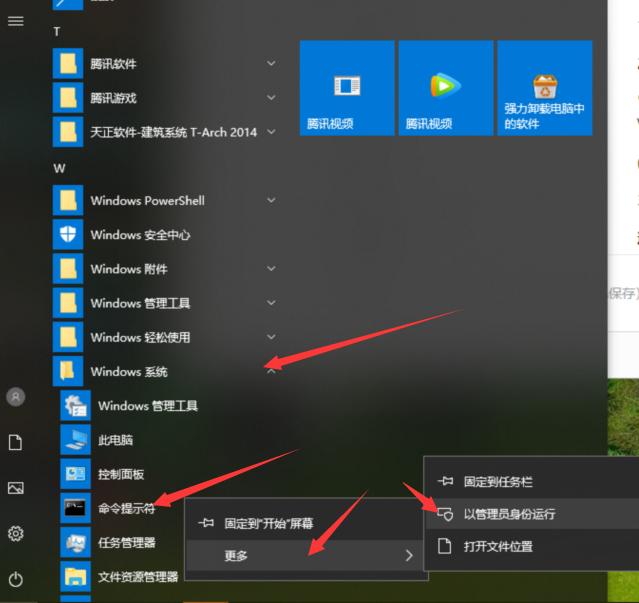
1 Open Command Prompt as administrator (Start -type CMD - right-click on the first result - click Run as administrator)
2. Run the below command followed by enter. A message stating that the service started will be displayed.
"C:\Program Files (x86)\Common Files\Autodesk Shared\AdskLicensing\Current\AdskLicensingService\AdskLicensingService*ex.e**"
3. Try the installation again.
翻译如下
解决方案:
要处理此错误消息,请执行以下步骤:
1.转到C\Program Files (x86)\Common Files\Autodesk Shared\ adsklicense
2.以管理员身份运行uninstall*ex.e**(右键单击>以管理员身份运行)。
3.请重试安装。
如果问题仍然存在,请尝试以下方法:
1.以管理员身份打开命令提示符(启动类型CMD -右键单击第一个结果点击以管理员身份运行)
2. 运行下面的命令,然后回车。将显示一条声明服务已启动的消息。
"C:\Program Files (x86)\Common Files\Autodesk Shared\ adsklicense \Current\AdskLicensingService\AdskLicensingService*ex.e**"
(找到AdskLicensingService*ex.e**右击以管理员身份运行,不要关闭窗口,再重新安装CAD)
3.再次尝试安装。
这里我试过之后第二种方法还是比较管用的,稍微整理了一下
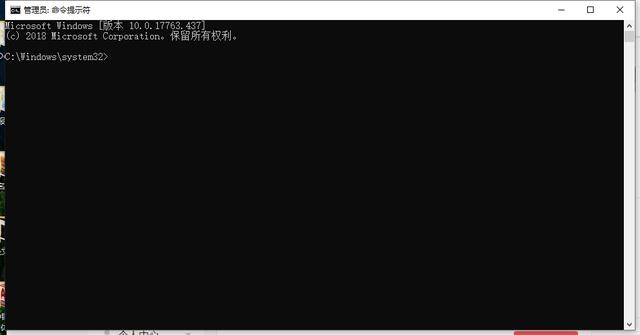
一、首先找到命令提示符,右键以管理员身份运行。
二、然后输入以下指令,回车:
"C:\Program Files (x86)\Common Files\Autodesk Shared\ adsklicense \Current\AdskLicensingService\AdskLicensingService*ex.e**"

三、然后不要关闭放在一边,重新打开CAD安装程序安装,
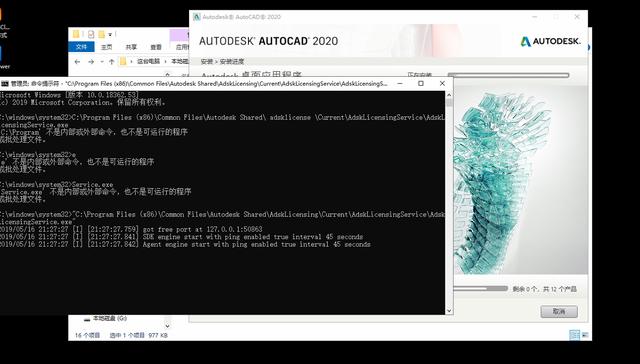
这样CAD2020就可以安装完成了!!
有问题可以关注私聊回复:CAD