题目要求:配置 ISCSI 客户端
配置 desktop0 使其能连接在 server0 上提供的 iqn.2014-11.com.example:server0 并符合以下要求
- l iSCSI 设备在系统启动的期间自动加载
- l 块设备 iSCSI 上包含一个大小 2100MiB 的分区,并格式化为 ext4
- l 此分区挂载在 /mnt/data 上同时在系统启动的期间自动加载
知识点小贴士:
iSCSI( Internet Small Computer System Interface 互联网小型计算机系统接口)是由IBM 下属的两大研发机构一一加利福尼亚AImaden和以色列Haifa研究中心共同开发的,是一个供硬件设备使用的、可在IP协议上层运行的SCSI指令集,是一种开放的基于IP协议的工业技术标准。该协议可以用TCP/IP对SCSI指令进行封装,使得这些指令能够通过基于P网络进行传输,从而实现SCSI 和TCP/IP协议的连接。对于局域网环境中的用户来说,采用该标准只需要不多的投资就可以方便、快捷地对信息和数据进行交互式传输及管理。
解题步骤:
(1)安装软件包:
[root@desktop0 ~]# yum list iscsi*
Loaded plugins: langpacks
Installed Packages
iscsi-initiator-utils.x86_64 6.2.0.873-21.el7 @rhel_dvd
iscsi-initiator-utils-iscsiuio.x86_64
 6.2.0.873-21.el7 @rhel_dvd
Available Packages
iscsi-initiator-utils.i686 6.2.0.873-21.el7 classroom.example.com_content_rhel7.0_x86_64_dvd
(2)配置服务,与server0端配置保持一致:
[root@desktop0 ~]# vim /etc/iscsi/initiatorname.iscsi
InitiatorName=iqn.2014-11.com.example:d0
(3)服务设置:
[root@desktop0 ~]# systemctl restart iscsid
[root@desktop0 ~]# systemctl enable iscsid
ln -s '/usr/lib/systemd/system/iscsid.service' '/etc/systemd/system/multi-user.target.wants/iscsid.service'
[root@desktop0 ~]# man iscsiadm | grep \\-mode
 -m, --mode op
 iscsiadm --mode discoverydb --type sendtargets --portal 192.168.1.10 --discover
 iscsiadm --mode node --targetname iqn.2001-05.com.doe:test --portal 192.168.1.1:3260 --login
 iscsiadm --mode node --targetname iqn.2001-05.com.doe:test --portal 192.168.1.1:3260 --logout
 iscsiadm --mode node
 iscsiadm --mode node --targetname iqn.2001-05.com.doe:test --portal 192.168.1.1:3260
(4)配置服务:
[root@desktop0 ~]# iscsiadm --mode discoverydb --type sendtargets --portal 172.25.0.11 --discover
172.25.0.11:3260,1 iqn.2014-11.com.example:server0
[root@desktop0 ~]# iscsiadm --mode node --targetname iqn.2014-11.com.example:server0 --portal 172.25.0.11:3260 --login
Logging in to [iface: default, target: iqn.2014-11.com.example:server0, portal: 172.25.0.11,3260] (multiple)
Login to [iface: default, target: iqn.2014-11.com.example:server0, portal: 172.25.0.11,3260] successful.
(5)格式化分区:
[root@desktop0 ~]# lsblk
NAME MAJ:MIN RM SIZE RO TYPE MOUNTPOINT
sda 8:0 0 3G 0 disk
vda 253:0 0 30G 0 disk
└─vda1 253:1 0 10G 0 part /
[root@desktop0 ~]# fdisk /dev/sda
Welcome to fdisk (util-linux 2.23.2).
Changes will remain in memory only, until you decide to write them.
Be careful before using the write command.
Device does not contain a recognized partition table
Building a new DOS disklabel with disk identifier 0xbf8ffb29.
Command (m for help): n
Partition type:
 p primary (0 primary, 0 extended, 4 free)
 e extended
Select (default p):
Using default response p
Partition number (1-4, default 1):
First sector (8192-6291455, default 8192):
Using default value 8192
Last sector, +sectors or +size{K,M,G} (8192-6291455, default 6291455): +2100M
Partition 1 of type Linux and of size 2.1 GiB is set
Command (m for help): w
The partition table has been altered!
Calling ioctl() to re-read partition table.
Syncing disks.
(6)格式化为ext4格式
[root@desktop0 ~]# mkfs.ext4 /dev/sda1
mke2fs 1.42.9 (28-Dec-2013)
Filesystem label=
OS type: Linux
Block size=4096 (log=2)
Fragment size=4096 (log=2)
Stride=0 blocks, Stripe width=1024 blocks
134640 inodes, 537600 blocks
26880 blocks (5.00%) reserved for the super user
First data block=0
Maximum filesystem blocks=551550976
17 block groups
32768 blocks per group, 32768 fragments per group
7920 inodes per group
Superblock backups stored on blocks:
 32768, 98304, 163840, 229376, 294912
Allocating group tables: done
Writing inode tables: done
Creating journal (16384 blocks): done
Writing superblocks and filesystem accounting information: 0/1done
(7)修改配置文件:
[root@desktop0 ~]# blkid /dev/sda1
/dev/sda1: UUID="5e5da144-7d8b-40da-b7e0-93958f7ec424" TYPE="ext4"
[root@desktop0 ~]# mkdir /mnt/data
[root@desktop0 ~]# man mount |grep net
<standard input>:156: warning [p 2, 2.0i]: cannot adjust line
<standard input>:965: warning [p 11, 4.0i]: cannot adjust line
<standard input>:965: warning [p 11, 4.2i]: can't break line
 mount -a -O no_netdev
 the option _netdev specified in the options
 mount -a -t ext2 -O _netdev
 mounts all ext2 filesystems with the _netdev
 ext2 or have the _netdev option specified.
 _netdev
 requires network access (used to prevent the
 tems until the network has been enabled on the
<standard input>:1525: warning [p 19, 2.7i, div `an-div', 0.0i]: cannot adjust line
<standard input>:2300: warning [p 29, 13.0i, div `an-div', 0.0i]: cannot adjust line
[root@desktop0 ~]# vim /etc/fstab
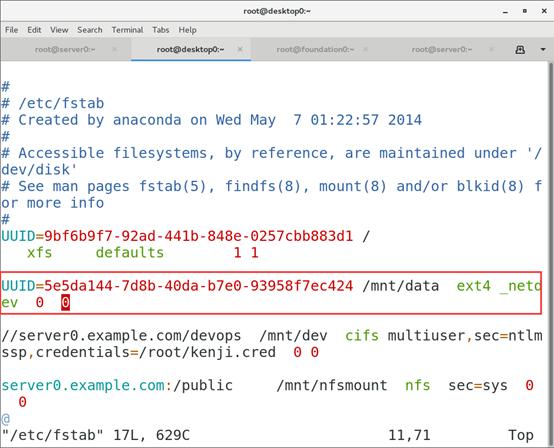
注释:
UUID=5e5da144-7d8b-40da-b7e0-93958f7ec424 /mnt/data ext4 _netdev 0 0
[root@desktop0 ~]# mount -a
[root@desktop0 ~]# df -h /mnt/data/
Filesystem Size Used Avail Use% Mounted on
/dev/sda1 2.0G 6.2M 1.9G 1% /mnt/data
(8)验证:
[root@desktop0 ~]# shutdown -r 0
Shutdown scheduled for Thu 2026-03-17T22:22:46+00:00 CST, use 'shutdown -c' to cancel.
[root@desktop0 ~]# Connection to desktop0 closed by remote host.
Connection to desktop0 closed.
You have new mail in /var/spool/mail/root
[root@desktop0 ~]# shutdown -r 0
重启desktop0:
[root@foundation0 ~]# rht-vmctl poweroff desktop
Are you sure you want to poweroff desktop? (y/n) y
Powering off desktop..
[root@foundation0 ~]# rht-vmctl start desktop