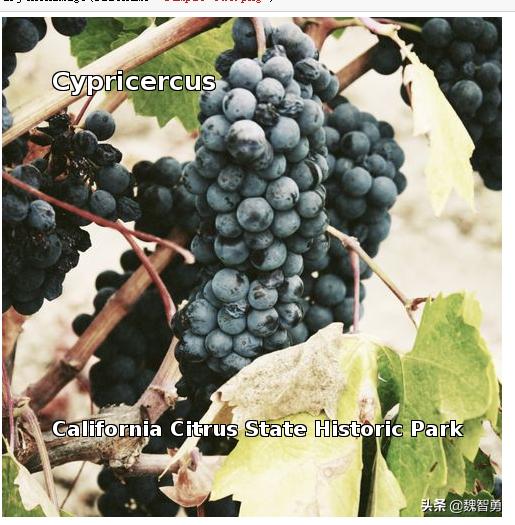
本文的目标通过生成随机的唱片封面和标题,来演示基本的Python网络数据抓取等功能。
1. 导入需要的库
from IPython.display import Image as IPythonImage
from PIL import Image
from PIL import ImageFont
from PIL import ImageDraw
2. display_cover函数用于生成并显示图片
def display_cover(top,bottom ):

 """
 import requests
 name=’album_art_raw.png’
 # https://picsum.photos/ 网站可以提供随机图片.
 # 以下命令用于获取图片:
 album_art_raw = requests.get(’https://picsum.photos/500/500/?random’)
 # 图片保存为 ’album_art_raw.png’
 with open(name,’wb’) as album_art_raw_file:
 album_art_raw_file.write(album_art_raw.content)
 # 有了图片之后,打开图片
 # 写入乐队名称和唱片名称
 img = Image.open("album_art_raw.png")
 draw = ImageDraw.Draw(img)
 # 设定字体
 # 在Linux系统下运行 "% ls /usr/share/fonts/truetype/dejavu" 可以看到都有哪些字体是可用的
 # 当然,也可以设计自己的 .ttf 字体!
 band_name_font = ImageFont.truetype("/usr/share/fonts/truetype/dejavu/DejaVuSans-Bold.ttf", 25) #25pt font
 album_name_font = ImageFont.truetype("/usr/share/fonts/truetype/dejavu/DejaVuSans-Bold.ttf", 20) # 20pt font
 # x,y 坐标设定写标题文字的地方
 # 从左上角按像素数
 band_x, band_y = 50, 50
 album_x, album_y = 50, 400
 # 为了使文字在任何图片下都可见,一个好的方法是给文字加一个黑边,以下是参考下文写的处理方法
 # https://mail.python.org/pipermail/image-sig/2009-May/005681.html
 outline_color ="black"
 draw.text((band_x-1, band_y-1), top, font=band_name_font, fill=outline_color)
 draw.text((band_x+1, band_y-1), top, font=band_name_font, fill=outline_color)
 draw.text((band_x-1, band_y+1), top, font=band_name_font, fill=outline_color)
 draw.text((band_x+1, band_y+1), top, font=band_name_font, fill=outline_color)
 draw.text((album_x-1, album_y-1), bottom , font=album_name_font, fill=outline_color)
 draw.text((album_x+1, album_y-1), bottom , font=album_name_font, fill=outline_color)
 draw.text((album_x-1, album_y+1), bottom , font=album_name_font, fill=outline_color)
 draw.text((album_x+1, album_y+1), bottom , font=album_name_font, fill=outline_color)
 draw.text((band_x,band_y),top,(255,255,255),font=band_name_font)
 draw.text((album_x, album_y),bottom,(255,255,255),font=album_name_font)
 return img
3. 从维基百科随机访问并*载下**一个页面,从中提取标题作为封面的标题
import requests
# 访问下面地址可以随机获取一个页面(科学家你好)
wikipedia_link=’https://en.wikipedia.org/wiki/Special:Random’
raw_random_wikipedia_page=requests.get(wikipedia_link)
# 将页面内容转换为字符串并显示
page=raw_random_wikipedia_page.text
print(page)
# 找到页面标题项,截取标题作为图片/唱片标题
startindex=page.find(’<title>’)+len(’<title>’)
endindex=page.find(’</title>’)-len(’ - Wikipedia’)
band_title=page[startindex:endindex]
print(band_title)
重复上述步骤,再抓取一张作为伪造唱片的乐队标题
wikipedia_link=’https://en.wikipedia.org/wiki/Special:Random’
raw_random_wikipedia_page=requests.get(wikipedia_link)
page=raw_random_wikipedia_page.text
print(page)
startindex=page.find(’<title>’)+len(’<title>’)
endindex=page.find(’</title>’)-len(’ - Wikipedia’)
album_title=page[startindex:endindex]
print(album_title)
4. 调用display_cover函数显示标题
img=display_cover(top=band_title,bottom=album_title)
img.save(’sample-out.png’)
IPythonImage(filename=’sample-out.png’)