前言
Netty是一个高性能、异步事件驱动的NIO框架,提供了对TCP、UDP和文件传输的支持,作为一个异步NIO框架,Netty的所有IO操作都是异步非阻塞的,通过Future-Listener机制,用户可以方便的主动获取或者通过通知机制获得IO操作结果。
作为当前最流行的NIO框架,Netty在互联网领域、大数据分布式计算领域、游戏行业、通信行业等获得了广泛的应用,一些业界著名的开源组件也基于Netty构建,比如RPC框架、zookeeper等。
那么,Netty性能为啥这么高?主要是因为其内部Reactor模型的实现。
Reactor模型
Netty中的Reactor模型主要由多路复用器(Acceptor)、事件分发器(Dispatcher)、事件处理器(Handler)组成,可以分为三种。
1、单线程模型:所有I/O操作都由一个线程完成,即多路复用、事件分发和处理都是在一个Reactor线程上完成的。
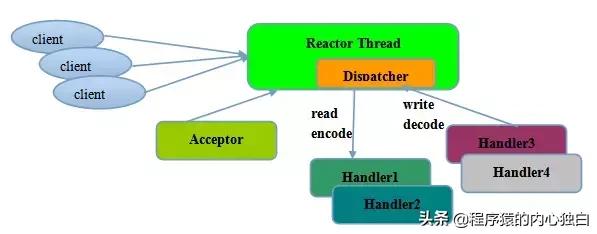
对于一些小容量应用场景,可以使用单线程模型。但是对于高负载、大并发的应用却不合适,主要原因如下:
- 一个线程同时处理成百上千的链路,性能上无法支撑,即便CPU负荷达到100%,也无法满足海量消息的编码、解码、读取和发送;
- 当负载过重后,处理速度将变慢,这会导致大量客户端连接超时,超时之后往往会进行重发,最终会导致大量消息积压和处理超时,成为系统的性能瓶颈;
- 一旦单线程意外跑飞,或者进入死循环,会导致整个系统通信模块不可用,不能接收和处理外部消息,造成节点故障,可靠性不高。
2、多线程模型:为了解决单线程模型存在的一些问题,演化而来的Reactor线程模型。
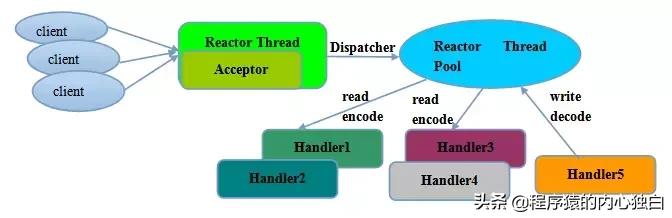
多线程模型的特点:
- 有专门一个Acceptor线程用于监听服务端,接收客户端的TCP连接请求;
- 网络IO的读写操作由一个NIO线程池负责,线程池可以采用标准的JDK线程池实现,包含一个任务队列和N个可用的线程,由这些NIO线程负责消息的读取、解码、编码和发送;
- 一个NIO线程可以同时处理多条链路,但是一个链路只能对应一个NIO线程,防止发生并发操作问题。
在绝大多数场景下,Reactor多线程模型都可以满足性能需求;但是,在极特殊应用场景中,一个NIO线程负责监听和处理所有的客户端连接可能会存在性能问题。例如百万客户端并发连接,或者服务端需要对客户端的握手消息进行安全认证,认证本身非常损耗性能。在这类场景下,单独一个Acceptor线程可能会存在性能不足问题,为了解决性能问题,产生了第三种Reactor线程模型-主从Reactor多线程模型。
3、主从多线程模型:采用多个reactor,每个reactor都在自己单独的线程里执行。如果是多核,则可以同时响应多个客户端的请求,一旦链路建立成功就将链路注册到负责I/O读写的SubReactor线程池上。
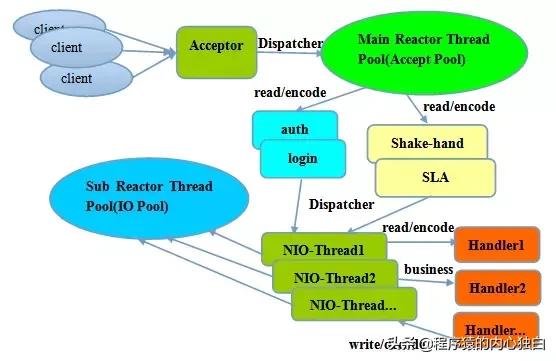
事实上,Netty的线程模型并非固定不变,在启动辅助类中创建不同的EventLoopGroup实例并通过适当的参数配置,就可以支持上述三种Reactor线程模型。正是因为Netty对Reactor线程模型的支持提供了灵活的定制能力,所以可以满足不同业务场景的性能需求。
示例代码
以下是server和client的示例代码,其中使用的是 Netty 4.x,先看看如何实现,后续会针对各个模块进行深入分析。
server 代码实现
public class EchoServer {
 private final int port;
 public EchoServer(int port) {
 this.port = port;
 }
 public void run() throws Exception {
 // Configure the server.
 EventLoopGroup bossGroup = new NioEventLoopGroup(); // (1)
 EventLoopGroup workerGroup = new NioEventLoopGroup();
 try {
 ServerBootstrap b = new ServerBootstrap(); // (2)
 b.group(bossGroup, workerGroup)
 .channel(NioServerSocketChannel.class) // (3)
 .option(ChannelOption.SO_BACKLOG, 100)
 .handler(new LoggingHandler(LogLevel.INFO))
 .childHandler(new ChannelInitializer<SocketChannel>() { // (4)
 @Override
 public void initChannel(SocketChannel ch) throws Exception {
 ch.pipeline().addLast(
 //new LoggingHandler(LogLevel.INFO),
 new EchoServerHandler());
 }
 });
 // Start the server.
 ChannelFuture f = b.bind(port).sync(); // (5)
 // Wait until the server socket is closed.
 f.channel().closeFuture().sync();
 } finally {
 // Shut down all event loops to terminate all threads.
 bossGroup.shutdownGracefully();
 workerGroup.shutdownGracefully();
 }
 }
 public static void main(String[] args) throws Exception {
 int port;
 if (args.length > 0) {
 port = Integer.parseInt(args[0]);
 } else {
 port = 8080;
 }
 new EchoServer(port).run();
 }
}
EchoServerHandler 实现
public class EchoServerHandler extends ChannelInboundHandlerAdapter {

 private static final Logger logger = Logger.getLogger(
 EchoServerHandler.class.getName());

 @Override
 public void channelRead(ChannelHandlerContext ctx, Object msg) throws Exception {
 ctx.write(msg);
 }

 @Override
 public void channelReadComplete(ChannelHandlerContext ctx) throws Exception {
 ctx.flush();
 }

 @Override
 public void exceptionCaught(ChannelHandlerContext ctx, Throwable cause) {
 // Close the connection when an exception is raised.
 logger.log(Level.WARNING, "Unexpected exception from downstream.", cause);
 ctx.close();
 }
}
1、NioEventLoopGroup 是用来处理I/O操作的线程池,Netty对 EventLoopGroup 接口针对不同的传输协议提供了不同的实现。在本例子中,需要实例化两个NioEventLoopGroup,通常第一个称为“boss”,用来accept客户端连接,另一个称为“worker”,处理客户端数据的读写操作。
2、ServerBootstrap 是启动服务的辅助类,有关socket的参数可以通过ServerBootstrap进行设置。
3、这里指定NioServerSocketChannel类初始化channel用来接受客户端请求。
4、通常会为新SocketChannel通过添加一些handler,来设置ChannelPipeline。ChannelInitializer 是一个特殊的handler,其中initChannel方法可以为SocketChannel 的pipeline添加指定handler。
5、通过绑定端口8080,就可以对外提供服务了。
client 代码实现
public class EchoClient {

 private final String host;
 private final int port;
 private final int firstMessageSize;

 public EchoClient(String host, int port, int firstMessageSize) {
 this.host = host;
 this.port = port;
 this.firstMessageSize = firstMessageSize;
 }

 public void run() throws Exception {
 // Configure the client.
 EventLoopGroup group = new NioEventLoopGroup();
 try {
 Bootstrap b = new Bootstrap();
 b.group(group)
 .channel(NioSocketChannel.class)
 .option(ChannelOption.TCP_NODELAY, true)
 .handler(new ChannelInitializer<SocketChannel>() {
 @Override
 public void initChannel(SocketChannel ch) throws Exception {
 ch.pipeline().addLast(
 //new LoggingHandler(LogLevel.INFO),
 new EchoClientHandler(firstMessageSize));
 }
 });

 // Start the client.
 ChannelFuture f = b.connect(host, port).sync();

 // Wait until the connection is closed.
 f.channel().closeFuture().sync();
 } finally {
 // Shut down the event loop to terminate all threads.
 group.shutdownGracefully();
 }
 }

 public static void main(String[] args) throws Exception {
 final String host = args[0];
 final int port = Integer.parseInt(args[1]);
 final int firstMessageSize;
 if (args.length == 3) {
 firstMessageSize = Integer.parseInt(args[2]);
 } else {
 firstMessageSize = 256;
 }

 new EchoClient(host, port, firstMessageSize).run();
 }
}
EchoClientHandler 实现
public class EchoClientHandler extends ChannelInboundHandlerAdapter {

 private static final Logger logger = Logger.getLogger(
 EchoClientHandler.class.getName());

 private final ByteBuf firstMessage;

 /**
 * Creates a client-side handler.
 */
 public EchoClientHandler(int firstMessageSize) {
 if (firstMessageSize <= 0) {
 throw new IllegalArgumentException("firstMessageSize: " + firstMessageSize);
 }
 firstMessage = Unpooled.buffer(firstMessageSize);
 for (int i = 0; i < firstMessage.capacity(); i ++) {
 firstMessage.writeByte((byte) i);
 }
 }

 @Override
 public void channelActive(ChannelHandlerContext ctx) {
 ctx.writeAndFlush(firstMessage);
 }

 @Override
 public void channelRead(ChannelHandlerContext ctx, Object msg) throws Exception {
 ctx.write(msg);
 }

 @Override
 public void channelReadComplete(ChannelHandlerContext ctx) throws Exception {
 ctx.flush();
 }

 @Override
 public void exceptionCaught(ChannelHandlerContext ctx, Throwable cause) {
 // Close the connection when an exception is raised.
 logger.log(Level.WARNING, "Unexpected exception from downstream.", cause);
 ctx.close();
 }
}