现在这个微调器正在给你很好的氛围,你已经开始学习 react 。

并在 VS Code 中打开您的应用程序目录。 应用程序的代码位于 src 文件夹中。 会有一个文件 index.js
import React from 'react'
import ReactDOM from 'react-dom/client'

import App from './App'

ReactDOM.createRoot(document.getElementById('root')).render(<App />)
和文件 App.js
const App = () => (
  <div>
    There will be something ...
  </div>
)

export default App
还有一些其他文件命名为
App.css、App.test.js、index.css、logo.svg、setupTests.js、reportWebVitals.js。
您现在可以删除,我们稍后再讨论。 并将 App.js 替换为上面的 App.js。
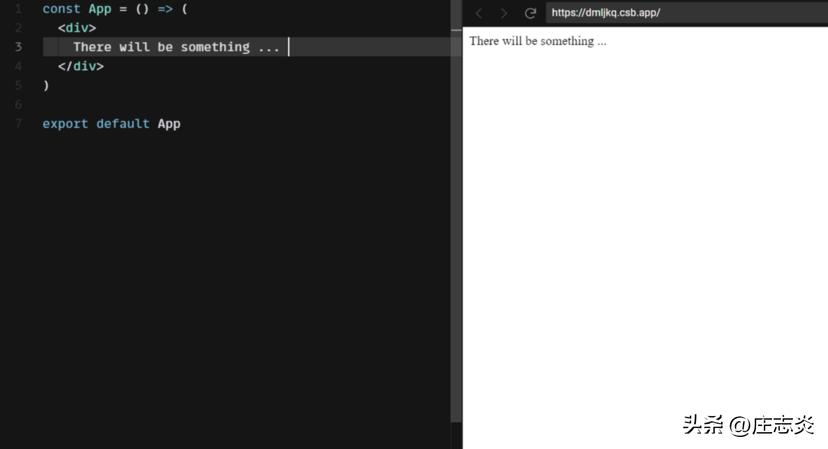
成分
如您所见,在其中导入了 App.js 的 index.js 文件。App 用作 react 组件。 并将其内容渲染到 id 值为“root”的 div 元素中。 而这个 <div id=”root”> 存在于文件 public/index.html 中。
import App from './App'

ReactDOM.createRoot(document.getElementById('root')).render(<App />)
public/index.html
<!DOCTYPE html>
<html lang="en">

<head>
	<meta charset="utf-8">
	<meta name="viewport" content="width=device-width, initial-scale=1, shrink-to-fit=no">
	<meta name="theme-color" content="#000000">
	<!--
      manifest.json provides metadata used when your web app is added to the
      homescreen on Android. See https://developers.google.com/web/fundamentals/engage-and-retain/web-app-manifest/
    -->
	<link rel="manifest" href="%PUBLIC_URL%/manifest.json">
	<link rel="shortcut icon" href="%PUBLIC_URL%/favicon.ico">
	<!--
      Notice the use of %PUBLIC_URL% in the tags above.
      It will be replaced with the URL of the `public` folder during the build.
      Only files inside the `public` folder can be referenced from the HTML.

      Unlike "/favicon.ico" or "favicon.ico", "%PUBLIC_URL%/favicon.ico" will
      work correctly both with client-side routing and a non-root public URL.
      Learn how to configure a non-root public URL by running `npm run build`.
    -->
	<title>React App</title>
</head>

<body>
	<noscript>
		You need to enable JavaScript to run this app.
	</noscript>
	<div id="root"></div>
	<!--
      This HTML file is a template.
      If you open it directly in the browser, you will see an empty page.

      You can add webfonts, meta tags, or analytics to this file.
      The build step will place the bundled scripts into the <body> tag.

      To begin the development, run `npm start` or `yarn start`.
      To create a production bundle, use `npm run build` or `yarn build`.
    -->
</body>

</html>
现在我们知道 App.js 是组件,所以尝试在 App.js 中更改一些东西,它将反映在浏览器中。
const App = () => (
  <div>
    <p>Hello world</p>
  </div>
)
而这就是javascript的功能,我们也可以在组件内修改和渲染动态内容。
const App = () => {
    const name = "Ram";
    const predicate = "is a good boy";   return (
      <div>
          <p>{name} {predicate}</p>
      </div>
   );};export default App;
并且 javascript 代码将按照我们的预期进行评估和呈现。
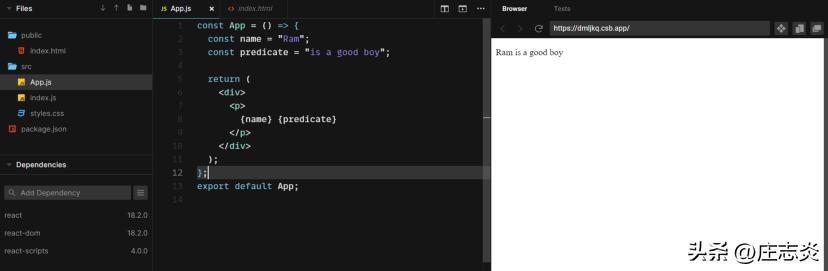
多个组件
现在 App.js 只有一个组件,我们可以使用多个组件。

将参数传递给组件
您正在使用 javascript 函数,可以在组件中传递参数。 看看这个例子——

我们可以使用道具来做到这一点。 我们可以使用带有变量名的花括号来评估它。
让我们看一下组件的可重用性。
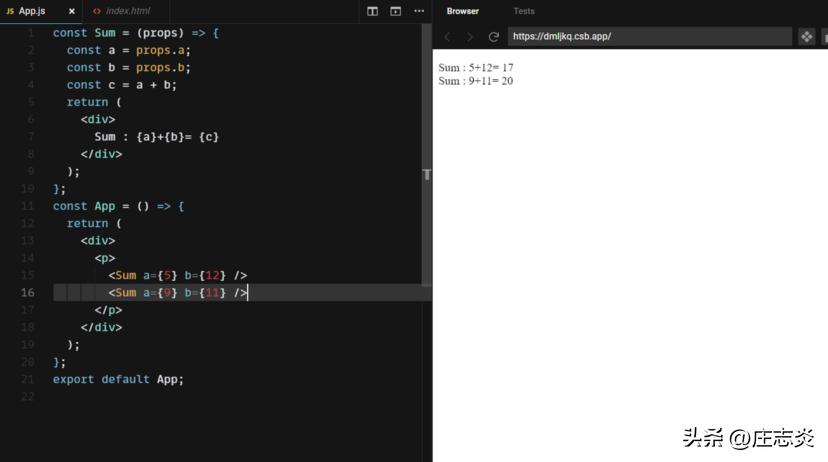
这里我们两次使用 Sum 组件。 我们可以在项目的任何地方使用这个组件。 所以当需要这个时,我们可以导入这个,我们不必再写了。
谢谢阅读 。 如果有任何错误/疑问,请发表评论。 我会尽快分享解决方案。
关注七爪网,获取更多APP/小程序/网站源码资源!