网络环境中,远程登录交换机是网络管理员进行配置和管理的基础。华为交换机作为一种广泛使用的网络设备,提供了多种远程登录方式,其中包括Telnet。Telnet远程登录允许管理员通过网络连接到交换机的命令行界面,进行各种配置和监控操作。Telnet远程登录,它为网络管理员提供了便捷的管理方式,无需直接物理接入设备。通过Telnet,管理员可以在任何具有网络连接的计算机上远程登录交换机,并进行诸如配置接口、设置VLAN、管理路由等操作。
然而,尽管Telnet远程登录提供了便利,但请注意Telnet是一种明文传输协议,安全性较低。为了提高网络安全性,建议使用更安全的远程登录协议,如SSH(Secure Shell)。在实施Telnet远程登录之前,请确保网络环境安全,并采取必要的安全措施,如强密码策略和访问控制列表(ACL)的配置。
本文将向您介绍如何配置华为交换机以启用Telnet远程登录方式,以便您可以轻松地远程管理和配置您的网络设备,有需要的友友们,可以参考下。
实验网络拓扑

配置思路
1、基础配置,确保拓扑中的网络设备,都能保持畅通
2、配置Telnet ,这里以AR1路由器为例
3、测试Telnet 配置是否成功,这里从AR2路由上Telnet 到AR1上
详细配置
1、基础配置
AR1 路由器接口配置
The device is running!

<Huawei>sys
Enter system view, return user view with Ctrl+Z.
[Huawei]undo inf
[Huawei]undo info-center en
Info: Information center is disabled.
[Huawei]
[Huawei]
[Huawei]in
[Huawei]inter
[Huawei]interface gi
[Huawei]interface GigabitEthernet 0/0/0
[Huawei-GigabitEthernet0/0/0]ip add 192.168.1.1 24
[Huawei-GigabitEthernet0/0/0]int gi 0/0/1
[Huawei-GigabitEthernet0/0/1]ip add 192.168.13.1 24
[Huawei-GigabitEthernet0/0/1]q
[Huawei]q
<Huawei>save
  The current configuration will be written to the device.
  Are you sure to continue? (y/n)[n]:y
  It will take several minutes to save configuration file, please wait.......
  Configuration file had been saved successfully
  Note: The configuration file will take effect after being activated
<Huawei>
AR2路由器接口配置
The device is running!

<Huawei>sys
Enter system view, return user view with Ctrl+Z.
[Huawei]undo inf
[Huawei]undo info-center en
Info: Information center is disabled.
[Huawei]
[Huawei]int
[Huawei]interface gi
[Huawei]interface GigabitEthernet 0/0/0
[Huawei-GigabitEthernet0/0/0]ip add 192.168.13.2 24
[Huawei-GigabitEthernet0/0/0]int gi 0/0/1
[Huawei-GigabitEthernet0/0/1]ip add 192.168.2.1 24
[Huawei-GigabitEthernet0/0/1]q
[Huawei]q
<Huawei>save
  The current configuration will be written to the device.
  Are you sure to continue? (y/n)[n]:y
  It will take several minutes to save configuration file, please wait.......
  Configuration file had been saved successfully
  Note: The configuration file will take effect after being activated
<Huawei>
PC1主机配置

PC2主机配置

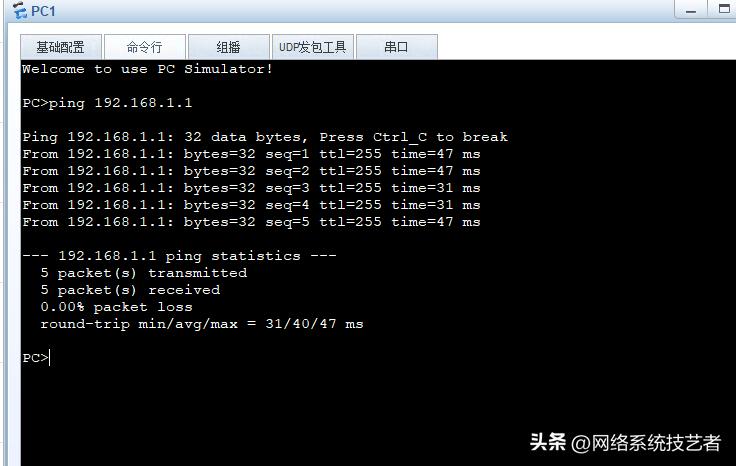
测试基础配置
各自所在网段的主机PC1/PC2与各自网关的连通性

通过上述测试,我们看到
PC1
ping 192.168.1.1 畅通
PC2
ping 192.168.2.1 畅通

2、配置Telnet 登录信息
这里以AR1路由器为例,
AR1路由器配置登录信息
#配置最大vty用户界面为15
[Huawei]user
[Huawei]user-?
  user-bind       User bind
  user-group      User group
  user-interface  Configure the user terminal interface
[Huawei]user-int
[Huawei]user-interface ?
  INTEGER<0,129-149>   The first user terminal interface to be configured
  console              Primary user terminal interface
  current              The current user terminal interface
  maximum-vty          The maximum number of VTY users, the default value is 5
  tty                  The asynchronous serial user terminal interface
  vty                  The virtual user terminal interface
[Huawei]user-interface max
[Huawei]user-interface maximum-vty 15
[Huawei]user-in
#进入vty用户界面视图
[Huawei]user-interface vty 0 4
#配置认证模式为password
[Huawei-ui-vty0-4]au
[Huawei-ui-vty0-4]authentication-mode
[Huawei-ui-vty0-4]au
[Huawei-ui-vty0-4]authentication-mode pa
[Huawei-ui-vty0-4]authentication-mode password
#设置明文密码
Please configure the login password (maximum length 16):123
#设置password登录密码
[Huawei-ui-vty0-4]set au
[Huawei-ui-vty0-4]set authentication pa
[Huawei-ui-vty0-4]set authentication password ci
[Huawei-ui-vty0-4]set authentication password cipher huawei123
#设置用户权限为15(最高,拥有全部权限
[Huawei-ui-vty0-4]user
[Huawei-ui-vty0-4]user pr
[Huawei-ui-vty0-4]user privilege lev
[Huawei-ui-vty0-4]user privilege level 15
[Huawei-ui-vty0-4]
[Huawei-ui-vty0-4]
测试Telnet
这里从AR2路由上Telnet AR1
<AR2>
<AR2>telnet 192.168.13.1
  Press CTRL_] to quit telnet mode
  Trying 192.168.13.1 ...
  Connected to 192.168.13.1 ...

Login authentication


Password:
  Password timeout expired
Password:

写在最后:
自我设限,固步自封,唯有突破极限,才能发掘潜能。以上就是本期整理的《华为交换机Telnet远程登录方式配置》,自己经历过的风雨,所以知道你也会坚强。你的【点赞】+【关注】,我会自动解读为认可。
作者简介:
我是“网络系统技艺者”,系统运维工程师一枚,持续分享【网络技术+系统运维技术】干货。码字不易,如果您觉得文章还可以,就收藏吧,也许在以后某个时间能够用得到。