一、思科链路聚合简介
Etherchannel--链路*绑捆**(链路聚合) 优点或者作用:– 交换机之间的链路的逻辑汇聚– 高带宽– 跨链路的负载共享– STP仅看到一个逻辑端口– 冗余技术出现背景:①高链路带宽--不能够提供冗余;成本高(光纤)②多链路--STP只会保存一条链路 ③Etherchannel--将多余的物理链路*绑捆**到一个逻辑链路,对于交换机来说不会出现链路的阻塞问题,此时传输的流量实际上是被多条的物理链路分担。如果出现链路失效,则直接把流量转移到另外活跃的正常链路上边,可以保证冗余性,只要物理链路有一条是UP的,逻辑链路就会保持UP 两种协议:①PAGP--思科私有的模式:desirable--主动 auto--自动(被动)②LACP--公有的模式:active--主动 passive--被动③静态的--没有协议,要求两边都是on的模式,一边如果不是的话会进入假死状态,所以两端必须on
Switch(config-if)#channel-group1 mode ?
activeEnableLACPunconditionally
autoEnablePAgPonlyifaPAgPdeviceisdetected
desirableEnablePAgPunconditionally
onEnableEtherchannelonly
passiveEnableLACPonlyifaLACPdeviceisdetected
配置方式:
交换机①
Switch(config)#interface port-channel 10 -创建链路聚合的端口10
Switch(config-if)#switchporttrunkencapsulationdot1q
Switch(config-if)#switchportmodetrunk
Switch(config)#intrangee0/0-1
Switch(config-if-range)#channel-group10modeactive(on)
交换机②
Switch(config)#interface port-channel 10 -创建链路聚合的端口10
Switch(config-if)#switchporttrunkencapsulationdot1q
Switch(config-if)#switchportmodetrunk
Switch(config)#intrangee0/0-1
Switch(config-if-range)#channel-group10modepassive或者active(on)
查看状态:
Switch#showetherchannelsummary--查看链路聚合信息
Numberofchannel-groupsinuse:1
Numberofaggregators:1
GroupPort-channelProtocolPorts
------+-------------+-----------+-----------------------------------------------
10Po10(SU)LACPEt0/0(P)Et0/1(P)
注意:思科设备的链路聚合,需要把物理接口也去设置为相同的二层模式
二、配置LACP模式的链路聚合的示例
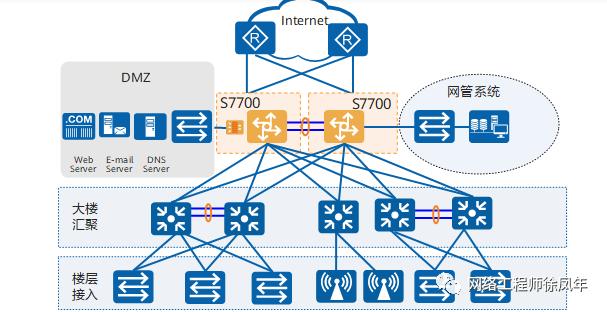
S7700可以作为中小型企业园区网络的核心设备。为中小企业园区提供高性价比、高可靠、多业务易部署的网络解决方案。

以太网链路聚合是指将多条以太网物理链路*绑捆**在一起成为一条逻辑链路,从而实现增加链路带宽的目的。链路聚合分为手工模式和LACP模式。 LACP模式需要有链路聚合控制协议LACP的参与。当需要在两个直连设备间提供一个较大的链路带宽而设备支持LACP协议时,建议使用LACP模式。LACP模式不仅可以实现增加带宽、提高可靠性、负载分担的目的,而且可以提高Eth-Trunk的容错性、提供备份功能。 LACP模式下,部分链路是活动链路,所有活动链路均参与数据转发。如果某条活动链路故障,链路聚合组自动在非活动链路中选择一条链路作为活动链路,参与数据转发的链路数目不变。
01 注意事项
一个Eth-Trunk接口中的成员接口必须是以太网类型和速率相同的接口。Eth-Trunk链路两端相连的物理接口的数量、速率、双工方式、流控配置必须一致。如果本端设备接口加入了Eth-Trunk,与该接口直连的对端接口也必须加入Eth-Trunk,两端才能正常通信。两台设备对接时需要保证两端设备上链路聚合的模式一致。本举例适用于S系列交换机所有产品的所有版本。
02 需求分析
2.1 背景信息
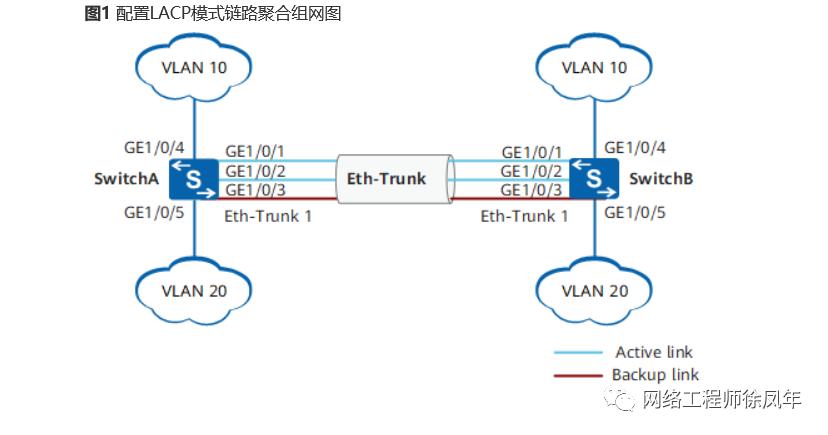
如图1所示,SwitchA和SwitchB通过以太链路分别都连接VLAN10和VLAN20的网络,且SwitchA和SwitchB之间有较大的数据流量。用户希望SwitchA和SwitchB之间能够提供较大的链路带宽来使相同VLAN间互相通信。在两台Switch设备上配置LACP模式链路聚合组,提高两设备之间的带宽与可靠性,具体要求如下:
2.2 业务需求
两条活动链路具有负载分担的能力。两设备间的链路具有1条冗余备份链路,当活动链路出现故障时,备份链路替代故障链路,保持数据传输的可靠性。同VLAN间可以相互通信
03 配置思路
3.1 采用如下思路配置LACP模式的链路聚合
创建Eth-Trunk,配置Eth-Trunk为LACP模式,实现链路聚合功能。将成员接口加入Eth-Trunk。配置系统优先级,确定主动端,按照主动端设备的接口选择活动接口。配置活动接口上限阈值,实现保证带宽的情况下提高网络的可靠性。配置接口优先级,确定活动链路接口,优先级高的接口将被选作活动接口创建VLAN并将接口加入VLAN。
04 操作步骤
4.1 在SwitchA上创建Eth-Trunk1并配置为LACP模式。SwitchB的配置与SwitchA类似,不再赘述
操作方式:
<HUAWEI> system-view
[HUAWEI] sysname SwitchA
[SwitchA] interface eth-trunk 1   //创建ID为1的Eth-Trunk接口
[SwitchA-Eth-Trunk1] mode lacp   //配置链路聚合模式为LACP模式
[SwitchA-Eth-Trunk1]quit
4.2 配置SwitchA上的成员接口加入Eth-Trunk1。SwitchB的配置与SwitchA类似,不再赘述
操作方式:
[SwitchA] interface gigabitethernet 1/0/1
[SwitchA-GigabitEthernet1/0/1] eth-trunk 1   //将GE1/0/1接口加入Eth-Trunk1中
[SwitchA-GigabitEthernet1/0/1] quit
[SwitchA] interface gigabitethernet 1/0/2
[SwitchA-GigabitEthernet1/0/2] eth-trunk 1   //将GE1/0/2接口加入Eth-Trunk1中
[SwitchA-GigabitEthernet1/0/2] quit
[SwitchA] interface gigabitethernet 1/0/3
[SwitchA-GigabitEthernet1/0/3] eth-trunk 1   //将GE1/0/3接口加入Eth-Trunk1中
[SwitchA-GigabitEthernet1/0/3]quit
4.3 在SwitchA上配置系统优先级为100,使其成为LACP主动端
操作方式: [SwitchA] lacp priority 100 //系统LACP优先级缺省为32768,修改SwitchA的优先级大于SwitchB的优先级,作为主动端
4.4 在SwitchA上配置活动接口上限阈值为2
操作方式: [SwitchA] interface eth-trunk 1[SwitchA-Eth-Trunk1] max active-linknumber 2 //链路聚合组活动接口数的上限阈值缺省是8,修改活动接口数的上限阈值为2[SwitchA-Eth-Trunk1] quit
4.5 在SwitchA上配置接口优先级确定活动链路 操作方式:
[SwitchA] interface gigabitethernet 1/0/1[SwitchA-GigabitEthernet1/0/1] lacp priority 100 //接口LACP优先级缺省为32768,修改GE1/0/1接口的LACP优先级为100,作为活动接口[SwitchA-GigabitEthernet1/0/1] quit[SwitchA] interface gigabitethernet 1/0/2[SwitchA-GigabitEthernet1/0/2] lacp priority 100 //接口LACP优先级缺省为32768,修改GE1/0/2接口的LACP优先级为100,作为活动接口[SwitchA-GigabitEthernet1/0/2] quit
4.6 创建VLAN并将接口加入VLAN。 创建VLAN10和VLAN20并分别加入接口。SwitchB的配置与SwitchA类似,不再赘述。
操作方式: [SwitchA] vlan batch 10 20[SwitchA] interface gigabitethernet 1/0/4[SwitchA-GigabitEthernet1/0/4] port link-type trunk //设置接口链路类型为trunk,接口缺省链路类型不是trunk口[SwitchA-GigabitEthernet1/0/4] port trunk allow-pass vlan 10[SwitchA-GigabitEthernet1/0/4] quit[SwitchA] interface gigabitethernet 1/0/5[SwitchA-GigabitEthernet1/0/5] port link-type trunk //设置接口链路类型为trunk,接口缺省链路类型不是trunk口[SwitchA-GigabitEthernet1/0/5] port trunk allow-pass vlan 20[SwitchA-GigabitEthernet1/0/5] quit的 配置Eth-Trunk1接口允许VLAN10和VLAN20通过。SwitchB的配置与SwitchA类似,不再赘述。 操作方式 : [SwitchA] interface eth-trunk 1[SwitchA-Eth-Trunk1] port link-type trunk //设置接口链路类型为trunk,接口缺省链路类型不是trunk口[SwitchA-Eth-Trunk1] port trunk allow-pass vlan 10 20[SwitchA-Eth-Trunk1] quit
4.7 检查状态
查看各Switch设备的Eth-Trunk信息,查看链路是否协商成功。
操作方式:
[SwitchA] display eth-trunk 1
Eth-Trunk1's state information is:
Local:
LAG ID: 1                       WorkingMode: LACP
Preempt Delay: Disabled         Hash arithmetic: According to SIP-XOR-DIP
System Priority: 100            System ID: 00e0-fca8-0417
Least Active-linknumber: 1      Max Active-linknumber: 2
Operate status: up              Number Of Up Port In Trunk: 2
--------------------------------------------------------------------------------
ActorPortName                    Status     PortType PortPri   PortNo PortKey   PortState  Weight
GigabitEthernet1/0/1             Selected  1GE       100      6145    2865      11111100     1
GigabitEthernet1/0/2             Selected  1GE       100      6146    2865      11111100     1
GigabitEthernet1/0/3             Unselect  1GE       32768    6147    2865      11100000     1

Partner:
--------------------------------------------------------------------------------
ActorPortName                     SysPri    SystemID    PortPri PortNo PortKey   PortState
GigabitEthernet1/0/1              32768  00e0-fca6-7f85  32768     6145   2609      11111100
GigabitEthernet1/0/2              32768  00e0-fca6-7f85  32768     6146   2609      11111100
GigabitEthernet1/0/3              32768  00e0-fca6-7f85  32768     6147   2609      11110000

[SwitchB] display eth-trunk 1
Eth-Trunk1's state information is:
Local:
LAG ID: 1                      WorkingMode: LACP
Preempt Delay: Disabled        Hash arithmetic: According to SIP-XOR-DIP
System Priority: 32768         System ID: 00e0-fca6-7f85
Least Active-linknumber: 1     Max Active-linknumber: 8
Operate status: up             Number Of Up Port In Trunk: 2
--------------------------------------------------------------------------------
ActorPortName                   Status     PortType    PortPri   PortNo  PortKey   PortState  Weight
GigabitEthernet1/0/1            Selected  1GE        32768      6145    2609      11111100     1
GigabitEthernet1/0/2            Selected  1GE        32768      6146    2609      11111100     1
GigabitEthernet1/0/3            Unselect  1GE        32768      6147    2609      11110000     1

Partner:
--------------------------------------------------------------------------------
ActorPortName                     SysPri    SystemID     PortPri  PortNo  PortKey   PortState
GigabitEthernet1/0/1              100    00e0-fca8-0417  100      6145     2865      11111100
GigabitEthernet1/0/2              100    00e0-fca8-0417  100      6146     2865      11111100
GigabitEthernet1/0/3              100    00e0-fca8-0417  32768    6147     2865      11100000
通过以上显示信息可以看到,SwitchA的系统优先级为100,高于SwitchB的系统优先级。Eth-Trunk的成员接口中GigabitEthernet1/0/1、GigabitEthernet1/0/2成为活动接口,处于“Selected”状态,接口GigabitEthernet1/0/3处于“Unselect”状态,同时实现M条链路的负载分担和N条链路的冗余备份功能。
05 配置文件
5.1 SwitchA的配置文件
#
sysname SwitchA
#
vlan batch 10 20
#
lacp priority 100
#
interface Eth-Trunk1
 port link-type trunk
 port trunk allow-pass vlan 10 20
 mode lacp
 max active-linknumber 2
#
interface GigabitEthernet1/0/1
 eth-trunk 1
 lacp priority 100
#
interface GigabitEthernet1/0/2
 eth-trunk 1
 lacp priority 100
#
interface GigabitEthernet1/0/3
 eth-trunk 1
#
interface GigabitEthernet1/0/4
 port link-type trunk
 port trunk allow-pass vlan 10
#
interface GigabitEthernet1/0/5
 port link-type trunk
 port trunk allow-pass vlan 20
#
return
5.2 SwitchB的配置文件
#
sysname SwitchB
#
vlan batch 10 20
#
interface Eth-Trunk1
 port link-type trunk
 port trunk allow-pass vlan 10 20
 mode lacp
#
interface GigabitEthernet1/0/1
 eth-trunk 1
#
interface GigabitEthernet1/0/2
 eth-trunk 1
#
interface GigabitEthernet1/0/3
 eth-trunk 1
#
interface GigabitEthernet1/0/4
 port link-type trunk
 port trunk allow-pass vlan 10
#
interface GigabitEthernet1/0/5
 port link-type trunk
 port trunk allow-pass vlan 20
#
return