在chrome中可以很方便地添加自定义搜索引擎,只要有一个搜索地址就可以,但是在firefox比较麻烦,但也并不复杂。这里以头条搜索为例。
首先你要有一个http服务器,一般用apache或nginx,然后在你的网站目录中创建一个search目录,在目录下创建一个 tt-search.htm文件,内容如下:
<!DOCTYPE html><html><head><meta charset="utf-8"/><title>tt-search</title>
  <link rel="search" type="application/opensearchdescription+xml" title="tt-search" href="http://localhost/search/tt-search.xml">
</head><body></body></html>
这里关键就是这个link标签要放在head标签内,指向一个xml文件,让firefox读取这个文件
在创建一个tt-search.xml文件,内容如下:
<OpenSearchDescription xmlns="http://a9.com/-/spec/opensearch/1.1/"
                       xmlns:moz="http://www.mozilla.org/2006/browser/search/">
  <ShortName>tt-search</ShortName>
  <Description>toutiao-search</Description>
  <InputEncoding>UTF-8</InputEncoding>
  <Image width="32" height="32" type="image/x-icon">https://sf3-cdn-tos.douyinstatic.com/obj/eden-cn/uhbfnupkbps/toutiao_favicon.ico</Image>
  <Url type="text/html" template="https://so.toutiao.com/search?">
    <Param name="dvpf" value="pc"/>
    <Param name="keyword" value="{searchTerms}"/>
  </Url>
  <!-- <Url type="application/x-suggestions+json" template="[suggestionURL]"/> -->
</OpenSearchDescription>
头条的pc端搜索地址是 https://so.toutiao.com/search?dvpf=pc&keyword=%s
然后用本地地址在firefox中打开你刚才创建的html文件,如 http://localhost/search/tt-search.htm,这时如果你的firefox保留了搜索框,上面会显示一个+号,点击会提示添加搜索引擎 tt-search,如图
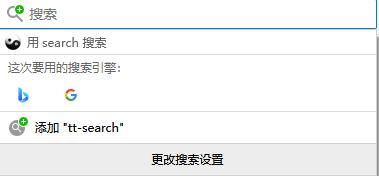
添加进去后就可以在firefox的地址栏输入内容时用方向键来切换用那个搜索引擎了。如下图

期待未来头条搜索直接支持firefox,就不需要在用这样的办法了。
本文来自 发现一个比百度更好用的搜索引擎。。。 - 闲聊灌水 - Emacs China