#头条创作挑战赛#
7.3 JSP 原理
JSP 是一个页面,故可用来写 html 标签。而且 JSP 本质上是一个 Servlet
访问 jsp 时的流程:

- 浏览器第一次访问 hello.jsp 页面
- tomcat 会将 hello.jsp 转换为名为 hello_jsp.java 的一个 Servlet
- tomcat 再将转换的 servlet 编译成字节码文件 hello_jsp.class
- tomcat 会执行该字节码文件,向外提供服务
从转换的 jsp.java 文件中可以看到 类的继承关系是继承了 HttpJspBase 这个类,而 HttpJspBase 这个类继承了 HttpServlet 。故而 jsp 是一个 servlet
在 jsp.java 可以看到有一个名为 _jspService() 的方法,该方法就是每次访问 jsp 时自动执行的方法,和 servlet 中的 service 方法一样 。
而在 _jspService() 方法中可以看到往浏览器写标签的代码,由tomcat自动完成这部分功能。
7.4 JSP 脚本
JSP脚本用于在 JSP页面内定义 Java代码。在之前的入门案例中我们就在 JSP 页面定义的 Java 代码就是 JSP 脚本。
7.4.1 JSP 脚本分类
- <%...%>:内容会直接放到 _jspService() 方法之中
- <%=...%>:内容会被方法哦 out.print() 中,作为 out.print() 的参数
- <%!...%>:内容会放到 _jspService() 方法之外,被类直接包含
代码演示:
在 hello.jsp 中书写
 <%
     System.out.println("hello,jsp~");
     int i = 3;
 %>
通过浏览器访问 hello.jsp 后,查看转换的 hello_jsp.java 文件,i 变量定义在了 _jspService() 方法中
在 hello.jsp 中书写
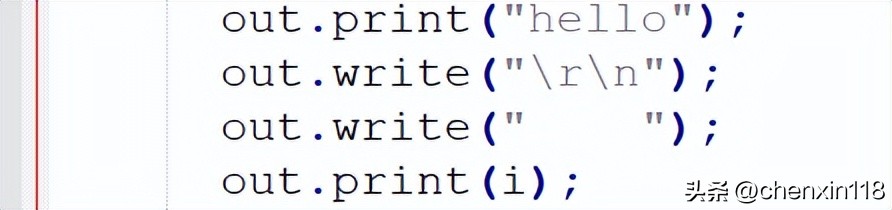
 <%="hello"%>
 <%=i%>
通过浏览器访问 hello.jsp 后,查看转换的 hello_jsp.java 文件,该脚本的内容被放在了 out.print() 中,作为参数
在 hello.jsp 中书写
 <%!
     void  show(){}
     String name = "zhangsan";
 %>
通过浏览器访问 hello.jsp 后,查看转换的 hello_jsp.java 文件,该脚本的内容被放在了成员位置

7.4.2 案例
1. 需求
使用JSP脚本展示品牌数据

说明:
- 在该案例中数据不从数据库中查询,而是在 JSP 页面上写死
2. 实现
- 创建实体类 Brand
- package pojo ; /* @Author 晨默 * @Date 2022/9/3 9:59 */ /** * 品牌实体类 */ public class Brand { // id 主键 private Integer id ; // 品牌名称 private String brandName ; // 企业名称 private String companyName ; // 排序字段 private Integer ordered ; // 描述信息 private String description ; // 状态:0:禁用 1:启用 private Integer status ; public Brand ( Integer id , String brandName , String companyName , Integer ordered , String description , Integer status ) { this . id = id ; this . brandName = brandName ; this . companyName = companyName ; this . ordered = ordered ; this . description = description ; this . status = status ; } public Integer getId () { return id ; } public void setId ( Integer id ) { this . id = id ; } public String getBrandName () { return brandName ; } public void setBrandName ( String brandName ) { this . brandName = brandName ; } public String getCompanyName () { return companyName ; } public void setCompanyName ( String companyName ) { this . companyName = companyName ; } public Integer getOrdered () { return ordered ; } public void setOrdered ( Integer ordered ) { this . ordered = ordered ; } public String getDescription () { return description ; } public void setDescription ( String description ) { this . description = description ; } public Integer getStatus () { return status ; } public void setStatus ( Integer status ) { this . status = status ; } @Override public String toString () { return "Brand{" + "id=" + id + ", brandName='" + brandName + '\'' + ", companyName='" + companyName + '\'' + ", ordered=" + ordered + ", description='" + description + '\'' + ", status=" + status + '}' ; }}
- 编写 brand.jsp 页面
- <% -- 对类进行导包 -- %><% @ page import = "pojo.Brand" %><% @ page import = "java.util.ArrayList" %><% @ page import = "java.util.List" %> <% -- Created by IntelliJ IDEA . User : 晨默 Date : 2022 / 9 / 3 Time : 10 : 01 To change this template use File | Settings | File Templates . -- %> <% @ page contentType = "text/html;charset=UTF-8" language = "java" %> <% // 查询数据库 List < Brand > brands = new ArrayList < Brand > (); brands . add ( new Brand ( 1 , "三只松鼠" , "三只松鼠" , 100 , "三只松鼠,好吃不上火" , 1 )); brands . add ( new Brand ( 2 , "优衣库" , "优衣库" , 200 , "优衣库,服适人生" , 0 )); brands . add ( new Brand ( 3 , "小米" , "小米科技有限公司" , 1000 , "为发烧而生" , 1 ));%> <!DOCTYPE html> <html lang = "en" > <head> <meta charset = "UTF-8" > <title> Title </title> </head> <body> <input type = "button" value = "新增" ><br> <hr> <table border = "1" cellspacing = "0" width = "800" > <tr> <th> 序号 </th> <th> 品牌名称 </th> <th> 企业名称 </th> <th> 排序 </th> <th> 品牌介绍 </th> <th> 状态 </th> <th> 操作 </th> </tr> <% -- 将数据改为动态的 -- %> <% -- for循环需要将 `tr` 标签包裹起来,这样才能实现循环的效果 -- %> <% for ( Brand brand : brands ) { //获取集合中的 每一个 Brand 对象 %> <tr align = "center" > <td> <% = brand . getId ()%> </td> <td> <% = brand . getBrandName ()%> </td> <td> <% = brand . getCompanyName ()%> </td> <td> <% = brand . getOrdered ()%> </td> <td> <% = brand . getDescription ()%> </td> <td> <% = brand . getStatus () == 1 ? "启用" : "禁用" %> </td> <td><a href = "#" > 修改 </a> <a href = "#" > 删除 </a></td> </tr> <% } %> </table> </body> </html>
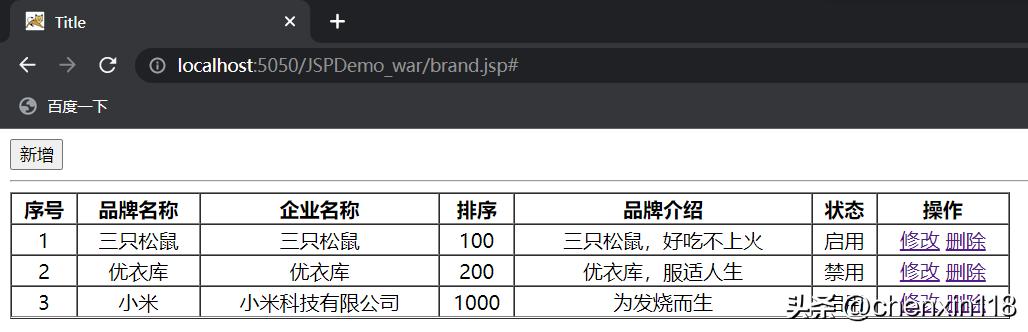
注意:<%%> 里面写的是 Java 代码,而外边写的是 HTML 标签
- 测试
7.4.3 JSP 缺点
- 书写麻烦:特别是复杂的页面
- 阅读麻烦
- 复杂度高:运行需要依赖于各种环境,JRE,JSP容器,JavaEE…
- 占内存和磁盘:JSP会自动生成.java和.class文件占磁盘,运行的是.class文件占内存
- 调试困难:出错后,需要找到自动生成的.java文件进行调试
- 不利于团队协作:前端人员不会 Java,后端人员不精 HTML
JSP 已逐渐退出历史舞台, 以后开发更多的是使用 HTML + Ajax 来替代
对技术的发展进行简单的说明

- 第一阶段:使用 servlet 即实现逻辑代码编写,也对页面进行拼接。这种模式我们之前也接触过
- 第二阶段:随着技术的发展,出现了 JSP ,人们发现 JSP 使用起来比 Servlet 方便很多,但是还是要在 JSP 中嵌套 Java 代码,也不利于后期的维护
- 第三阶段:使用 Servlet 进行逻辑代码开发,而使用 JSP 进行数据展示

- 第四阶段:使用 servlet 进行后端逻辑代码开发,而使用 HTML 进行数据展示。而这里面就存在问题, HTML 是静态页面,怎么进行动态数据展示呢?这就是 ajax 的作用了。