本文主要讲述,基于Jersey+netty开源框架如何实现高性能微服务?
在本案例中,通过Jersey+netty实现一个微服务,模拟从csv文件中读取100000万条数据,然后,通过postman模拟客户端,调用微服务提供的RESTful接口,测试Jersey+netty高性能,具体实施方法步骤如下:
步骤1:初始化netty微服务,代码如下:
public class App {
static final String ROOT_PATH = "ems";
private static final URI BASE_URI = URI.create("http://localhost:8888/");
public static void main(String[] args) {
try {
System.out.println("\"ems\" ems App on Netty container.");
ResourceConfig resourceConfig = new MyAppResource();
final Channel server = NettyHttpContainerProvider.createHttp2Server(BASE_URI, resourceConfig, null);
Runtime.getRuntime().addShutdownHook(new Thread(new Runnable() {
@Override
public void run() {
server.close();
}
}));
System.out.println(String.format("Application started. (HTTP/2 enabled!)\nTry out %s%s\nStop the application using "
+ "CTRL+C.", BASE_URI, ROOT_PATH));
Thread.currentThread().join();
} catch (InterruptedException ex) {
Logger.getLogger(App.class.getName()).log(Level.SEVERE, null, ex);
}
}
}
步骤2:注册微服务资源;
public class MyAppResource extends ResourceConfig {
public MyAppResource() {
this.register(MvvmResource.class);
}
}
步骤3:基于jersey实现RESTful接口,demo样例如下
@Path("ems/api/v1")
public class MvvmResource {
@GET
@Path("hello")
@Produces(MediaType.TEXT_PLAIN)
public String hello() {
System.out.println("hello!");
return "ok";
}
@Path("{path: .*}")
@Produces({ MediaType.APPLICATION_JSON, MediaType.APPLICATION_XML, MediaType.TEXT_PLAIN })
@Consumes({ MediaType.APPLICATION_JSON, MediaType.APPLICATION_XML, MediaType.TEXT_PLAIN })
@POST
public String onPost(@PathParam("path") String path, String data) {
System.out.println("path:" + path + ",data:" + data);
return data;
}
@Produces({ MediaType.APPLICATION_JSON, MediaType.APPLICATION_XML, MediaType.TEXT_PLAIN })
@Consumes({ MediaType.APPLICATION_JSON, MediaType.APPLICATION_XML, MediaType.TEXT_PLAIN })
@DELETE
@Path("{path: .*}")
public String onDelete(@PathParam("path") String path, String data) {
System.out.println("path:" + path + ",data:" + data);
return data;
}
@Path("{path: .*}")
@Produces({ MediaType.APPLICATION_JSON, MediaType.APPLICATION_XML, MediaType.TEXT_PLAIN })
@Consumes({ MediaType.APPLICATION_JSON, MediaType.APPLICATION_XML, MediaType.TEXT_PLAIN })
@PUT
public String onPut(@PathParam("path") String path, String data) {
System.out.println("path:" + path + ",data:" + data);
return data;
}
@Produces({ MediaType.APPLICATION_JSON, MediaType.APPLICATION_XML, MediaType.TEXT_PLAIN })
@Consumes({ MediaType.APPLICATION_JSON, MediaType.APPLICATION_XML, MediaType.TEXT_PLAIN })
@GET
@Path("{path: .*}")
public String onGet(@PathParam("path") String path, @QueryParam("from") String from, String data) {
System.out.println("path:" + path + ",data:" + data);
return data;
}
@Produces({ MediaType.APPLICATION_JSON, MediaType.APPLICATION_XML, MediaType.TEXT_PLAIN })
@Consumes({ MediaType.APPLICATION_JSON, MediaType.APPLICATION_XML, MediaType.TEXT_PLAIN })
@PATCH
@Path("{path: .*}")
public String onPatch(@PathParam("path") String path, String data) {
System.out.println("path:" + path + ",data:" + data);
return data;
}
@GET
@Path("getByStream")
@Produces(MediaType.APPLICATION_OCTET_STREAM)
public Response getAllByStream(@QueryParam("filePath") String filePath) {
File file = new File("E:/" + filePath);
System.out.println("file:"+file);
if (!file.exists()) {
return Response.status(Response.Status.NOT_FOUND).build();
}
String fileName = null;
try {
fileName = URLEncoder.encode("export.csv", "UTF-8");
} catch (UnsupportedEncodingException e1) {
e1.printStackTrace();
}
return Response.ok(new StreamingOutput() {
@Override
public void write(OutputStream output) throws IOException, WebApplicationException {
output.write(FileUtils.readFileToByteArray(file));
}
}).header("Content-disposition", "attachment;filePath=" + filePath).header("Cache-Control", "no-cache").build();
}
}
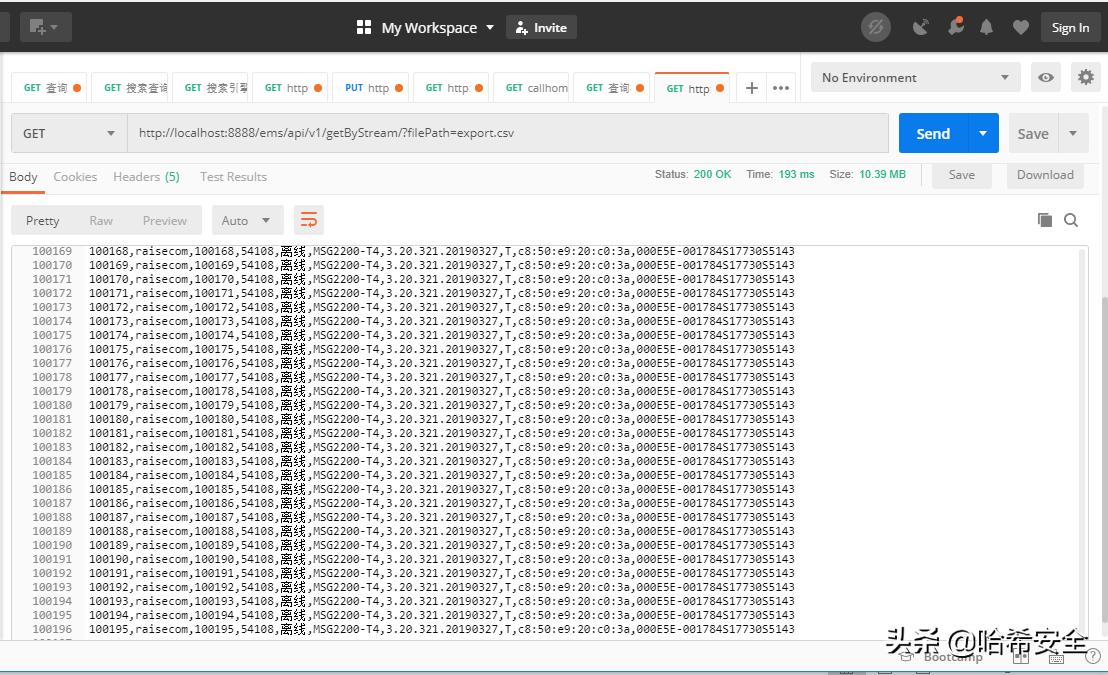
4、测试微服务接口,参考结果如下: