1. Cisco 9120的图形化配置
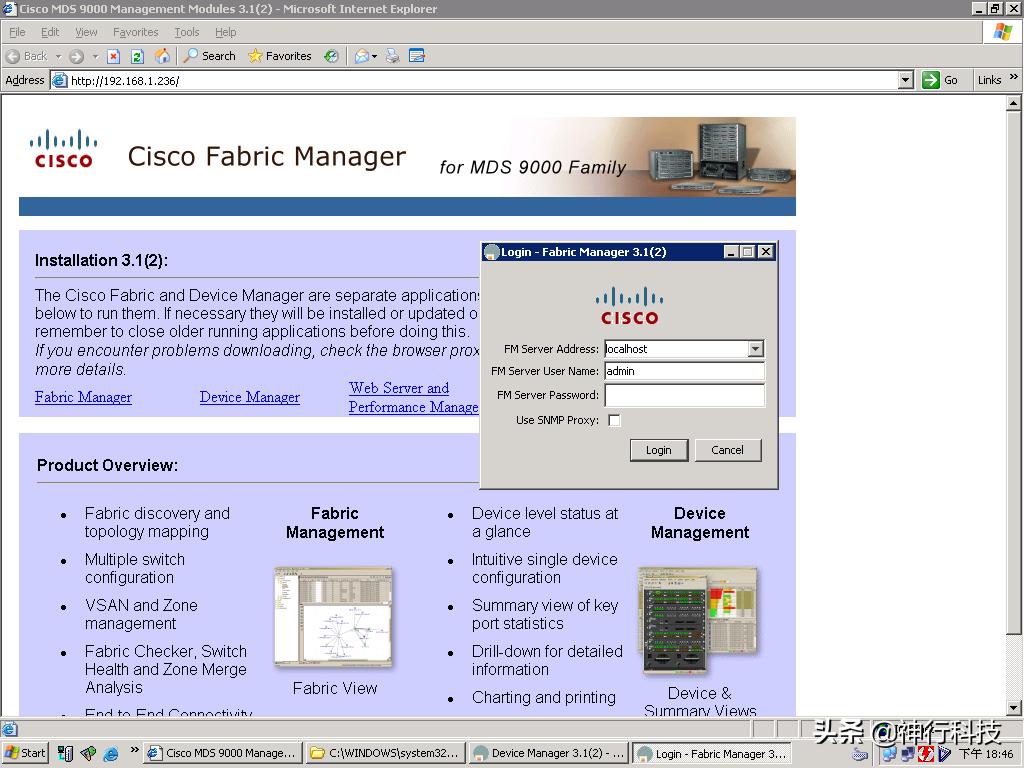
两次的用户名和密码不一样,有一个是admin/password
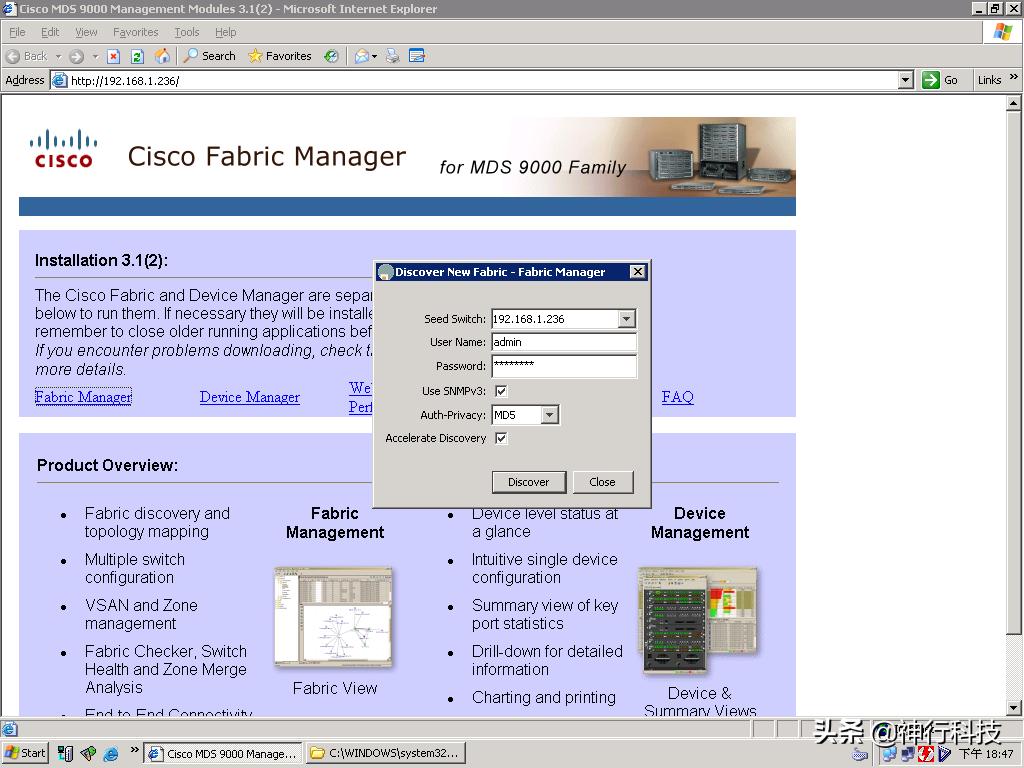
d
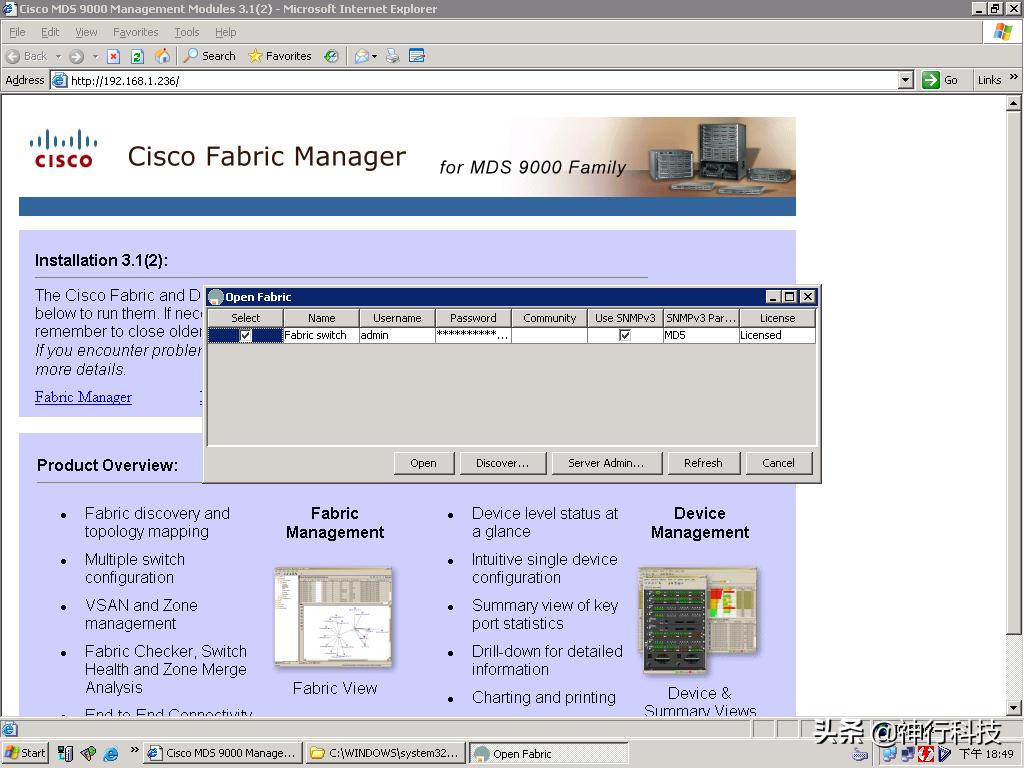
选择后open
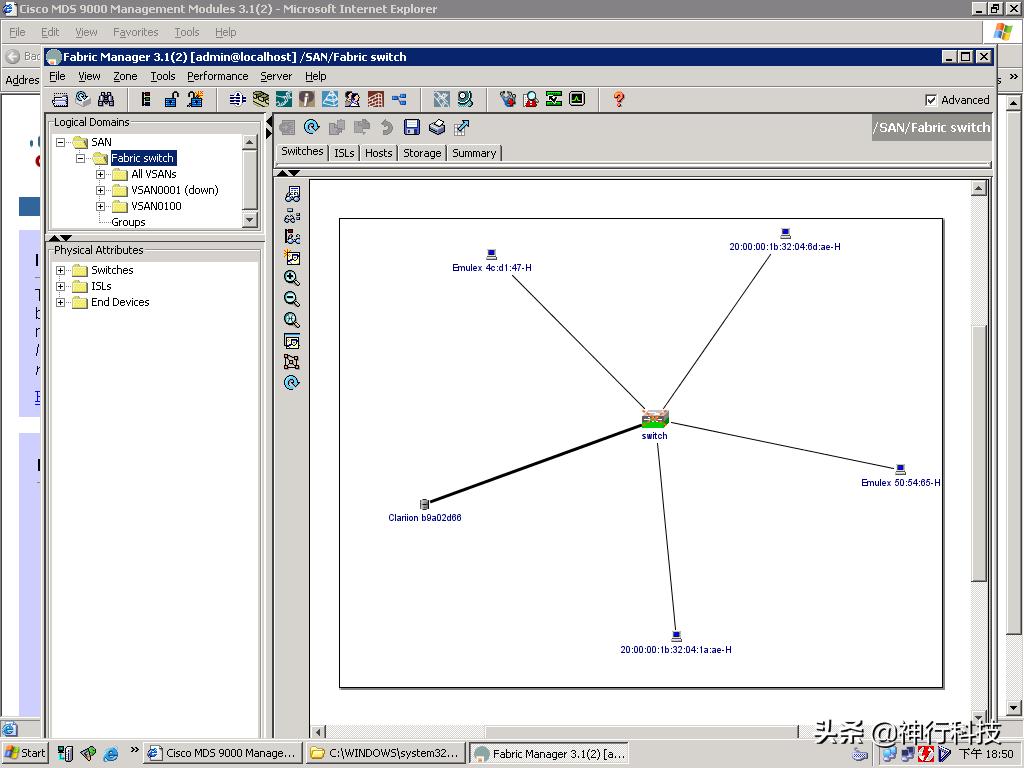
Zone 管理
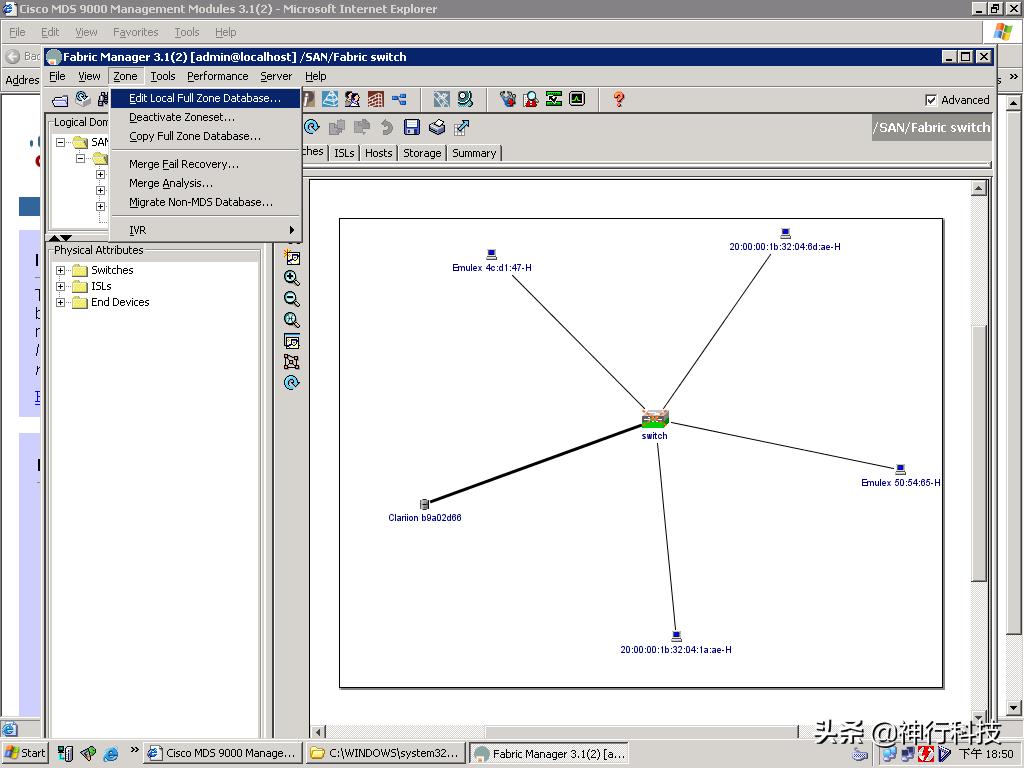
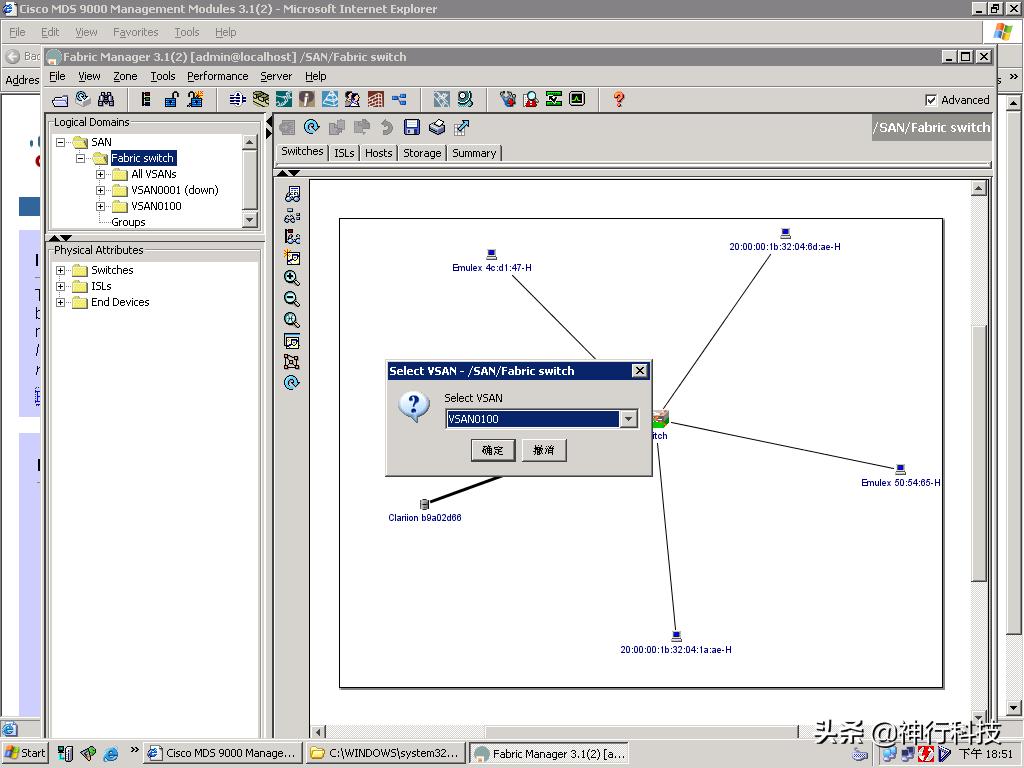
选择vsan
选择zone, 建立一个新的zone
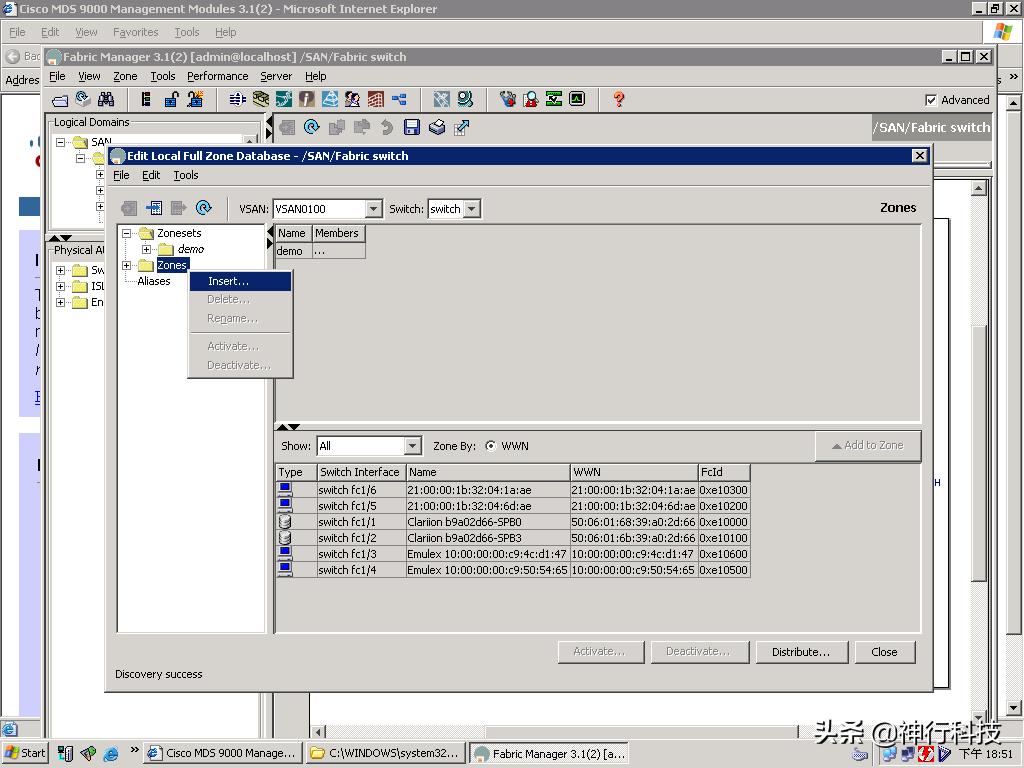
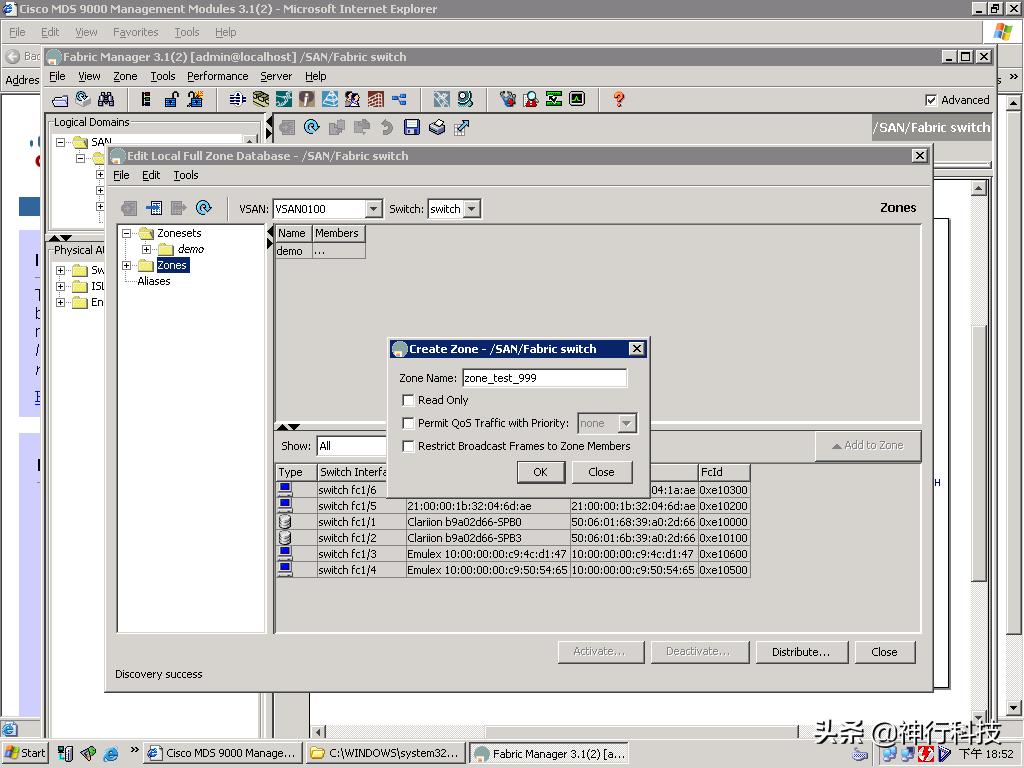
Zone 下面看到刚建立的zone
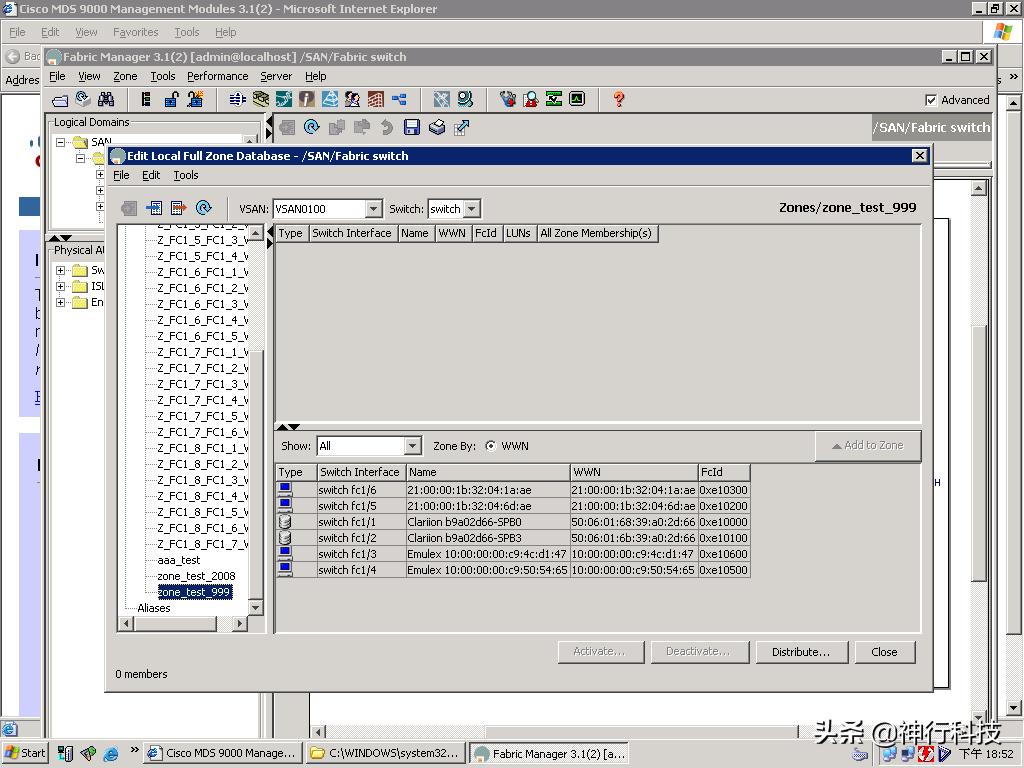
选择成员,通过"Add to Zone"加口到zone 中
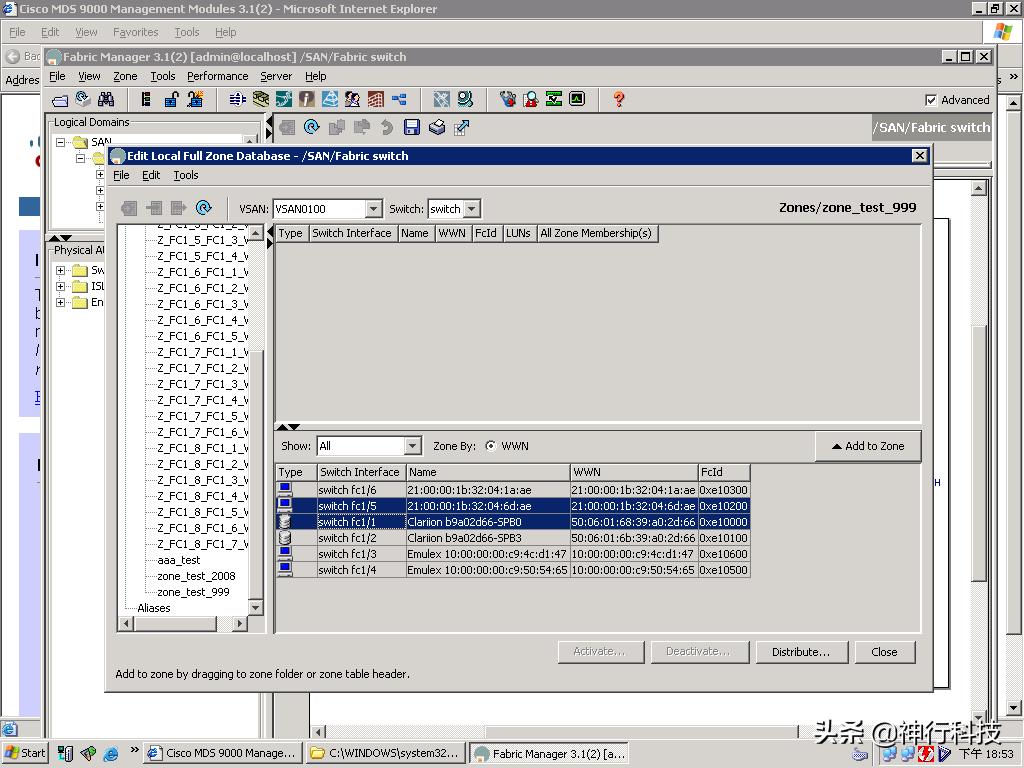
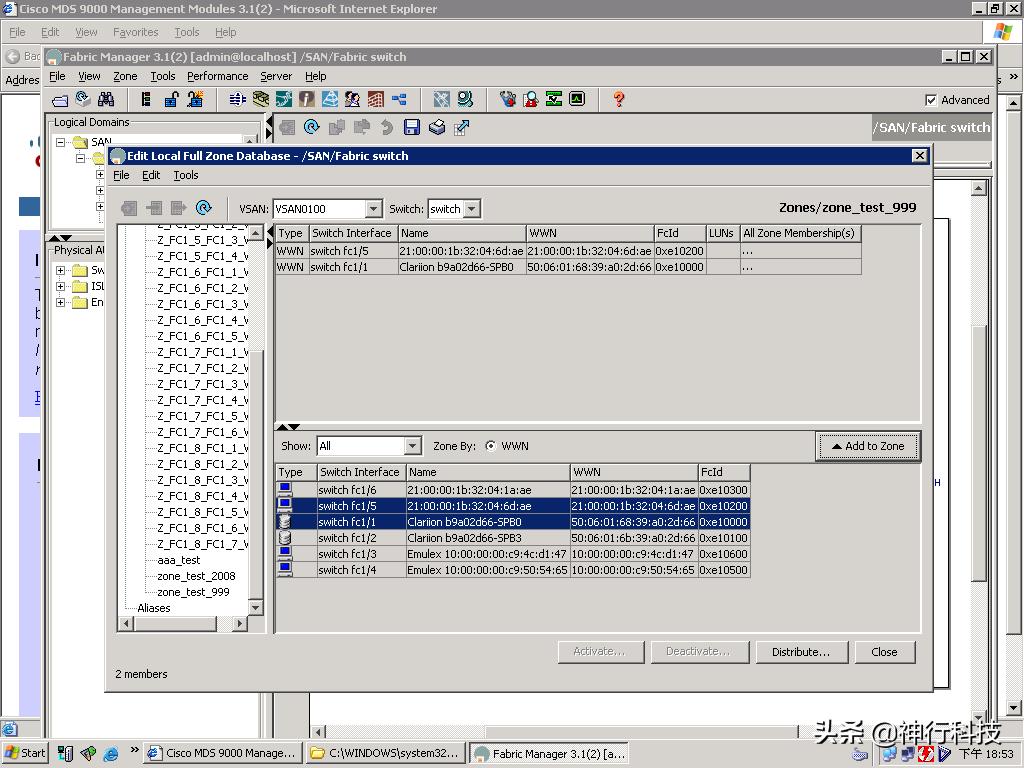
选择zoneset 名字,加zone成员
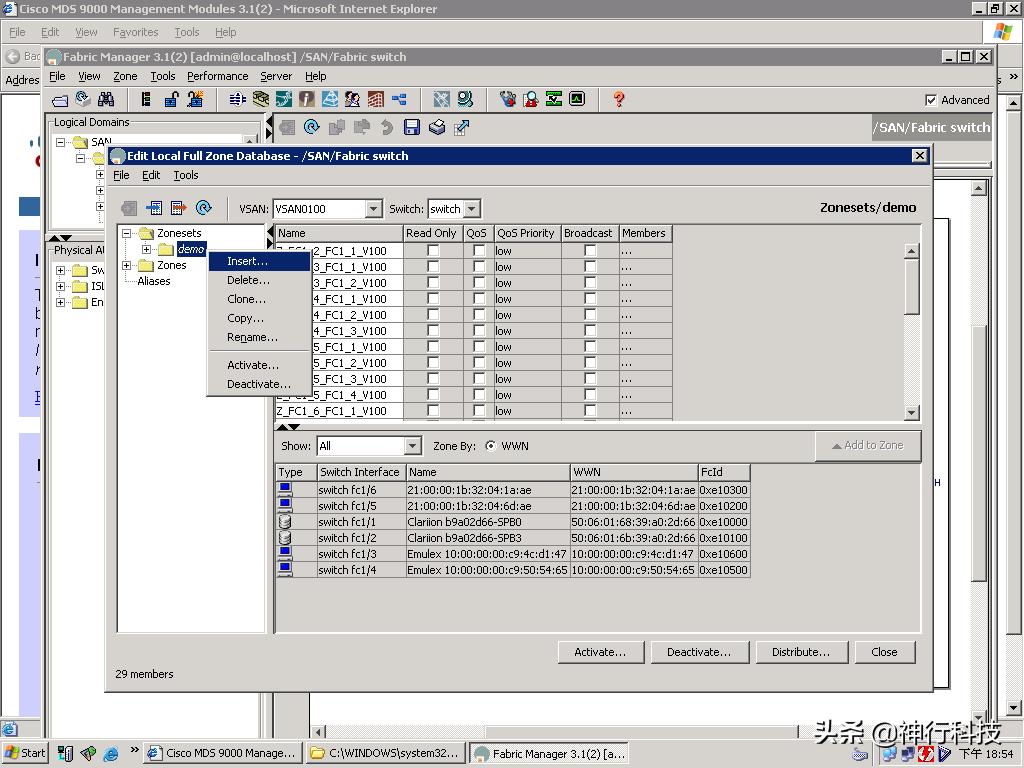
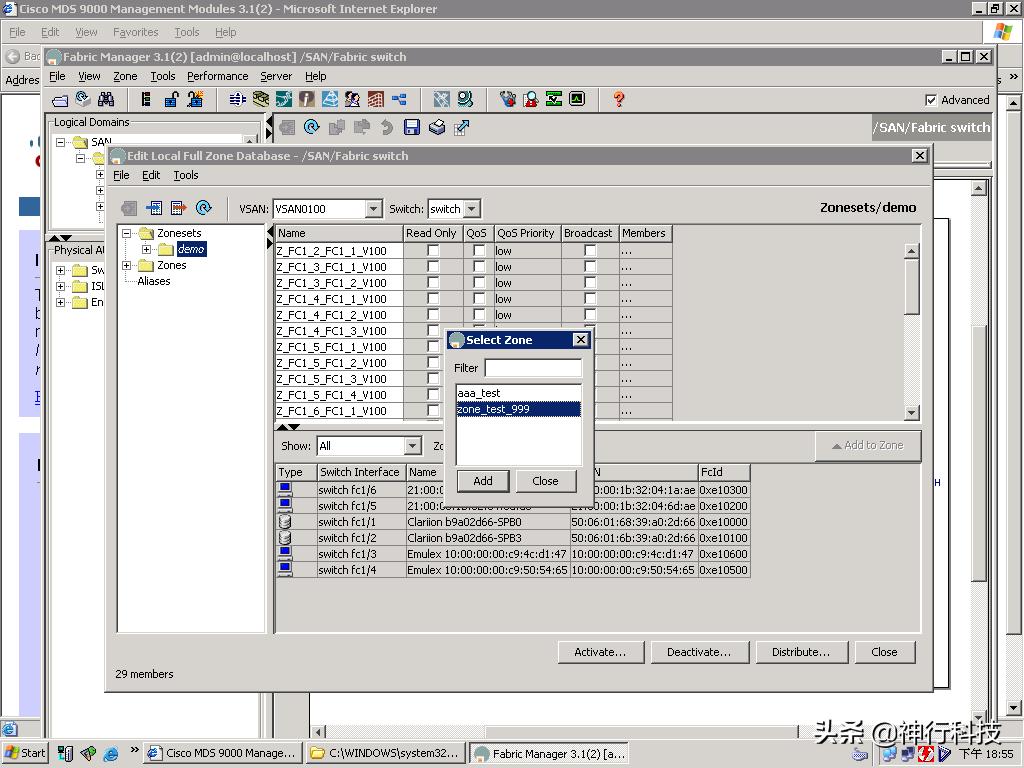
在zoneset "demo"下面可以看到新zone 已经加入
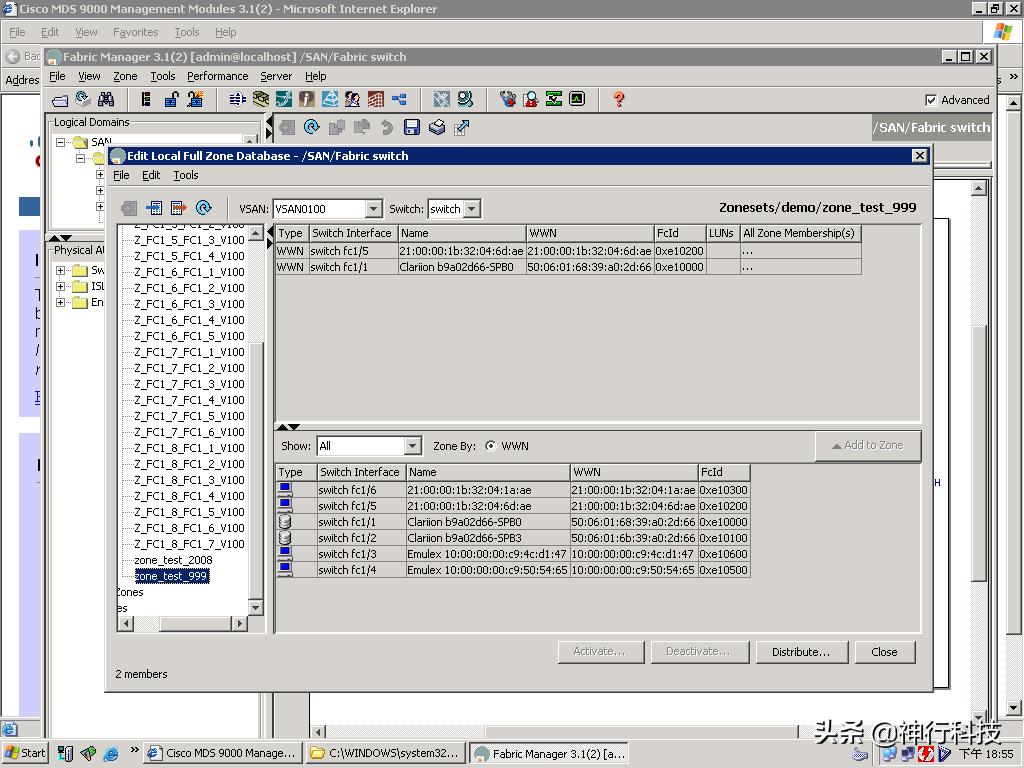
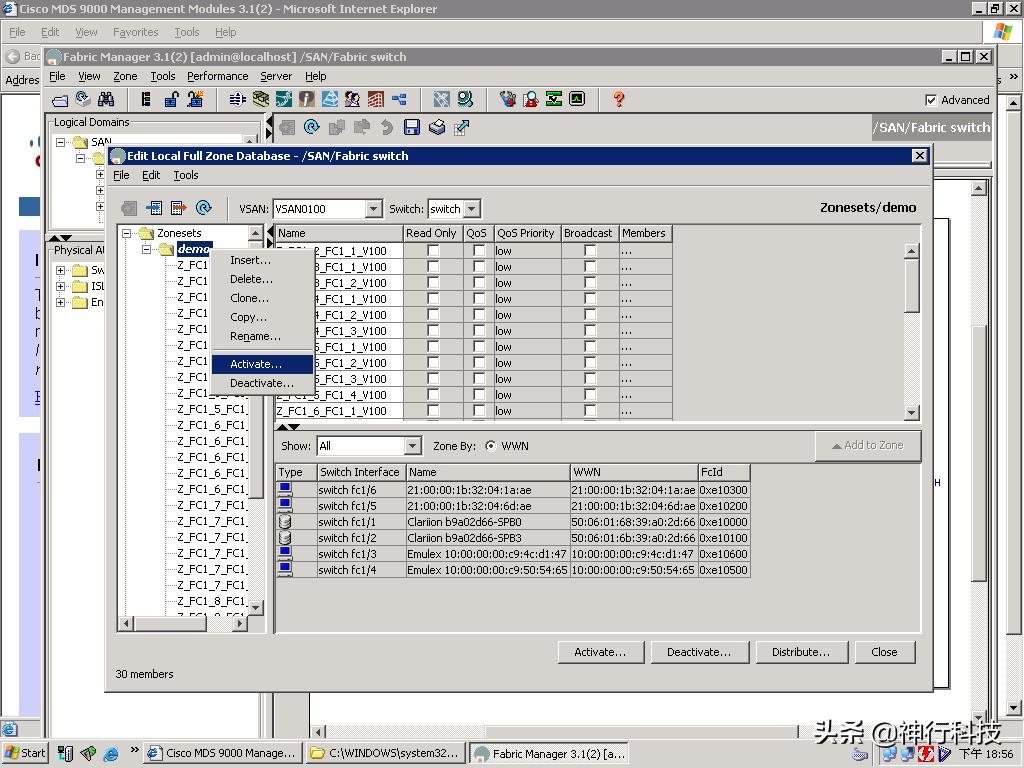
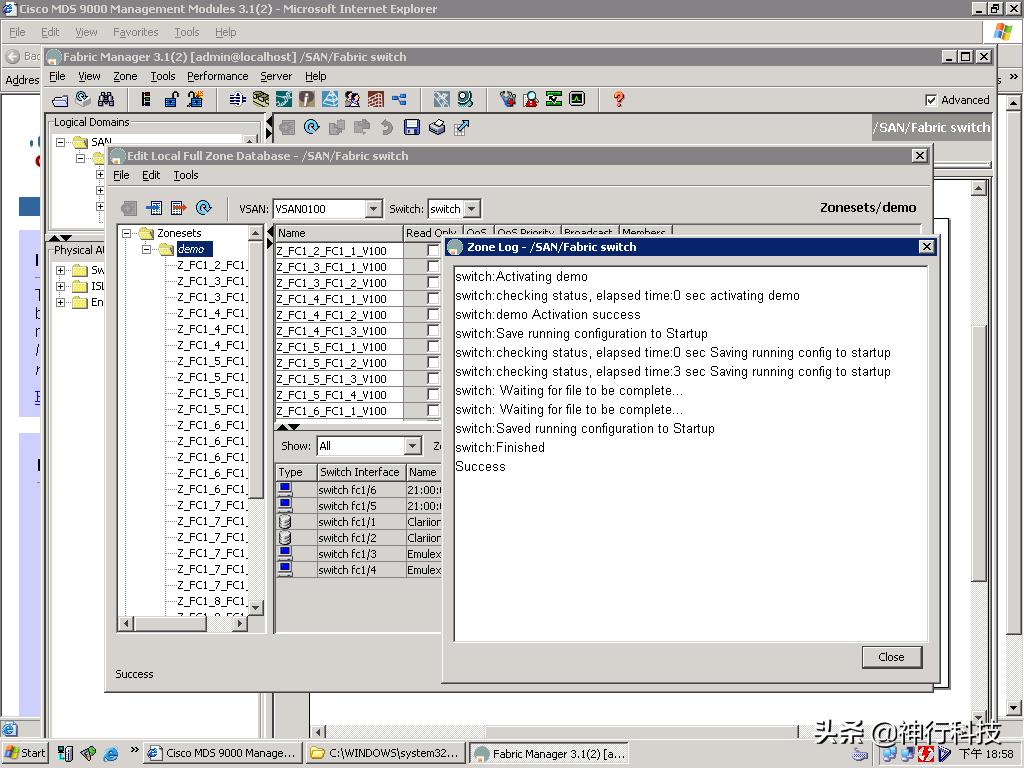
选择zoneset 名字,重新activate zoneset
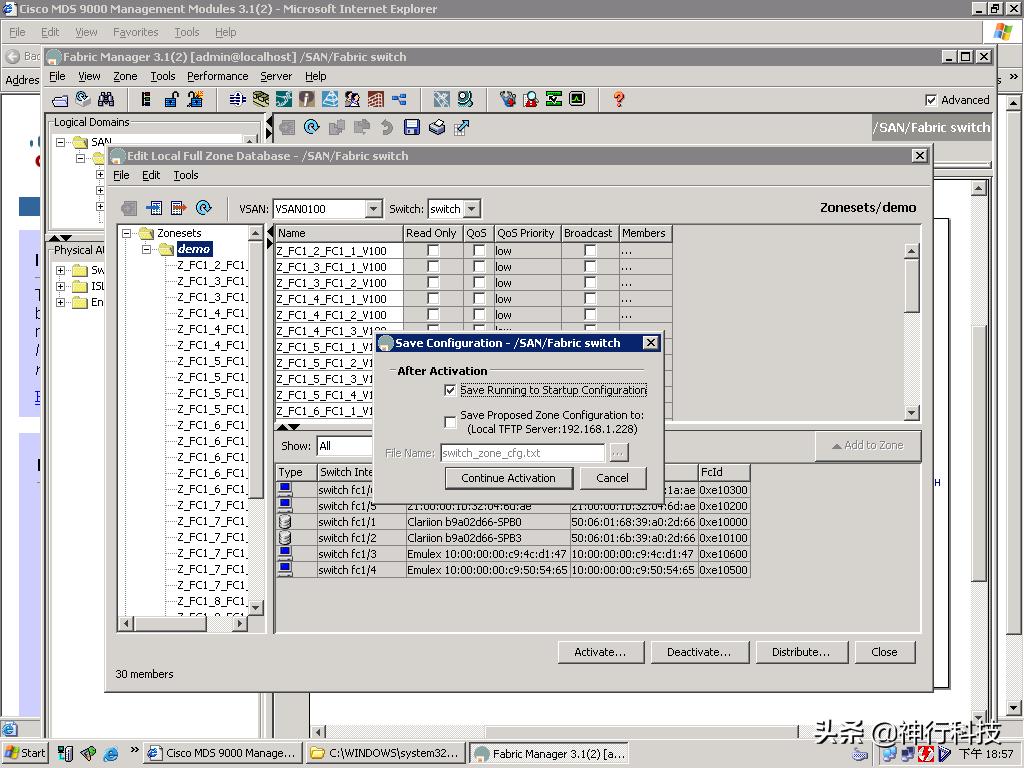
Activate 过程中保存配置
激活完毕
命令行方式
2. Cisco 9120的命令行配置
以Cisco9120-1 为例
2.1. 初始化信息
在启动交换机后,会有类似如下的信息显示:
---- System Admin Account Setup ----
Enter the password for "admin": 输入admin管理员密码,系统设为P@ssw0rd
Confirm the password for "admin": 再次输入admin管理员密码,P@ssw0rd
---- Basic System Configuration Dialog ----
This setup utility will guide you through the basic configuration of
the system. Setup configures only enough connectivity for management
of the system.
Please register Cisco MDS 9000 Family devices promptly with your
supplier. Failure to register may affect response times for initial
service calls. MDS devices must be registered to receive entitled
support services.
Press Enter at anytime to skip a dialog. Use ctrl-c at anytime
to skip the remaining dialogs.
Would you like to enter the basic configuration dialog (yes/no): no
MDS Switch
switch login: admin
Password:
Cisco Storage Area Networking Operating System (SAN-OS) Software
TAC support: http://www.cisco.com/tac
Copyright (c) 2002-2005, Cisco Systems, Inc. All rights reserved.
The copyrights to certain works contained herein are owned by
other third parties and are used and distributed under license.
Some parts of this software are covered under the GNU Public
License. A copy of the license is available at
http://www.gnu.org/licenses/gpl.html.
switch#
然后,可以按照类似以太网交换机配置的方法来配置交换机了。
2.2. 交换机配置
2.2.1. 配置交换机管理地址
switch# config t
Enter configuration commands, one per line. End with CNTL/Z.
witchs (config)# switchname wh-sw9120-1
wh-sw9120-1 (config)#
wh-sw9120-1 (config)# interface mgmt 0
wh-sw9120-1 (config-if)# ip adress 10.94.6.203 255.255.255.0
wh-sw9120-1 (config-if)# no shutdown
2.2.2. 配置VSAN
在本项目中,利用交换机默认的VSAN 1 ,故这部分配置不需要单独手动配置了。
2.2.3. 配置ZONESET
wh-sw9120-1#config t
wh-sw9120-1 (config)# zoneset name wh-sw1 vsan 1
wh-sw9120-1 (config-zoneset)#member ZONE_NAME把ZONE填加到该ZONESET中
注:在交换机处于正常运行时,如果配置了新的ZONE,并且填加到了ZONESET中,此时需要Acitvate才能生效,命令如下:
wh-sw9120-1#config t
wh-sw9120-1 (config)#zoneset activate name wh-sw1 vsan 1
2.2.4. 配置ZONE
下面配置ZONE
基本命令如下:
wh-sw9120-1#config t
wh-sw9120-1 (config)#zone name wh-netapp-aix-1 vsan 1
wh-sw9120-1 (config)#member interface fc1/1
wh-sw9120-1 (config)#member interface fc1/2
wh-sw9120-1 (config)#member interface fc1/3
wh-sw9120-1 (config)#member interface fc1/4
wh-sw9120-1 (config)#zone name wh-aix-tape-1 vsan 1
wh-sw9120-1 (config)#member interface fc1/1
wh-sw9120-1 (config)#member interface fc1/2
wh-sw9120-1 (config)#member interface fc1/5
wh-sw9120-1 (config)#member interface fc1/6
wh-sw9120-1 (config)#zone name wh-netapp-hp-1 vsan 1
wh-sw9120-1 (config)#member interface fc1/1
wh-sw9120-1 (config)#member interface fc1/2
wh-sw9120-1 (config)#member interface fc1/7
wh-sw9120-1 (config)#member interface fc1/8
2.3. 配置信息显示
2.3.1. Cisco 9120-1
wh-sw9120-1# sh run
version 3.0(2a)
fcdomain fcid database
vsan 1 wwn 20:01:00:0d:ec:25:6c:00 fcid 0xb10000 area dynamic
vsan 1 wwn 20:02:00:0d:ec:25:6c:00 fcid 0xb10100 area dynamic
vsan 1 wwn 50:06:0b:00:00:bd:8f:e8 fcid 0xb10200 area dynamic
vsan 1 wwn 50:06:0b:00:00:bd:90:10 fcid 0xb10300 area dynamic
vsan 1 wwn 10:00:00:00:c9:5f:5a:35 fcid 0xb10400 dynamic
vsan 1 wwn 10:00:00:00:c9:5f:5b:c2 fcid 0xb10401 dynamic
interface fc1/1
interface fc1/2
interface fc1/3
interface fc1/4
interface fc1/5
interface fc1/6
interface fc1/7
interface fc1/8
interface fc1/9
interface fc1/10
interface fc1/11
interface fc1/12
interface fc1/13
interface fc1/14
[7m--More--[m
interface fc1/15
interface fc1/16
interface fc1/17
interface fc1/18
interface fc1/19
interface fc1/20
switchname wh-sw9120-1
role name default-role
description This is a system defined role and applies to all users
rule 1 permit show feature system
rule 2 permit show feature snmp
rule 3 permit show feature module
rule 4 permit show feature hardware
rule 5 permit show feature environment
username admin password 5 $1$RsOsG7Dc$uHBLaWa4hPmLTECgnp0cN0 role network-admin
boot kickstart bootflash:/m9100-s1ek9-kickstart-mz.3.0.2a.bin
boot system bootflash:/m9100-s1ek9-mz.3.0.2a.bin
kernel core target 0.0.0.0
kernel core limit 1
snmp-server user admin network-admin auth md5 0xd88dcbb4309689e65e9640f419091eb9
priv 0xd88dcbb4309689e65e9640f419091eb9 localizedkey
no snmp-server enable traps vrrp
snmp-server enable traps license
callhome
zone name wh-netapp-aix-1 vsan 1
member interface fc1/1 swwn 20:00:00:0d:ec:25:6c:00
member interface fc1/2 swwn 20:00:00:0d:ec:25:6c:00
member interface fc1/3 swwn 20:00:00:0d:ec:25:6c:00
member interface fc1/4 swwn 20:00:00:0d:ec:25:6c:00
zone name wh-aix-tape vsan 1
member interface fc1/3 swwn 20:00:00:0d:ec:25:6c:00
member interface fc1/4 swwn 20:00:00:0d:ec:25:6c:00
member interface fc1/5 swwn 20:00:00:0d:ec:25:6c:00
member interface fc1/6 swwn 20:00:00:0d:ec:25:6c:00
zone name wh-netapp-hp-1 vsan 1
member interface fc1/1 swwn 20:00:00:0d:ec:25:6c:00
member interface fc1/2 swwn 20:00:00:0d:ec:25:6c:00
member interface fc1/7 swwn 20:00:00:0d:ec:25:6c:00
member interface fc1/8 swwn 20:00:00:0d:ec:25:6c:00
zoneset name wh-netapp-aix vsan 1
member wh-netapp-aix-1
member wh-aix-tape
member wh-netapp-hp-1
zoneset activate name wh-netapp-aix vsan 1
interface fc1/1
no shutdown
interface fc1/2
no shutdown
interface fc1/3
no shutdown
interface fc1/4
no shutdown
interface fc1/5
no shutdown
interface fc1/6
no shutdown
interface fc1/7
no shutdown
interface fc1/8
no shutdown
interface fc1/9
no shutdown
interface fc1/10
no shutdown
interface fc1/11
no shutdown
interface fc1/12
no shutdown
interface fc1/13
no shutdown
interface fc1/14
no shutdown
interface fc1/15
no shutdown
interface fc1/16
no shutdown
interface fc1/17
interface fc1/18
interface fc1/19
interface fc1/20
interface mgmt0
switchport speed 100
ip address 10.94.2.203 255.255.255.0
2.3.2. Cisco 9120-2
输入no,然后进入命令行配置模式;输入yes,然后进入配置向导模式。
输入正确的用户名和刚才设置的密码P@ssw0rd,进入命令行模式
修改交换机名为wh-sw9120-1
配置交换机的管理IP地址
配置zone,并给zone命名,然后把指定端口加入到该zone中