Routing
- Routing(路由):更准确的应该叫做Endpoint Routing,负责将HTTP请求按照匹配规则选择对应的终结点
- Endpoint(终结点):负责当HTTP请求到达时,执行代码
路由是通过 UseRouting 和 UseEndpoints 两个中间件配合在一起来完成注册的:
typescript
public class Startup
{
    public void ConfigureServices(IServiceCollection services)
    {
        // 添加Routing相关服务
        // 注意,其已在 ConfigureWebDefaults 中添加,无需手动添加,此处仅为演示
        services.AddRouting();
    }

    public void Configure(IApplicationBuilder app, IWebHostEnvironment env)
    {
        app.UseRouting();

        app.UseEndpoints(endpoints =>
        {
            endpoints.MapGet("/", async context =>
            {
                await context.Response.WriteAsync("Hello World!");
            });
        });
    }
}
- UseRouting :用于向中间件管道添加路由匹配中间件( EndpointRoutingMiddleware )。该中间件会检查应用中定义的终结点列表,然后通过匹配 URL 和 HTTP 方法来选择最佳的终结点。简单说,该中间件的作用是根据一定规则来选择出终结点
- UseEndpoints :用于向中间件管道添加终结点中间件( EndpointMiddleware )。可以向该中间件的终结点列表中添加终结点,并配置这些终结点要执行的委托,该中间件会负责运行由 EndpointRoutingMiddleware 中间件选择的终结点所关联的委托。简单说,该中间件用来执行所选择的终结点委托
UseRouting 与 UseEndpoints 必须同时使用,而且必须先调用 UseRouting ,再调用 UseEndpoints
Endpoints
先了解一下终结点的类结构:
arduino
public class Endpoint
{
    public Endpoint(RequestDelegate requestDelegate, EndpointMetadataCollection? metadata, string? displayName);

    public string? DisplayName { get; }

    public EndpointMetadataCollection Metadata { get; }

    public RequestDelegate RequestDelegate { get; }

    public override string? ToString();
}
终结点有以下特点:
- 可执行:含有 RequestDelegate 委托
- 可扩展:含有 Metadata 元数据集合
- 可选择:可选的包含路由信息
- 可枚举:通过DI容器,查找 EndpointDataSource 来展示终结点集合。
在中间件管道中获取路由选择的终结点
对于中间件还不熟悉的,可以先看一下中间件(Middleware)。
在中间件管道中,我们可以通过 HttpContext 来检索终结点等信息。需要注意的是,终结点对象在创建完毕后,是不可变的,无法修改。
在调用 UseRouting 之前,你可以注册一些用于修改路由操作的数据,比如 UseRewriter 、 UseHttpMethodOverride 、 UsePathBase 等。在调用 UseRouting 和 UseEndpoints 之间,可以注册一些用于提前处理路由结果的中间件,如 UseAuthentication 、 UseAuthorization 、 UseCors 等。
我们一起看下面的代码:
arcade
public void Configure(IApplicationBuilder app, IWebHostEnvironment env)
{
    app.Use(next => context =>
    {
        // 在 UseRouting 调用前,始终为 null
        Console.WriteLine(#34;1. Endpoint: {context.GetEndpoint()?.DisplayName ?? "null"}");
        return next(context);
    });

    // EndpointRoutingMiddleware 调用 SetEndpoint 来设置终结点
    app.UseRouting();

    app.Use(next => context =>
    {
        // 如果路由匹配到了终结点,那么此处就不为 null,否则,还是 null
        Console.WriteLine(#34;2. Endpoint: {context.GetEndpoint()?.DisplayName ?? "null"}");
        return next(context);
    });

    // EndpointMiddleware 通过 GetEndpoint 方法获取终结点,
    // 然后执行该终结点的 RequestDelegate 委托
    app.UseEndpoints(endpoints =>
    {
        endpoints.MapGet("/", context =>
        {
            // 匹配到了终结点,肯定不是 null
            Console.WriteLine(#34;3. Endpoint: {context.GetEndpoint()?.DisplayName ?? "null"}");
            return Task.CompletedTask;
        }).WithDisplayName("Custom Display Name");  // 自定义终结点名称
    });

    app.Use(next => context =>
    {
        // 只有当路由没有匹配到终结点时,才会执行这里
        Console.WriteLine(#34;4. Endpoint: {context.GetEndpoint()?.DisplayName ?? "null"}");
        return next(context);
    });
}
当访问 / 时,输出为:
yaml
1. Endpoint: null
2. Endpoint: Custom Display Name
3. Endpoint: Custom Display Name
当访问其他不匹配的URL时,输出为:
yaml
1. Endpoint: null
2. Endpoint: null
4. Endpoint: null
当路由匹配到了终结点时, EndpointMiddleware 则是该路由的终端中间件;当未匹配到终结点时,会继续执行后面的中间件。
终端中间件:与普通中间件不同的是,该中间件执行后即返回,不会调用后面的中间件。
配置终结点委托
可以通过以下方法将委托关联到终结点
- MapGet
- MapPost
- MapPut
- MapDelete
- MapHealthChecks
- 其他类似“MapXXX”的方法
dart
public void Configure(IApplicationBuilder app, IWebHostEnvironment env)
{
    app.UseRouting();

    // 在执行终结点前进行授权
    app.UseAuthorization();

    app.UseEndpoints(endpoints =>
    {
        endpoints.MapGet("/", async context => await context.Response.WriteAsync("get"));
        endpoints.MapPost("/", async context => await context.Response.WriteAsync("post"));
        endpoints.MapPut("/", async context => await context.Response.WriteAsync("put"));
        endpoints.MapDelete("/", async context => await context.Response.WriteAsync("delete"));
        endpoints.MapHealthChecks("/healthChecks");
        endpoints.MapControllers();
    });

}
路由模板
规则:
- 通过 {} 来绑定路由参数,如: {name}
- 将 ? 作为参数后缀,以指示该参数是可选的,如:{name?}
- 通过 = 设置默认值,如:{name=jjj} 表示name的默认值是jjj
- 通过 : 添加内联约束,如:{id:int},后面追加 : 可以添加多个内联约束,如:{id:int:min(1)}
- 多个路由参数间必须通过文本或分隔符分隔,例如 {a}{b} 就不符合规则,可以修改为类似 {a}+-{b} 或 {a}/{b} 的形式
- 先举个例子, /book/{name} 中的 {name} 为路由参数, book 为非路由参数文本。非路由参数的文本和分隔符 / :是不分区大小写的(官方中文文档翻译错了)要使用没有被Url编码的格式,如空格会被编码为 %20,不应使用 %20,而应使用空格如果要匹配 { 或 } ,则使用 {{ 或 }} 进行转义
catch-all参数
路由模板中的星号 * 和双星号 ** 被称为catch-all参数,该参数可以作为路由参数的前缀,如 /Book/{*id} 、 /Book/{**id} ,可以匹配以 /Book 开头的任意Url,如 /Book 、 /Book/ 、 /Book/abc 、 /Book/abc/def 等。
* 和 ** 在一般使用上没有什么区别,它们仅仅在使用 LinkGenerator 时会有不同,如 id = abc/def ,当使用 /Book/{*id} 模板时,会生成 /Book/abc%2Fdef ,当使用 /Book/{**id} 模板时,会生成 /Book/abc/def 。
复杂段
复杂段通过 非贪婪 的方式 从右到左 进行匹配,例如 [Route("/a{b}c{d}")] 就是一个复杂段。实际上,它的确很复杂,只有了解它的工作方式,才能正确的使用它。
贪婪匹配(也称为“懒惰匹配”):匹配最大可能的字符串非贪婪匹配:匹配最小可能的字符串
接下来,就拿模板 [Route("/a{b}c{d}")] 来举两个例子:
成功匹配 的案例——当Url为 /abcd 时,匹配过程为( | 用于辅助展示算法的解析方式):
- 从右到左读取模板,找到的第一个文本为 c 。接着,读取Url /abcd ,可解析为 /ab|c|d
- 此时,Url中右侧的所有内容 d 均与路由参数 {d} 匹配
- 然后,继续从右到左读取模板,找到的下一个文本为 a 。接着,从刚才停下的地方继续读取Url /ab|c|d ,解析为 /a|b|c|d
- 此时,Url中右侧的值 b 与路由参数 {b} 匹配
- 最后,没有剩余的路由模板段或参数,也没有剩余的Url文本,因此匹配成功。
匹配失败 的案例——当Url为 /aabcd 时,匹配过程为( | 用于辅助展示算法的解析方式):
- 从右到左读取模板,找到的第一个文本为 c 。接着,读取Url /aabcd ,可解析为 /aab|c|d
- 此时,Url中右侧的所有内容 d 均与路由参数 {d} 匹配
- 然后,继续从右到左读取模板,找到的下一个文本为 a 。接着,从刚才停下的地方继续读取Url /aab|c|d ,解析为 /a|a|b|c|d
- 此时,Url中右侧的值 b 与路由参数 {b} 匹配
- 最后,没有剩余的路由模板段或参数,但还有剩余的Url文本,因此匹配不成功。
使用复杂段,相比普通路由模板来说,会造成更加昂贵的性能影响
路由约束
通过路由约束,可以在路由匹配过程中,检查URL是否是可接受的。另外,路由约束一般是用来消除路由歧义,而不是用来进行输入验证的。
实现上,当Http请求到达时,路由参数和该参数的约束名会传递给 IInlineConstraintResolver 服务, IInlineConstraintResolver 服务会负责创建 IRouteConstraint 实例,以针对Url进行处理。
预定义的路由约束
摘自官方文档
|
约束 |
示例 |
匹配项示例 |
说明 |
|
int |
{id:int} |
123456789, -123456789 |
匹配任何整数 |
|
bool |
{active:bool} |
true, FALSE |
匹配 true 或 false。 不区分大小写 |
|
datetime |
{dob:datetime} |
2016-12-31, 2016-12-31 7:32pm |
匹配固定区域中的有效 DateTime 值 |
|
decimal |
{price:decimal |
49.99, -1,000.01 |
匹配固定区域中的有效 decimal 值。 |
|
double |
{weight:double} |
1.234, -1,001.01e8 |
匹配固定区域中的有效 double 值。 |
|
float |
{weight:float} |
1.234, -1,001.01e8 |
匹配固定区域中的有效 float 值。 |
|
guid |
{id:guid} |
CD2C1638-1638-72D5-1638-DEADBEEF1638 |
匹配有效的 Guid 值 |
|
long |
{ticks:long} |
123456789, -123456789 |
匹配有效的 long 值 |
|
minlength(value) |
{username:minlength(4)} |
Rick |
字符串必须至少为 4 个字符 |
|
maxlength(value) |
{filename:maxlength(8)} |
MyFile |
字符串不得超过 8 个字符 |
|
length(length) |
{filename:length(12)} |
somefile.txt |
字符串必须正好为 12 个字符 |
|
length(min,max) |
{filename:length(8,16)} |
somefile.txt |
字符串必须至少为 8 个字符,且不得超过 16 个字符 |
|
min(value) |
{age:min(18)} |
19 |
整数值必须至少为 18 |
|
max(value) |
{age:max(120)} |
91 |
整数值不得超过 120 |
|
range(min,max) |
{age:range(18,120)} |
91 |
整数值必须至少为 18,且不得超过 120 |
|
alpha |
{name:alpha} |
Rick |
字符串必须由一个或多个字母字符组成,a-z,并区分大小写。 |
|
regex(expression) |
{ssn:regex(^\d{{3}}-\d{{2}}-\d{{4}}$)} |
123-45-6789 |
字符串必须与正则表达式匹配 |
|
required |
{name:required} |
Rick |
用于强制在 URL 生成过程中存在非参数值 |
正则表达式路由约束
通过 regex(expression) 来设置正则表达式约束,并且该正则表达式是:
- RegexOptions.IgnoreCase :忽略大小写
- RegexOptions.Compiled :将该正则表达式编译为程序集。这会使得执行速度更快,但会拖慢启动时间。
- RegexOptions.CultureInvariant :忽略区域文化差异。
另外,还需要注意对某些字符进行转义:
- \ 替换为 \\
- { 替换为 {{ , } 替换为 }}
- [ 替换为 [[ , ] 替换为 ]]
例如:
|
标准正则表达式 |
转义的正则表达式 |
|
^\d{3}-\d{2}-\d{4}$ |
^\\d{{3}}-\\d{{2}}-\\d{{4}}$ |
|
^[a-z]{2}$ |
^[[a-z]]{{2}}$ |
- 指定 regex 约束的两种方式:
arcade
// 内联方式
app.UseEndpoints(endpoints =>
{
    endpoints.MapGet("{message:regex(^\\d{{3}}-\\d{{2}}-\\d{{4}}$)}",
        context =>
        {
            return context.Response.WriteAsync("inline-constraint match");
        });
 });

// 变量声明方式
app.UseEndpoints(endpoints =>
{
    endpoints.MapControllerRoute(
        name: "people",
        pattern: "People/{ssn}",
        constraints: new { ssn = "^\\d{3}-\\d{2}-\\d{4}#34;, },
        defaults: new { controller = "People", action = "List", });
});
不要书写过于复杂的正则表达式,否则,相比普通路由模板来说,会造成更加昂贵的性能影响
自定义路由约束
先说一句,自定义路由约束很少会用到,在你决定要自定义路由约束之前,先想想是否有其他更好的替代方案,如使用模型绑定。
通过实现 IRouteConstraint 接口来创建自定义路由约束,该接口仅有一个 Match 方法,用于验证路由参数是否满足约束,返回 true 表示满足约束, false 则表示不满足约束。
以下示例要求路由参数中必须包含字符串“1”:
reasonml
public class MyRouteConstraint : IRouteConstraint
{
    public bool Match(HttpContext httpContext, IRouter route, string routeKey, RouteValueDictionary values, RouteDirection routeDirection)
    {
        if (values.TryGetValue(routeKey, out object value))
        {
            var valueStr = Convert.ToString(value, CultureInfo.InvariantCulture);

            return valueStr?.Contains("1") ?? false;
        }

        return false;
    }
}
然后进行路由约束注册:
typescript
public void ConfigureServices(IServiceCollection services)
{
    services.AddRouting(options =>
    {
        // 添加自定义路由约束,约束 Key 为 my
        options.ConstraintMap["my"] = typeof(MyRouteConstraint);
    });
}
最后你就可以类似如下进行使用了:
csharp
[HttpGet("{id:my}")]
public string Get(string id)
{
    return id;
}
路由模板优先级
考虑一下,有两个路由模板: /Book/List 和 /Book/{id} ,当url为 /Book/List 时,会选择哪个呢?从结果我们可以得知,是模板 /Book/List 。它是根据以下规则来确定的:
- 越具体的模板优先级越高
- 包含更多匹配段的模板更具体
- 含有文本的段比参数段更具体
- 具有约束的参数段比没有约束的参数段更具体
- 复杂段和具有约束的段同样具体
- catch-all 参数段是最不具体的
核心源码解析
AddRouting
swift
public static class RoutingServiceCollectionExtensions
{
    public static IServiceCollection AddRouting(this IServiceCollection services)
    {
        // 内联约束解析器,负责创建 IRouteConstraint 实例
        services.TryAddTransient<IInlineConstraintResolver, DefaultInlineConstraintResolver>();
        // 对象池
        services.TryAddTransient<ObjectPoolProvider, DefaultObjectPoolProvider>();
        services.TryAddSingleton<ObjectPool<UriBuildingContext>>(s =>
        {
            var provider = s.GetRequiredService<ObjectPoolProvider>();
            return provider.Create<UriBuildingContext>(new UriBuilderContextPooledObjectPolicy());
        });

        services.TryAdd(ServiceDescriptor.Transient<TreeRouteBuilder>(s =>
        {
            var loggerFactory = s.GetRequiredService<ILoggerFactory>();
            var objectPool = s.GetRequiredService<ObjectPool<UriBuildingContext>>();
            var constraintResolver = s.GetRequiredService<IInlineConstraintResolver>();
            return new TreeRouteBuilder(loggerFactory, objectPool, constraintResolver);
        }));

        // 标记已将所有路由服务注册完毕
        services.TryAddSingleton(typeof(RoutingMarkerService));

        var dataSources = new ObservableCollection<EndpointDataSource>();
        services.TryAddEnumerable(ServiceDescriptor.Transient<IConfigureOptions<RouteOptions>, ConfigureRouteOptions>(
            serviceProvider => new ConfigureRouteOptions(dataSources)));

        // EndpointDataSource,用于全局访问终结点列表
        services.TryAddSingleton<EndpointDataSource>(s =>
        {
            return new CompositeEndpointDataSource(dataSources);
        });

        services.TryAddSingleton<ParameterPolicyFactory, DefaultParameterPolicyFactory>();
        // MatcherFactory,用于根据 EndpointDataSource 创建 Matcher
        services.TryAddSingleton<MatcherFactory, DfaMatcherFactory>();
        // DfaMatcherBuilder,用于创建 DfaMatcher 实例
        services.TryAddTransient<DfaMatcherBuilder>();
        services.TryAddSingleton<DfaGraphWriter>();
        services.TryAddTransient<DataSourceDependentMatcher.Lifetime>();
        services.TryAddSingleton<EndpointMetadataComparer>(services =>
        {
            return new EndpointMetadataComparer(services);
        });

        // LinkGenerator相关服务
        services.TryAddSingleton<LinkGenerator, DefaultLinkGenerator>();
        services.TryAddSingleton<IEndpointAddressScheme<string>, EndpointNameAddressScheme>();
        services.TryAddSingleton<IEndpointAddressScheme<RouteValuesAddress>, RouteValuesAddressScheme>();
        services.TryAddSingleton<LinkParser, DefaultLinkParser>();

        // 终结点选择、匹配策略相关服务
        services.TryAddSingleton<EndpointSelector, DefaultEndpointSelector>();
        services.TryAddEnumerable(ServiceDescriptor.Singleton<MatcherPolicy, HttpMethodMatcherPolicy>());
        services.TryAddEnumerable(ServiceDescriptor.Singleton<MatcherPolicy, HostMatcherPolicy>());

        services.TryAddSingleton<TemplateBinderFactory, DefaultTemplateBinderFactory>();
        services.TryAddSingleton<RoutePatternTransformer, DefaultRoutePatternTransformer>();
        return services;
    }

    public static IServiceCollection AddRouting(
        this IServiceCollection services,
        Action<RouteOptions> configureOptions)
    {
        services.Configure(configureOptions);
        services.AddRouting();

        return services;
    }
}
UseRouting
csharp
public static class EndpointRoutingApplicationBuilderExtensions
{
    private const string EndpointRouteBuilder = "__EndpointRouteBuilder";

    public static IApplicationBuilder UseRouting(this IApplicationBuilder builder)
    {
        VerifyRoutingServicesAreRegistered(builder);

        var endpointRouteBuilder = new DefaultEndpointRouteBuilder(builder);
        // 将 endpointRouteBuilder 放入共享字典中
        builder.Properties[EndpointRouteBuilder] = endpointRouteBuilder;

        // 将 endpointRouteBuilder 作为构造函数参数传入 EndpointRoutingMiddleware
        return builder.UseMiddleware<EndpointRoutingMiddleware>(endpointRouteBuilder);
    }

    private static void VerifyRoutingServicesAreRegistered(IApplicationBuilder app)
    {
        // 必须先执行了 AddRouting
        if (app.ApplicationServices.GetService(typeof(RoutingMarkerService)) == null)
        {
            throw new InvalidOperationException(Resources.FormatUnableToFindServices(
                nameof(IServiceCollection),
                nameof(RoutingServiceCollectionExtensions.AddRouting),
                "ConfigureServices(...)"));
        }
    }
}
EndpointRoutingMiddleware
终于到了路由匹配的逻辑了,才是我们应该关注的,重点查看 Invoke :
csharp
internal sealed class EndpointRoutingMiddleware
{
    private const string DiagnosticsEndpointMatchedKey = "Microsoft.AspNetCore.Routing.EndpointMatched";

    private readonly MatcherFactory _matcherFactory;
    private readonly ILogger _logger;
    private readonly EndpointDataSource _endpointDataSource;
    private readonly DiagnosticListener _diagnosticListener;
    private readonly RequestDelegate _next;

    private Task<Matcher>? _initializationTask;

    public EndpointRoutingMiddleware(
        MatcherFactory matcherFactory,
        ILogger<EndpointRoutingMiddleware> logger,
        IEndpointRouteBuilder endpointRouteBuilder,
        DiagnosticListener diagnosticListener,
        RequestDelegate next)
    {
        _matcherFactory = matcherFactory ?? throw new ArgumentNullException(nameof(matcherFactory));
        _logger = logger ?? throw new ArgumentNullException(nameof(logger));
        _diagnosticListener = diagnosticListener ?? throw new ArgumentNullException(nameof(diagnosticListener));
        _next = next ?? throw new ArgumentNullException(nameof(next));

        _endpointDataSource = new CompositeEndpointDataSource(endpointRouteBuilder.DataSources);
    }

    public Task Invoke(HttpContext httpContext)
    {
        // 已经选择了终结点,则跳过匹配
        var endpoint = httpContext.GetEndpoint();
        if (endpoint != null)
        {
            Log.MatchSkipped(_logger, endpoint);
            return _next(httpContext);
        }

        // 等待 _initializationTask 初始化完成,进行匹配,并流转到下一个中间件
        var matcherTask = InitializeAsync();
        if (!matcherTask.IsCompletedSuccessfully)
        {
            return AwaitMatcher(this, httpContext, matcherTask);
        }

        // _initializationTask在之前就已经初始化完成了,直接进行匹配任务,并流转到下一个中间件
        var matchTask = matcherTask.Result.MatchAsync(httpContext);
        if (!matchTask.IsCompletedSuccessfully)
        {
            return AwaitMatch(this, httpContext, matchTask);
        }

        // 流转到下一个中间件
        return SetRoutingAndContinue(httpContext);

        static async Task AwaitMatcher(EndpointRoutingMiddleware middleware, HttpContext httpContext, Task<Matcher> matcherTask)
        {
            var matcher = await matcherTask;
            // 路由匹配,选择终结点
            await matcher.MatchAsync(httpContext);
            await middleware.SetRoutingAndContinue(httpContext);
        }

        static async Task AwaitMatch(EndpointRoutingMiddleware middleware, HttpContext httpContext, Task matchTask)
        {
            await matchTask;
            await middleware.SetRoutingAndContinue(httpContext);
        }
    }

    [MethodImpl(MethodImplOptions.AggressiveInlining)]
    private Task SetRoutingAndContinue(HttpContext httpContext)
    {
        // 终结点仍然为空,则匹配失败
        var endpoint = httpContext.GetEndpoint();
        if (endpoint == null)
        {
            Log.MatchFailure(_logger);
        }
        else
        {
            // 匹配成功则触发事件
            if (_diagnosticListener.IsEnabled() && _diagnosticListener.IsEnabled(DiagnosticsEndpointMatchedKey))
            {
                // httpContext对象包含了相关信息
                _diagnosticListener.Write(DiagnosticsEndpointMatchedKey, httpContext);
            }

            Log.MatchSuccess(_logger, endpoint);
        }

        // 流转到下一个中间件
        return _next(httpContext);
    }

    private Task<Matcher> InitializeAsync()
    {
        var initializationTask = _initializationTask;
        if (initializationTask != null)
        {
            return initializationTask;
        }

        // 此处我删减了部分线程竞争代码,因为这不是我们讨论的重点
        // 此处主要目的是在该Middleware中,确保只初始化_initializationTask一次

        var matcher = _matcherFactory.CreateMatcher(_endpointDataSource);

        using (ExecutionContext.SuppressFlow())
        {
            _initializationTask = Task.FromResult(matcher);
        }
    }
}
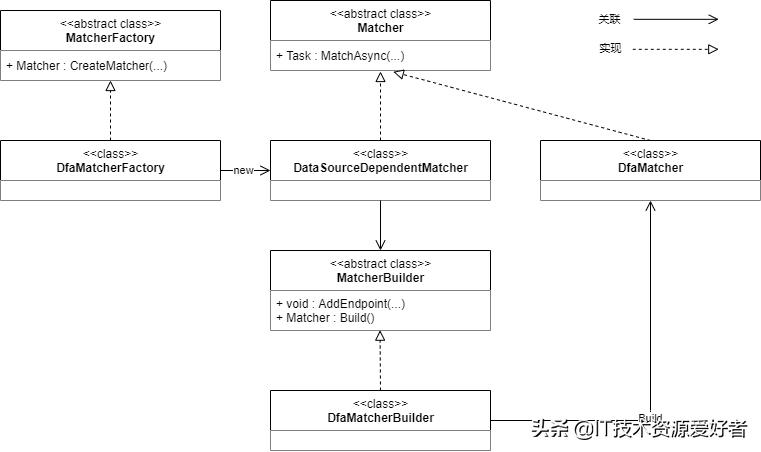
上述代码的核心就是将 _endpointDataSource 传递给 _matcherFactory ,创建 matcher ,然后进行匹配 matcher.MatchAsync(httpContext) 。ASP.NET Core默认使用的 matcher 类型是 DfaMatcher ,DFA(Deterministic Finite Automaton)是一种被称为“确定有限状态自动机”的算法,可以从候选终结点列表中查找到匹配度最高的那个终结点。
UseEndpoints
csharp
public static class EndpointRoutingApplicationBuilderExtensions
{
    public static IApplicationBuilder UseEndpoints(this IApplicationBuilder builder, Action<IEndpointRouteBuilder> configure)
    {
        VerifyRoutingServicesAreRegistered(builder);

        VerifyEndpointRoutingMiddlewareIsRegistered(builder, out var endpointRouteBuilder);

        configure(endpointRouteBuilder);

        var routeOptions = builder.ApplicationServices.GetRequiredService<IOptions<RouteOptions>>();
        foreach (var dataSource in endpointRouteBuilder.DataSources)
        {
            routeOptions.Value.EndpointDataSources.Add(dataSource);
        }

        return builder.UseMiddleware<EndpointMiddleware>();
    }

    private static void VerifyEndpointRoutingMiddlewareIsRegistered(IApplicationBuilder app, out DefaultEndpointRouteBuilder endpointRouteBuilder)
    {
        // 将 endpointRouteBuilder 从共享字典中取出来,如果没有,则说明之前没有调用 UseRouting
        if (!app.Properties.TryGetValue(EndpointRouteBuilder, out var obj))
        {
            var message =
                #34;{nameof(EndpointRoutingMiddleware)} matches endpoints setup by {nameof(EndpointMiddleware)} and so must be added to the request " +
                #34;execution pipeline before {nameof(EndpointMiddleware)}. " +
                #34;Please add {nameof(EndpointRoutingMiddleware)} by calling '{nameof(IApplicationBuilder)}.{nameof(UseRouting)}' inside the call " +
                #34;to 'Configure(...)' in the application startup code.";
            throw new InvalidOperationException(message);
        }

        endpointRouteBuilder = (DefaultEndpointRouteBuilder)obj!;

        // UseRouting 和 UseEndpoints 必须添加到同一个 IApplicationBuilder 实例上
        if (!object.ReferenceEquals(app, endpointRouteBuilder.ApplicationBuilder))
        {
            var message =
                #34;The {nameof(EndpointRoutingMiddleware)} and {nameof(EndpointMiddleware)} must be added to the same {nameof(IApplicationBuilder)} instance. " +
                #34;To use Endpoint Routing with 'Map(...)', make sure to call '{nameof(IApplicationBuilder)}.{nameof(UseRouting)}' before " +
                #34;'{nameof(IApplicationBuilder)}.{nameof(UseEndpoints)}' for each branch of the middleware pipeline.";
            throw new InvalidOperationException(message);
        }
    }
}
EndpointMiddleware
EndpointMiddleware 中间件中包含了很多异常处理和日志记录代码,为了方便查看核心逻辑,我都删除并进行了简化:
csharp
internal sealed class EndpointMiddleware
{
    internal const string AuthorizationMiddlewareInvokedKey = "__AuthorizationMiddlewareWithEndpointInvoked";
    internal const string CorsMiddlewareInvokedKey = "__CorsMiddlewareWithEndpointInvoked";

    private readonly ILogger _logger;
    private readonly RequestDelegate _next;
    private readonly RouteOptions _routeOptions;

    public EndpointMiddleware(
        ILogger<EndpointMiddleware> logger,
        RequestDelegate next,
        IOptions<RouteOptions> routeOptions)
    {
        _logger = logger ?? throw new ArgumentNullException(nameof(logger));
        _next = next ?? throw new ArgumentNullException(nameof(next));
        _routeOptions = routeOptions?.Value ?? throw new ArgumentNullException(nameof(routeOptions));
    }

    public Task Invoke(HttpContext httpContext)
    {
        var endpoint = httpContext.GetEndpoint();
        if (endpoint?.RequestDelegate != null)
        {
            // 执行该终结点的委托,并且视该中间件为终端中间件
            var requestTask = endpoint.RequestDelegate(httpContext);
            if (!requestTask.IsCompletedSuccessfully)
            {
                return requestTask;
            }

            return Task.CompletedTask;
        }

        // 若没有终结点,则继续执行下一个中间件
        return _next(httpContext);
    }
}
总结
说了那么多,最后给大家总结了三张UML类图:
RoutePattern

EndPoint

Matcher
另外,本文仅仅提到了路由的基本使用方式和原理,如果你想要进行更加深入透彻的了解,推荐阅读蒋金楠老师的ASP.NET Core 3框架揭秘的路由部分。
欢迎点赞+转发+关注!大家的支持是我分享最大的动力!!!