
作者:nx4dm1n
稿费:300RMB(不服你也来投稿啊!)
投稿方式:发送邮件至linwei#360.cn,或登陆网页版在线投稿
I. 什么是DIVA
DIVA(Damn insecure and vulnerable App)是一个故意设计的存在很多漏洞的Android app,目的是为了让开发、安全工程师、QA等了解Android app常见的一些安全问题,类似dvwa,也可以把它当成一个漏洞演练系统。
为了使用DIVA熟悉各种常见的app安全问题,需要做一些准备工作。
准备工作:
1,安装JDK,很多工具需要用到java环境;
2,安装Android开发工具(ADT,Android studio),*载下**地址:
https://developer.android.com/studio/index.html
主要包括SDK管理器,安卓虚拟设备管理器(Android Virtual Device,AVD)等,并且集成了adb、emulator等常用工具。dex2Jar、adb是Android app测试常用到的工具,emulator是ADT自带的模拟器,可以模拟Android环境。
3,安装APKtool、Drozer、dex2jar、JD-GUI
Apktoolss*载下**地址:https://bitbucket.org/iBotPeaches/apktool/downloads
Drozer*载下**地址:https://labs.mwrinfosecurity.com/tools/drozer/
Dex2jar*载下**地址:https://sourceforge.net/projects/dex2jar/?source=typ_redirect
JD-GUI*载下**地址:http://jd.benow.ca/
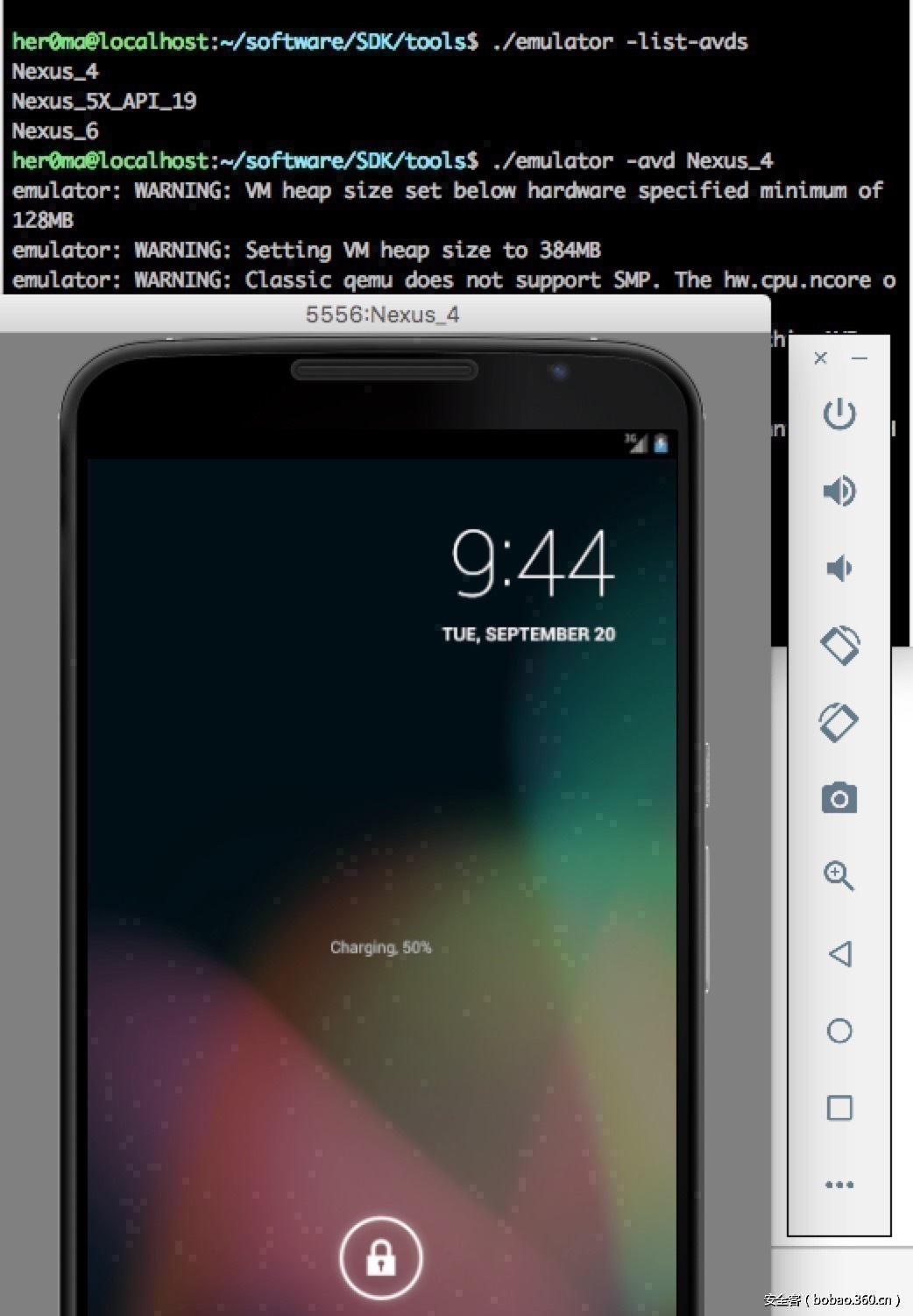
首先运行Android模拟器,可以使用如下命令:
|
1
2
3
4
5
6
7
|
#列出已经建立好的AVD,也就是模拟器
her0ma@localhost:~/software/SDK/tools$ ./emulator -list-avds
Nexus_4
Nexus_5X_API_19
Nexus_6
#启动模拟器,-avd参数指定模拟器的名称
her0ma@localhost:~/software/SDK/tools$ ./emulator -avd Nexus_4
|
4,*载下**并安装DIVA,*载下**地址: http://www.payatu.com/wp-content/uploads/2016/01/diva-beta.tar.gz
使用adb安装DIVA app到模拟器,命令如下:
|
1
2
3
4
|
her0ma@localhost:~/software/SDK/platform-tools$ ./adb install /Users/her0ma/software/diva-beta.apk
[100%] /data/local/tmp/diva-beta.apk
pkg: /data/local/tmp/diva-beta.apk
Success
|

如果开启了多个模拟器,可以用-s参数来指定具体要安装到那台模拟器。
5,打开已经安装好的DIVA app,如图所示:

II. 反编译App
对Android app进行静态分析是一种常见的漏洞查找方式,可以使用Dex2Jar获取app的.java文件。命令如下:
|
1
2
|
her0ma@localhost:~/software/dex2jar$ sudo ./d2j-dex2jar.sh /Users/her0ma/software/diva-beta.apk
dex2jar /Users/her0ma/software/diva-beta.apk -> ./diva-beta-dex2jar.jar
|
会在工具同目录下生成一个.jar文件,可以用JD-GUI工具直接打开diva-beta-dex2jar.jar文件
III. 使用apktool获取smail代码
Android app静态分析的时候,可以通过AndroidManifest.xml文件来了解app及其内部结构的一些信息,可以使用apktool获取这个文件以及smali代码,如图:

使用到的命令:
|
1
2
3
4
5
6
7
8
9
10
11
12
|
her0ma@localhost:~/software/SDK/tools$ java -jar apktool_2.2.0.jar d /Users/her0ma/software/diva-beta.apk -o 360bobao
I: Using Apktool 2.2.0 on diva-beta.apk
I: Loading resource table...
I: Decoding AndroidManifest.xml with resources...
I: Loading resource table from file: /Users/her0ma/Library/apktool/framework/1.apk
I: Regular manifest package...
I: Decoding file-resources...
I: Decoding values */* XMLs...
I: Baksmaling classes.dex...
I: Copying assets and libs...
I: Copying unknown files...
I: Copying original files...
|
会将提取出来的xml以及smali文件输出到360bobao这个目录。
IV. 问题1:不安全的日志输出
该问题主要是由于app代码中将敏感信息输出到app的logcat中,查看app记录的logcat,可以使用如下命令:
|
1
|
her0ma@localhost:~/software/SDK/platform-tools$ ./adb logcat
|
然后在app的表单中输入内容,check out就可以看到相关的日志输出:
|
1
2
3
4
|
09-20 20:09:16.631 1538 1598 D ConnectivityService: NetworkAgentInfo [MOBILE (UMTS) - 101] validation failed
09-20 20:09:43.466 2557 2557 E diva-log: Error while processing transaction with credit card: 6225880111111111
09-20 20:09:43.613 1198 1583 D AudioFlinger: mixer(0xf4580000) throttle end: throttle time(154)
09-20 20:09:45.474 2557 2570 E Surface : getSlotFromBufferLocked: unknown buffer: 0x7f18601fd050
|

可以看出用户输入的内容被输出到了日志中,看看具体的漏洞代码,用JD-GUI打开LogActivity.class文件,相关代码如图:
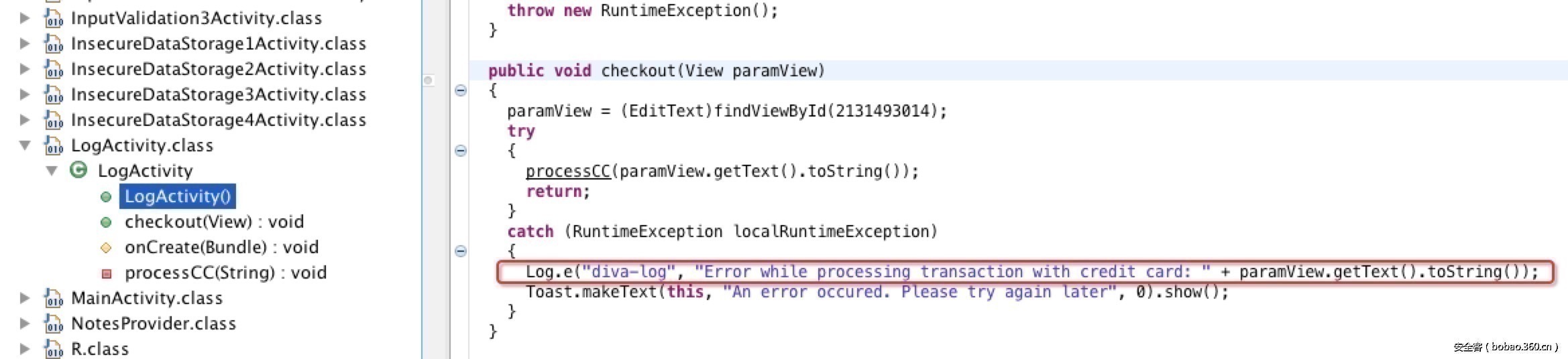
下面这行代码就是将用户输入的内容记录到了logcat中。
|
1
|
Log.e("diva-log", "Error while processing transaction with credit card: " + paramView.getText().toString());
|
V. 问题2:硬编码问题
很多开发小伙伴在开发app的时候,明明是可以用可变变量的,但是由于没有相关安全开发意识,使用了硬编码的方式,导致存在一定的安全风险。具体有关硬编码的定义可以参考百度,开发人员在开发的过程中应该尽量避免使用硬编码。先看看问题2涉及到的代码HardcodeActivity.class,JD-GUI打开,相关代码如下:
|
1
2
3
4
5
6
7
8
9
|
public void access(View paramView)
{
if (((EditText)findViewById(2131492987)).getText().toString().equals("vendorsecretkey"))
{
Toast.makeText(this, "Access granted! See you on the other side :)", 0).show();
return;
}
Toast.makeText(this, "Access denied! See you in hell :D", 0).show();
}
|
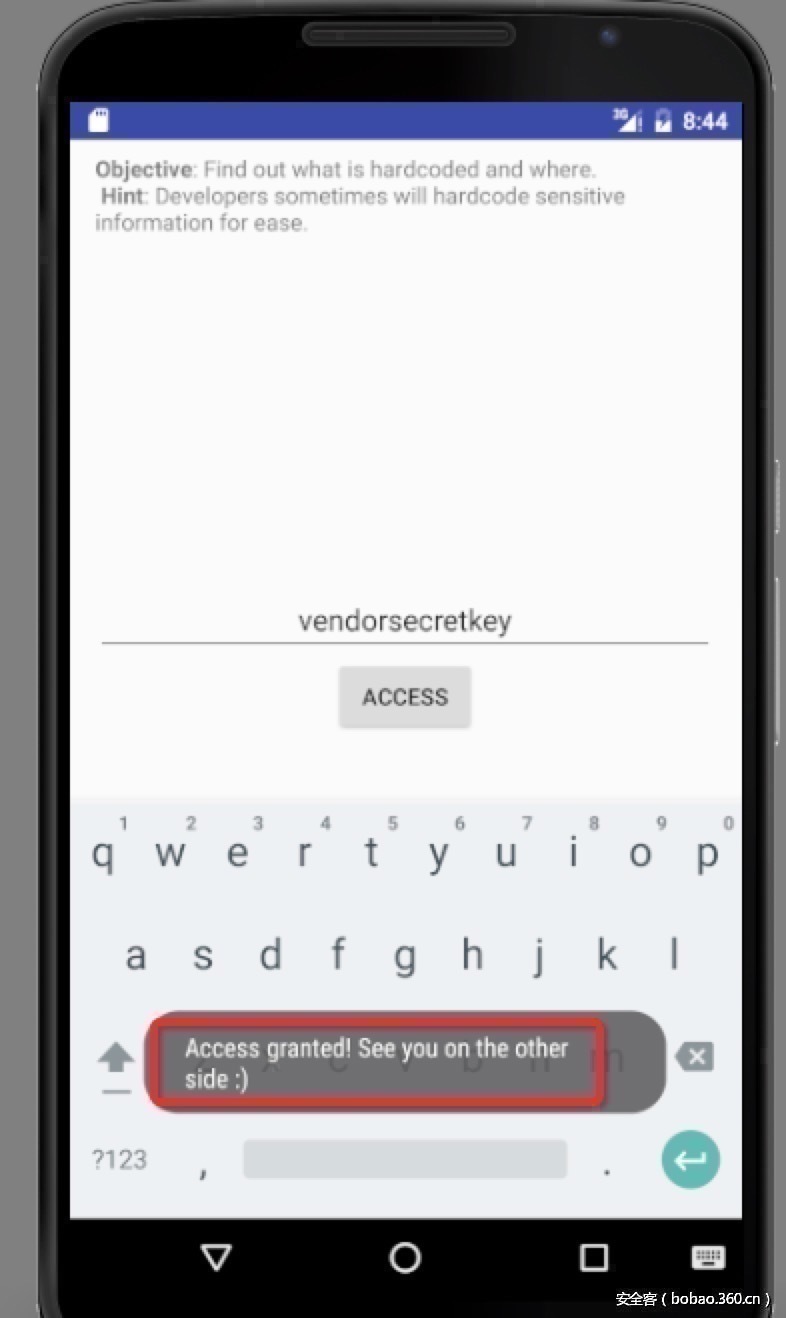
秘钥被明文写在了代码中,通过判断用户的输入是否和代码中的明文秘钥相同,来确定是否允许访问,对应代码:
|
1
|
if (((EditText)findViewById(2131492987)).getText().toString().equals("vendorsecretkey"))
|
攻击者只需要在app中输入秘钥就可以访问成功,如图:
后文中会继续讨论有关硬编码的问题。
VI. 问题3:不安全的数据存储
不安全的数据存储也是App常见的安全问题之一,主要有三种方式:
1,将敏感数据保存到配置文件中;
2,将敏感数据保存在本地的sqlite3数据库中;
3,将敏感数据保存在临时文件或者sd卡中。
在DIVA中关于此项问题的案例主要是3、4、5、6,首先看敏感数据存储在配置文件中的情况,对应的漏洞代码文件InsecureDataStorage1Activity.class,继续用JG-GUI打开,漏洞代码片段如下:
|
1
2
3
4
5
6
7
8
9
10
|
public void saveCredentials(View paramView)
{
paramView = PreferenceManager.getDefaultSharedPreferences(this).edit();
EditText localEditText1 = (EditText)findViewById(2131493000);
EditText localEditText2 = (EditText)findViewById(2131493001);
paramView.putString("user", localEditText1.getText().toString());
paramView.putString("password", localEditText2.getText().toString());
paramView.commit();
Toast.makeText(this, "3rd party credentials saved successfully!", 0).show();
}
|
上面问题代码中,使用了SharedPreferences类,该类是Android平台上一个轻量级的存储类,主要是用来保存一些常用的配置,本例中是用该类存储了用户名和密码,因此是具有风险的。SharedPreferences类存储的数据会以.xml的形式存储在/data/data/apppackagename/shared_prefs目录下。如图:

|
1
2
3
4
5
6
7
8
9
10
11
12
13
14
15
16
17
18
19
20
|
#adb shell进入到模拟器的shell模式下
her0ma@localhost:~/software/SDK/platform-tools$ ./adb shell
#app安装之后会在/data/data下有相关的数据目录,保存缓存、配置文件等。
root@generic_x86_64:/ # cd /data/data/
root@generic_x86_64:/data/data # ls |grep diva
jakhar.aseem.diva
root@generic_x86_64:/data/data/jakhar.aseem.diva # ls
cache
code_cache
databases
shared_prefs
root@generic_x86_64:/data/data/jakhar.aseem.diva/shared_prefs # ls
jakhar.aseem.diva_preferences.xml
#在配置文件中看到了app中用户输入的账号和密码。
root@generic_x86_64:/data/data/jakhar.aseem.diva/shared_prefs # cat jakhar.aseem.diva_preferences.xml
<?xml version='1.0' encoding='utf-8' standalone='yes' ?>
<map>
<string name="user">admin</string>
<string name="password">admin</string>
</map>
|
另外一种不安全的数据库存储,是将用户的敏感信息存储到本地的数据库中,一般app对应的数据库目录:
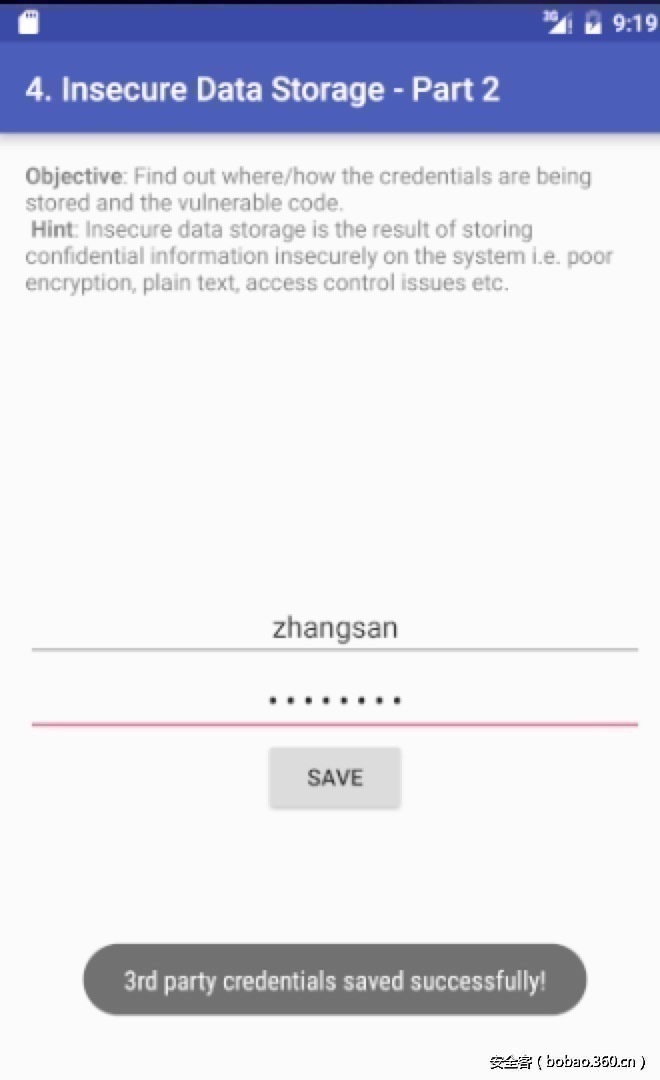
/data/data/apppackagename/databases,本例中是: /data/data/jakhar.aseem.diva/databases,如图先在4中保存一下数据:
|
1
2
3
4
5
6
7
8
9
10
11
12
13
|
adb pull将模拟器中的文件拉倒本地
her0ma@localhost:~/software/SDK/platform-tools$ ./adb pull /data/data/jakhar.aseem.diva/databases/ids2 /Users/her0ma/software/
[100%] /data/data/jakhar.aseem.diva/databases/ids2
用sqlite3数据库打开,可以查看到用户存储的敏感数据
her0ma@localhost:~/software$ file ids2
ids2: SQLite 3.x database
her0ma@localhost:~/software$ sqlite3 ids2
SQLite version 3.8.10.2 2026-03-14T13:04:50+00:00
Enter ".help" for usage hints.
sqlite> .tables
android_metadata myuser
sqlite> select * from myuser;
zhangsan|p@ssw0rd
|
对应的漏洞文件InsecureDataStorage2Activity.class代码片段如下:
|
1
2
3
4
5
6
7
8
9
10
11
12
13
14
15
16
17
18
19
20
|
public void saveCredentials(View paramView)
{
paramView = (EditText)findViewById(2131493003);
EditText localEditText = (EditText)findViewById(2131493004);
//将用户提交的数据保存在了数据库中
try
{
this.mDB*ex.e**cSQL("INSERT INTO myuser VALUES ('" + paramView.getText().toString() + "', '" + localEditText.getText().toString() + "');");
this.mDB.close();
Toast.makeText(this, "3rd party credentials saved successfully!", 0).show();
return;
}
catch (Exception paramView)
{
for (;;)
{
Log.d("Diva", "Error occurred while inserting into database: " + paramView.getMessage());
}
}
}
|
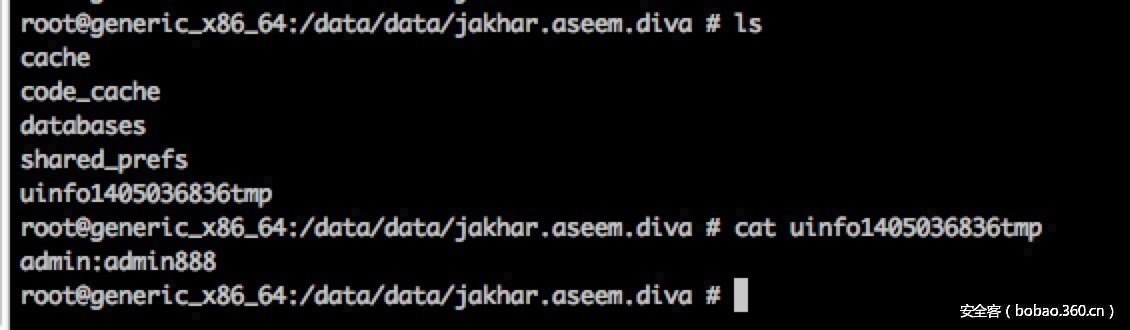
还有一种不安全的数据存储,是将数据存储在临时文件或者sd卡中,看对应的漏洞文件分别是InsecureDataStorage3Activity.class、InsecureDataStorage3Activity.class的相关代码片段如图:
存储在临时文件中,

存储在sd卡中,漏洞代码片段:
