难度指数:⭐⭐⭐ 适合年龄:9岁+
一、序言
超声波雷达探测器,让你的作品装置也能"眼观六路",主要用途:可以安装到汽车尾部,制作成倒车雷达,使停车和倒车更容易、更安全。
视频加载中...
二、准备器材
Arduino Uno 1块
超声波传感器 1个
9g舵机 1个
杜邦线 若干
Uno板拓展板(可选) 1块
瓦楞纸盒 1个
三、模块讲解
Arduino Uno:大脑中枢,用来接收超声波传感器传过来的信号并作处理;
超声波传感器:检测装置与周围障碍物的距离,并转化为电信号返回给Uno板;
舵机:受Uno主控板信号的控制,一直缓慢地从0度转到180度;
瓦楞纸盒:装置结构件,方便安装固定电子元件。
四、接线图
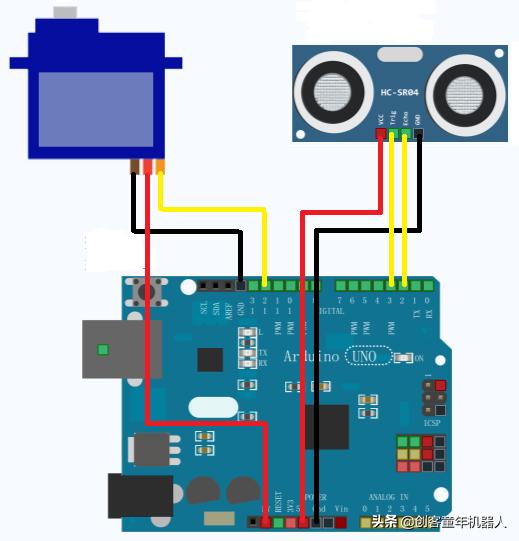
点击可查看大图
五、制作过程

主控制器放在盒内,纸盒正面开两个孔,一个用于安装舵机,一个用于走线。纸盒侧面也开一个孔,用于通电。
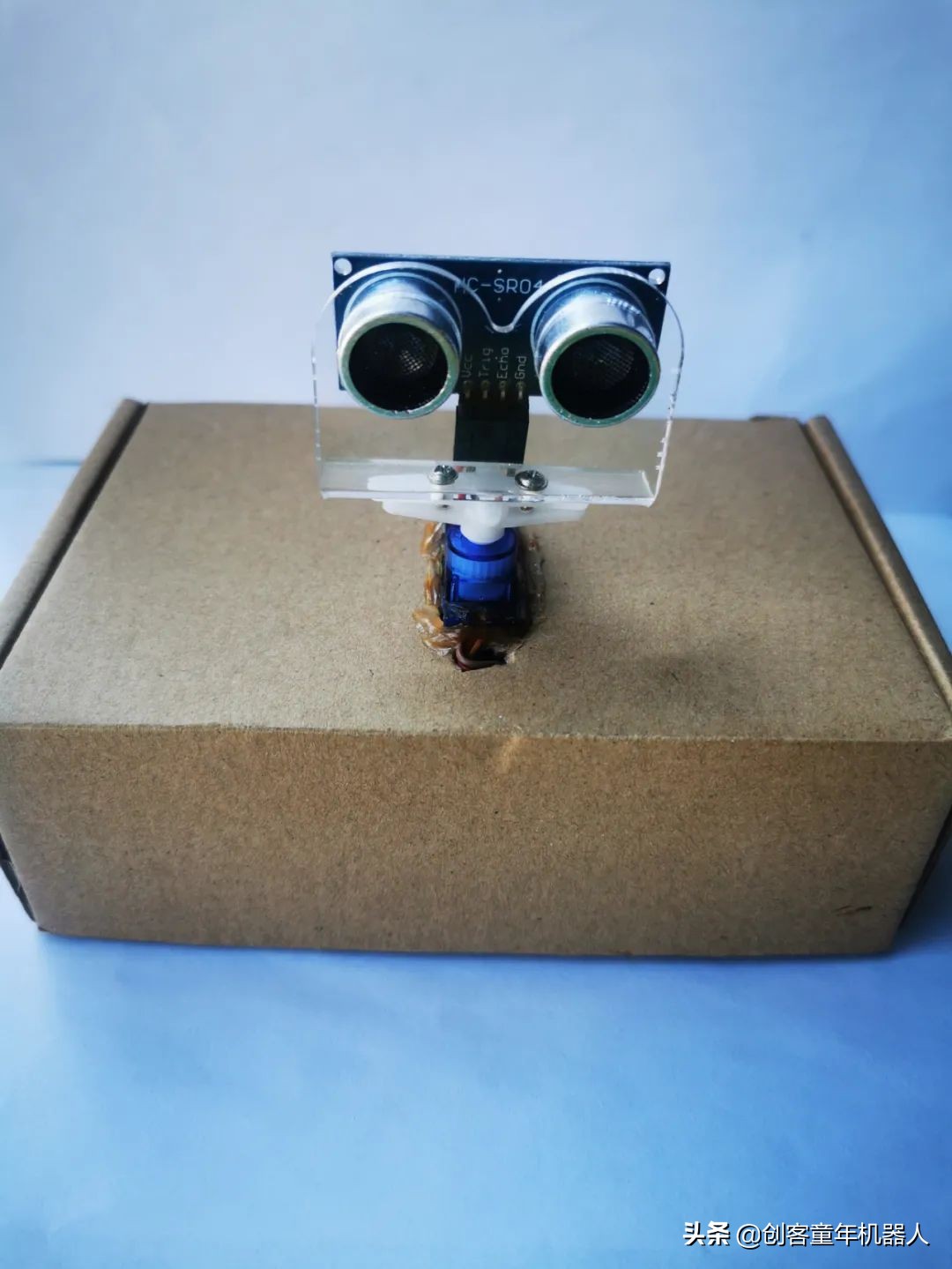
作品正面图
六、程序
模该装置的程序分两部分,一部分是写入到Arduino板的程序(接收外界信号),一部分是运行在电脑端processing软件中的程序(图形输出显示)。
Arduino的程序:
#include<stdio.h>
#include <Servo.h>
Servo mServo; //创建一个舵机控制对象
//当前角度
int mAngleNum = 0;
//当前是正向旋转还是反向旋转
char mFront = 0;
//超声波测距引脚
const int mTrigPin = 3;
const int mEchoPin = 2;
//当前距离
int mDistance = 0;
//像串口发送数据 发送到processing
void sendStatusToSerial();
//测距
void ranging();
void setup() {
// put your setup code here, to run once:
Serial.begin(9600);
mServo.attach(12); // 该舵机由arduino第12脚控制
pinMode(mTrigPin, OUTPUT);
// 要检测引脚上输入的脉冲宽度,需要先设置为输入状态
pinMode(mEchoPin, INPUT);
}
void loop() {
// put your main code here, to run repeatedly:
//多角度设置
mServo.write(180 - mAngleNum);
//超声波测距
ranging();
//发数据
sendStatusToSerial();
delay(60);
if( mFront == 0 )
{
mAngleNum ++;
if( mAngleNum > 180 )
{
mFront = 1;
}
}
else
{
mAngleNum --;
if( mAngleNum < 0 )
{
mFront = 0;
}
}
}
//发送当前状态到串口
void sendStatusToSerial()
{
char mAngleStr[6];
char mDistanceStr[6];
sprintf( mAngleStr, "%d", mAngleNum);
sprintf( mDistanceStr, "%d", mDistance);
delayMicroseconds(2);
Serial.print(mAngleStr);
Serial.print(",");
Serial.print(mDistanceStr);
Serial.print(".");
delay(50);
}
//测距
void ranging()
{
// 产生一个10us的高脉冲去触发TrigPin
digitalWrite(mTrigPin, LOW); //低高低电平发一个短时间脉冲去TrigPin
delayMicroseconds(2);
digitalWrite(mTrigPin, HIGH);
delayMicroseconds(10);
digitalWrite(mTrigPin, LOW);
mDistance = pulseIn(mEchoPin, HIGH) / 58.0; //将回波时间换算成cm
}
Processing的程序:
import processing.serial.*;
import java.awt.event.KeyEvent;
import java.io.IOException;
PFont font;
Serial myPort;
String angle="";
String distance="";
String data="";
String noObject;
float pixsDistance;
int iAngle, iDistance;
int index1=0;
int index2=0;
PFont orcFont;
void setup() {
size (1200, 700); //这个分辨率自己根据你的电脑的配置和显示屏幕配置进行更改。
smooth();
font = createFont("宋体.vlw",48);
textFont(font);
myPort = new Serial(this,"COM5", 9600); //这个串口号一定要更改。
myPort.bufferUntil('.');
}
void draw() {
fill(98,245,31);
noStroke();
fill(0,4);
rect(0, 0, width, height-height*0.065);
fill(98,245,31);
drawRadar();
drawLine();
drawObject();
drawText();
}
void serialEvent (Serial myPort) {
data = myPort.readStringUntil('.');
data = data.substring(0,data.length()-1);
index1 = data.indexOf(",");
angle= data.substring(0, index1);
distance= data.substring(index1+1, data.length());
iAngle = int(angle);
iDistance = int(distance);
}
void drawRadar() {
pushMatrix();
translate(width/2,height-height*0.074);
noFill();
strokeWeight(2);
stroke(98,245,31);
// draws the arc lines
arc(0,0,(width-width*0.0625),(width-width*0.0625),PI,TWO_PI);
arc(0,0,(width-width*0.27),(width-width*0.27),PI,TWO_PI);
arc(0,0,(width-width*0.479),(width-width*0.479),PI,TWO_PI);
arc(0,0,(width-width*0.687),(width-width*0.687),PI,TWO_PI);
// draws the angle lines
line(-width/2,0,width/2,0);
line(0,0,(-width/2)*cos(radians(30)),(-width/2)*sin(radians(30)));
line(0,0,(-width/2)*cos(radians(60)),(-width/2)*sin(radians(60)));
line(0,0,(-width/2)*cos(radians(90)),(-width/2)*sin(radians(90)));
line(0,0,(-width/2)*cos(radians(120)),(-width/2)*sin(radians(120)));
line(0,0,(-width/2)*cos(radians(150)),(-width/2)*sin(radians(150)));
line((-width/2)*cos(radians(30)),0,width/2,0);
popMatrix();
}
void drawObject() {
pushMatrix();
translate(width/2,height-height*0.074);
strokeWeight(9);
stroke(255,10,10); // red color
pixsDistance=iDistance*((height-height*0.1666)*0.025);
if(iDistance<40){
line(pixsDistance*cos(radians(iAngle)),-pixsDistance*sin(radians(iAngle)),(width-width*0.505)*cos(radians(iAngle)),-(width-width*0.505)*sin(radians(iAngle)));
}
popMatrix();
}
void drawLine() {
pushMatrix();
strokeWeight(9);
stroke(30,250,60);
translate(width/2,height-height*0.074);
line(0,0,(height-height*0.12)*cos(radians(iAngle)),-(height-height*0.12)*sin(radians(iAngle)));
popMatrix();
}
void drawText() {
pushMatrix();
if(iDistance>40) {
noObject = "检测范围外";
}else {
noObject = "检测范围内";
}
fill(0,0,0);
noStroke();
rect(0, height-height*0.0648, width, height);
fill(98,245,31);
textSize(25);
text("10cm",width-width*0.3854,height-height*0.0833);
text("20cm",width-width*0.281,height-height*0.0833);
text("30cm",width-width*0.177,height-height*0.0833);
text("40cm",width-width*0.0729,height-height*0.0833);
textSize(28);
text("对象: " + noObject, width-width*0.875, height-height*0.0277);
text("角度: " + iAngle +" °", width-width*0.48, height-height*0.0277);
text("距离: ", width-width*0.26, height-height*0.0277);
if(iDistance<40) {
text(" " + iDistance +"cm", width-width*0.225, height-height*0.0277);
}
textSize(25);
fill(98,245,60);
translate((width-width*0.4994)+width/2*cos(radians(30)),(height-height*0.0907)-width/2*sin(radians(30)));
rotate(-radians(-60));
text("30°",0,0);
resetMatrix();
translate((width-width*0.503)+width/2*cos(radians(60)),(height-height*0.0888)-width/2*sin(radians(60)));
rotate(-radians(-30));
text("60°",0,0);
resetMatrix();
translate((width-width*0.507)+width/2*cos(radians(90)),(height-height*0.0833)-width/2*sin(radians(90)));
rotate(radians(0));
text("90°",0,0);
resetMatrix();
translate(width-width*0.513+width/2*cos(radians(120)),(height-height*0.07129)-width/2*sin(radians(120)));
rotate(radians(-30));
text("120°",0,0);
resetMatrix();
translate((width-width*0.5104)+width/2*cos(radians(150)),(height-height*0.0574)-width/2*sin(radians(150)));
rotate(radians(-60));
text("150°",0,0);
popMatrix();
}
七、作品欣赏

Processing软件*载下**
链接:https://pan.baidu.com/s/1Uv9OaznsMnyZxM9RGXVMLQ
提取码:cktn