上次我们分享了如何使用Excel在当当网上搜索图书信息,并将图书的封面、现价、定价、折扣、链接等数据抓取到Excel:
原文中此处为链接,暂不支持采集
然后有个朋友问,Excel能不能批量*载下**网上的图片?譬如说罢,我在百度上搜索了520啊、胡歌啊、杨幂啊甚么滴,想把图片都*载下**下来……

Excel行不行?
坦白的说,当然……行啊!
照例看个示例动画先。
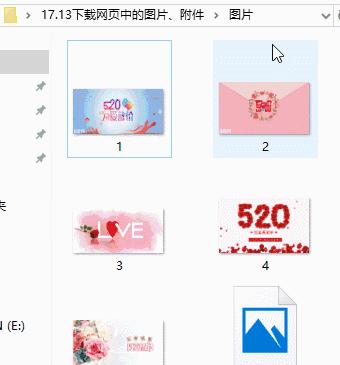
A2单元格输入搜索的关键字,例如520,点击按钮即可将百度图片搜索结果的前30张图片*载下**到指定文件夹内。
小贴士:
1,可以*载下**百度各种类型的图片,比如PNG、JPG、GIF等。图片会被*载下**到当前Excel工作簿所在路径下的名为图片的文件夹中。如果不存在图片文件夹,代*会码**自行建立;如果存在图片文件夹,代*会码**删除该文件夹下所有的文件。
2,图片按序号命名,也就是1~2~3~4~520啊。
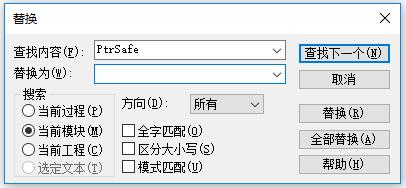
3,代码支持64位电脑,如果是32位则需要自行修改API函数,也就是通过查找替换的方式将PtrSafe替换为空白。
4,最后说一个特别认真特别重要的是:我爱你,你知道的。

代码如下:
Private Declare PtrSafe Function URLDownloadToFile Lib "urlmon" Alias "URLDownloadToFileA" (ByVal pCaller As Long, ByVal szURL As String, ByVal szExtName As String, ByVal dwReserved As Long, ByVal lpfnCB As Long) As Long
Private Declare PtrSafe Function DeleteUrlCacheEntry Lib "wininet" Alias "DeleteUrlCacheEntryA" (ByVal lpszUrlName As String) As Long
Sub DownloadPictures()
Dim strKey As String
Dim strURL As String
Dim strFolderPath As String
Dim strText As String
Dim strPicPath As String
Dim strPicURL As String
Dim strExtName As String
Dim aPageNum As Variant
Dim aExtName As Variant
Dim i As Long
Dim k As Long
strFolderPath = ThisWorkbook.Path & "\图片\"
If Dir(strFolderPath, vbDirectory + vbHidden) > "" Then
If Dir(strFolderPath & "*.*") > "" Then Kill strFolderPath & "*.*"
Else
MkDir strFolderPath
End If
strKey = [a2].Value
If Len(strKey) = 0 Then
MsgBox "未输入查询关键字,程序退出。"
Exit Sub
End If
strKey = encodeURI(strKey) '对查询关键字转码
With CreateObject("msxml2.xmlhttp") '发送网页请求,获得响应信息
strURL = "http://image.baidu.com/search/index?tn=baiduimage&word=" & strKey
.Open "GET", strURL, "False"
.send
strText = .responseText
End With
aPageNum = Split(strText, """pageNum"":")
'按关键字pageNum对响应信息进行拆分
For i = 1 To UBound(aPageNum)
If InStr(1, aPageNum(i), "objURL", vbTextCompare) Then
'判断是否存在字符串objurl
k = k + 1
strPicURL = Split(Split(aPageNum(i), """objURL"":""")(1), """,")(0)
'图片的网址
aExtName = Split(strPicURL, ".")
strExtName = "." & aExtName(UBound(aExtName))
'图片的后缀名
strPicPath = strFolderPath & k & strExtName
'图片保存地址
DeleteUrlCacheEntry strPicURL
'删除图片缓存数据
URLDownloadToFile 0, strPicURL, strPicPath, 0, 0
'*载下**图片
End If
Next
End Sub
Function encodeURI(strText As String) As String
Dim objDOM As Object
Set objDOM = CreateObject("htmlfile")
With objDOM.parentWindow
objDOM.Write "<Script></Script>"
encodeURI = .eval("encodeURIComponent('" & strText & "')")
End With
Set objDOM = Nothing
End Function
图文:看见星光