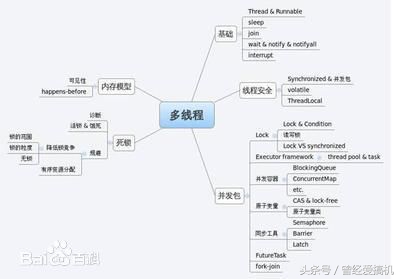
多线程(多线程的引入)
* 1.什么是线程
* 线程是程序执行的一条路径, 一个进程中可以包含多条线程
* 多线程并发执行可以提高程序的效率, 可以同时完成多项工作
* 2.多线程的应用场景
* 红蜘蛛同时共享屏幕给多个电脑
* 迅雷开启多条线程一起*载下**
* QQ同时和多个人一起视频
* 服务器同时处理多个客户端请求
###24.02_多线程(多线程并行和并发的区别)(了解)
* 并行就是两个任务同时运行,就是甲任务进行的同时,乙任务也在进行。(需要多核CPU)
* 并发是指两个任务都请求运行,而处理器只能按受一个任务,就把这两个任务安排轮流进
行,由于时间间隔较短,使人感觉两个任务都在运行。
* 比如我跟两个网友聊天,左手操作一个电脑跟甲聊,同时右手用另一台电脑跟乙聊天,这
就叫并行。
* 如果用一台电脑我先给甲发个消息,然后立刻再给乙发消息,然后再跟甲聊,再跟乙聊。
这就叫并发。
###24.03_多线程(Java程序运行原理和JVM的启动是多线程的吗)(了解)
* A:Java程序运行原理
* Java命令会启动java虚拟机,启动JVM,等于启动了一个应用程序,也就是启动了
一个进程。该进程会自动启动一个 “主线程” ,然后主线程去调用某个类的 main 方法。
* B:JVM的启动是多线程的吗
* JVM启动至少启动了垃圾回收线程和主线程,所以是多线程的。
###24.04_多线程(多线程程序实现的方式1)(掌握)
* 1.继承Thread
* 定义类继承Thread
* 重写run方法
* 把新线程要做的事写在run方法中
* 创建线程对象
* 开启新线程, 内部会自动执行run方法
*
public class Demo2_Thread {
/**
* @param args
*/
public static void main(String[] args) {
MyThread mt = new MyThread();
//4,创建自定义类的对象
mt.start();
//5,开启线程
for(int i = 0; i < 3000; i++) {
System.out.println("bb");
}
}
}
//1,定义类继承Thread
public void run() {
//2,重写run方法
for(int i = 0; i < 3000; i++) {
//3,将要执行的代码,写在run方法中
System.out.println
("aaaaaaaaaaaaaaaaaaaaaaaaaaaa");
}
}
}
###24.05_多线程(多线程程序实现的方式2)(掌握)
* 2.实现Runnable
* 定义类实现Runnable接口
* 实现run方法
* 把新线程要做的事写在run方法中
* 创建自定义的Runnable的子类对象
* 创建Thread对象, 传入Runnable
* 调用start()开启新线程, 内部会自动调用Runnable的run()方法
public class Demo3_Runnable {
/**
* @param args
*/
public static void main(String[] args) {
MyRunnable mr = new MyRunnable();
//4,创建自定义类对象
//Runnable target = new MyRunnable();
Thread t = new Thread(mr);
//5,将其当作参数传递给Thread的构造函数
t.start();
//6,开启线程
for(int i = 0; i < 3000; i++) {
System.out.println("bb");
}
}
}
//1,自定义类实现Runnable接口
@Override
public void run() {
//2,重写run方法
for(int i = 0; i < 3000; i++) {
//3,将要执行的代码,写在run方法中
System.out.println
("aaaaaaaaaaaaaaaaaaaaaaaaaaaa");
}
}
}
###24.06_多线程(实现Runnable的原理)(了解)
* 查看源码
* 1,看Thread类的构造函数,传递了Runnable接口的引用
* 2,通过init()方法找到传递的target给成员变量的target赋值
* 3,查看run方法,发现run方法中有判断,如果target不为null就会调用Runnable接
口子类对象的run方法
###24.07_多线程(两种方式的区别)(掌握)
* 查看源码的区别:
* a.继承Thread : 由于子类重写了Thread类的run(), 当调用start()时, 直接找子
类的run()方法
* b.实现Runnable : 构造函数中传入了Runnable的引用, 成员变量记住了它,
start()调用run()方法时内部判断成员变量Runnable的引用是否为空, 不为空编译时看的是
Runnable的run(),运行时执行的是子类的run()方法
* 继承Thread
* 好处是:可以直接使用Thread类中的方法,代码简单
* 弊端是:如果已经有了父类,就不能用这种方法
* 实现Runnable接口
* 好处是:即使自己定义的线程类有了父类也没关系,因为有了父类也可以实现接口,
而且接口是可以多实现的
* 弊端是:不能直接使用Thread中的方法需要先获取到线程对象后,才能得到Thread
的方法,代码复杂
###24.08_多线程(匿名内部类实现线程的两种方式)(掌握)
* 继承Thread类
new Thread() {
//1,new 类(){}继承这个类
public void run() {
//2,重写run方法
for(int i = 0; i < 3000; i++) {
//3,将要执行的代码,写在run方法中
System.out.println
("aaaaaaaaaaaaaaaaaaaaaaaaaaaa");
}
}
}.start();
* 实现Runnable接口
new Thread(new Runnable(){
//1,new 接口(){}实现这个接口
public void run() {
//2,重写run方法
for(int i = 0; i < 3000; i++) {
//3,将要执行的代码,写在run方法中
System.out.println("bb");
}
}
}).start();
###24.09_多线程(获取名字和设置名字)(掌握)
* 1.获取名字
* 通过getName()方法获取线程对象的名字
* 2.设置名字
* 通过构造函数可以传入String类型的名字
*
new Thread("xxx") {
public void run() {
for(int i = 0; i < 1000; i++) {
System.out.println(this.getName()
+ "....aaaaaaaaaaaaaaaaaaaaaaa");
}
}
}.start();
new Thread("yyy") {
public void run() {
for(int i = 0; i < 1000; i++) {
System.out.println(this.getName()
+ "....bb");
}
}
}.start();
* 通过setName(String)方法可以设置线程对象的名字
*
Thread t1 = new Thread() {
public void run() {
for(int i = 0; i < 1000; i++) {
System.out.println(this.getName()
+ "....aaaaaaaaaaaaaaaaaaaaaaa");
}
}
};
Thread t2 = new Thread() {
public void run() {
for(int i = 0; i < 1000; i++) {
System.out.println(this.getName()
+ "....bb");
}
}
};
t1.setName("芙蓉姐姐");
t2.setName("凤姐");
t1.start();
t2.start();
###24.10_多线程(获取当前线程的对象)(掌握)
* Thread.currentThread(), 主线程也可以获取
*
new Thread(new Runnable() {
public void run() {
for(int i = 0; i < 1000; i++) {
System.out.println
(Thread.currentThread().getName() + "...aaaaaaaaaaaaaaaaaaaaa");
}
}
}).start();
new Thread(new Runnable() {
public void run() {
for(int i = 0; i < 1000; i++) {
System.out.println
(Thread.currentThread().getName() + "...bb");
}
}
}).start();
Thread.currentThread().setName("我是主线程");
//获取主函数线程的引用,并改名字
System.out.println(Thread.currentThread().getName());
//获取主函数线程的引用,并获取名字
###24.11_多线程(休眠线程)(掌握)
* Thread.sleep(毫秒,纳秒), 控制当前线程休眠若干毫秒1秒= 1000毫秒 1秒 = 1000 *
1000 * 1000纳秒 1000000000
new Thread() {
public void run() {
for(int i = 0; i < 10; i++) {
System.out.println(getName() +
"...aaaaaaaaaaaaaaaaaaaaaa");
try {
Thread.sleep(10);
} catch (InterruptedException e)
{
e.printStackTrace();
}
}
}
}.start();
new Thread() {
public void run() {
for(int i = 0; i < 10; i++) {
System.out.println(getName() +
"...bb");
try {
Thread.sleep(10);
} catch (InterruptedException e)
{
e.printStackTrace();
}
}
}
}.start();
###24.12_多线程(守护线程)(掌握)
* setDaemon(), 设置一个线程为守护线程, 该线程不会单独执行, 当其他非守护线程都执行
结束后, 自动退出
*
Thread t1 = new Thread() {
public void run() {
for(int i = 0; i < 50; i++) {
System.out.println(getName() +
"...aaaaaaaaaaaaaaaaaaaaaa");
try {
Thread.sleep(10);
} catch (InterruptedException e)
{
e.printStackTrace();
}
}
}
};
Thread t2 = new Thread() {
public void run() {
for(int i = 0; i < 5; i++) {
System.out.println(getName() +
"...bb");
try {
Thread.sleep(10);
} catch (InterruptedException e)
{
e.printStackTrace();
}
}
}
};
t1.setDaemon(true);
//将t1设置为守护线程
t1.start();
t2.start();
###24.13_多线程(加入线程)(掌握)
* join(), 当前线程暂停, 等待指定的线程执行结束后, 当前线程再继续
* join(int), 可以等待指定的毫秒之后继续
*
final Thread t1 = new Thread() {
public void run() {
for(int i = 0; i < 50; i++) {
System.out.println(getName() +
"...aaaaaaaaaaaaaaaaaaaaaa");
try {
Thread.sleep(10);
} catch (InterruptedException e)
{
e.printStackTrace();
}
}
}
};
Thread t2 = new Thread() {
public void run() {
for(int i = 0; i < 50; i++) {
if(i == 2) {
try {
//t1.join();
//插队,加入
t1.join(30);
//加入,有固定的时间,过了固定时间,继续交替执行
Thread.sleep(10);
} catch
(InterruptedException e) {
e.printStackTrace();
}
}
System.out.println(getName() +
"...bb");
}
}
};
t1.start();
t2.start();
###24.14_多线程(礼让线程)(了解)
* yield让出cpu
###24.15_多线程(设置线程的优先级)(了解)
* setPriority()设置线程的优先级
###24.16_多线程(同步代码块)(掌握)
* 1.什么情况下需要同步
* 当多线程并发, 有多段代码同时执行时, 我们希望某一段代码执行的过程中CPU不
要切换到其他线程工作. 这时就需要同步.
* 如果两段代码是同步的, 那么同一时间只能执行一段, 在一段代码没执行结束之
前, 不会执行另外一段代码.
* 2.同步代码块
* 使用synchronized关键字加上一个锁对象来定义一段代码, 这就叫同步代码块
* 多个同步代码块如果使用相同的锁对象, 那么他们就是同步的
Demo d = new Demo();
public static void print1() {
synchronized(d){
//锁对象可以是任意对象,但是被锁的代码需要保证是同一把锁,不能用匿名对象
System.out.print("黑");
System.out.print("马");
System.out.print("程");
System.out.print("序");
System.out.print("员");
System.out.print("\r\n");
}
}
public static void print2() {
synchronized(d){
System.out.print("传");
System.out.print("智");
System.out.print("播");
System.out.print("客");
System.out.print("\r\n");
}
}
}
###24.17_多线程(同步方法)(掌握)
* 使用synchronized关键字修饰一个方法, 该方法中所有的代码都是同步的
public static void print1() {
synchronized(Printer.class){
//锁对象可以是任意对象,但是被锁的代码需要保证是同一把锁,不能用匿名对象
System.out.print("黑");
System.out.print("马");
System.out.print("程");
System.out.print("序");
System.out.print("员");
System.out.print("\r\n");
}
}
/*
* 非静态同步函数的锁是:this
* 静态的同步函数的锁是:字节码对象
*/
public static synchronized void print2() {
System.out.print("传");
System.out.print("智");
System.out.print("播");
System.out.print("客");
System.out.print("\r\n");
}
}
###24.18_多线程(线程安全问题)(掌握)
* 多线程并发操作同一数据时, 就有可能出现线程安全问题
* 使用同步技术可以解决这种问题, 把操作数据的代码进行同步, 不要多个线程一起操作
public class Demo2_Synchronized {
/**
* @param args
* 需求:铁路售票,一共100张,通过四个窗口卖完.
*/
public static void main(String[] args) {
TicketsSeller t1 = new TicketsSeller();
TicketsSeller t2 = new TicketsSeller();
TicketsSeller t3 = new TicketsSeller();
TicketsSeller t4 = new TicketsSeller();
t1.setName("窗口1");
t2.setName("窗口2");
t3.setName("窗口3");
t4.setName("窗口4");
t1.start();
t2.start();
t3.start();
t4.start();
}
}
private static int tickets = 100;
static Object obj = new Object();
public TicketsSeller() {
super();
}
public TicketsSeller(String name) {
super(name);
}
public void run() {
while(true) {
synchronized(obj) {
if(tickets <= 0)
break;
try {
Thread.sleep
(10);//线程1睡,线程2睡,线程3睡,线程4睡
} catch
(InterruptedException e) {
e.printStackTrace();
}
System.out.println
(getName() + "...这是第" + tickets-- + "号票");
}
}
}
}
###24.19_多线程(火车站卖票的例子用实现Runnable接口)(掌握)
###24.20_多线程(死锁)(了解)
* 多线程同步的时候, 如果同步代码嵌套, 使用相同锁, 就有可能出现死锁
* 尽量不要嵌套使用
private static String s1 = "筷子左";
private static String s2 = "筷子右";
public static void main(String[] args) {
new Thread() {
public void run() {
while(true) {
synchronized(s1) {
System.out.println(getName() + "...拿到" + s1 + "等待" + s2);
synchronized(s2)
{
System.out.println(getName() + "...拿到" + s2 + "开吃");
}
}
}
}
}.start();
new Thread() {
public void run() {
while(true) {
synchronized(s2) {
System.out.println(getName() + "...拿到" + s2 + "等待" + s1);
synchronized(s1)
{
System.out.println(getName() + "...拿到" + s1 + "开吃");
}
}
}
}
}.start();
}
###24.21_多线程(以前的线程安全的类回顾)(掌握)
* A:回顾以前说过的线程安全问题
* 看源码:Vector,StringBuffer,Hashtable,Collections.synchroinzed(xxx)
* Vector是线程安全的,ArrayList是线程不安全的
* StringBuffer是线程安全的,StringBuilder是线程不安全的
* Hashtable是线程安全的,HashMap是线程不安全的