一:文件系统
1. 什么是文件系统?
操作系统中负责管理和存储文件信息的软件机构称为文件管理系统,简称文件系统。
通常文件系统是用于存储和组织文件的一种机制,便于对文件进行方便的查找与访问。
文件系统是对文件存储设备的空间进行组织和分配,负责文件存储并对存入的文件进行保护和检索的系统。
它负责为用户建立文件,存入、读出、修改、转储文件,控制文件的存取,当用户不再使用时撤销文件等。
随着文件种类的增多,扩增了更多的文件系统,为了对各种文件系统进行统一的管理与组织。
2. Linux文件系统
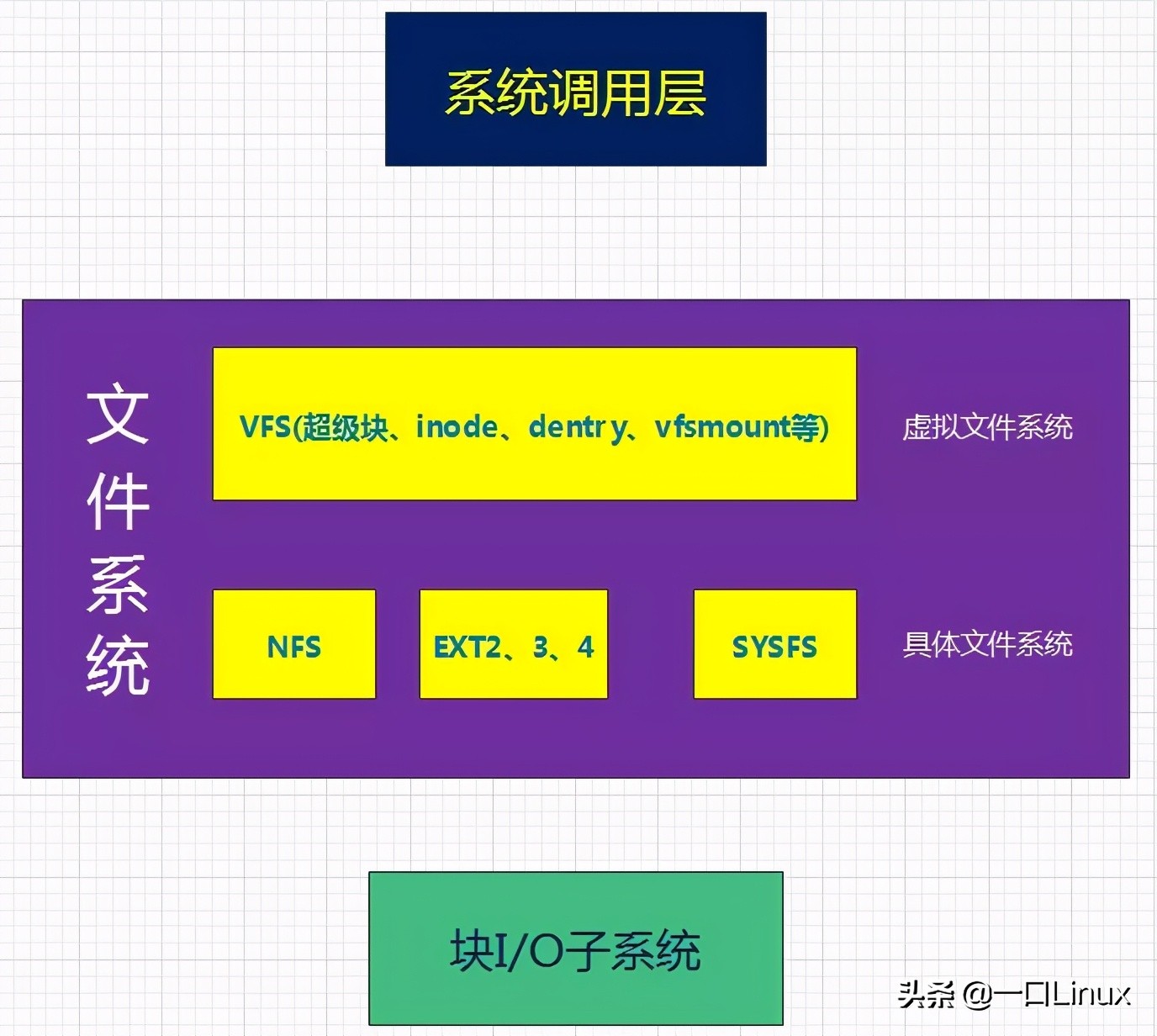
Linux将文件系统分为了两层:VFS(虚拟文件系统)、具体文件系统,如下图所示:
VFS
VFS(Virtual Filesystem Switch)称为虚拟文件系统或虚拟文件系统转换,是一个内核软件层,在具体的文件系统之上抽象的一层,用来处理与Posix文件系统相关的所有调用,表现为能够给各种文件系统提供一个通用的接口,使上层的应用程序能够使用通用的接口访问不同文件系统,同时也为不同文件系统的通信提供了媒介。
VFS并不是一种实际的文件系统,它只存在于内存中,不存在任何外存空间,VFS在系统启动时建立,在系统关闭时消亡。
VFS由 超级块、inode、dentry、vfsmount 等结构来组成。
Linux系统中存在很多的文件系统,例如常见的**ext2,ext3,ext4,sysfs,rootfs,proc...**等等。
二 、VFS
1. VFS在linux架构中的位置
从用户的使用角度,Linux下的文件系统中宏观上主要分为三层:
- 1.上层的文件系统的系统调用(System-call );
- 2.虚拟文件系统VFS(Virtual File System)层,
- 3.挂载到VFS中的各种实际文件系统。
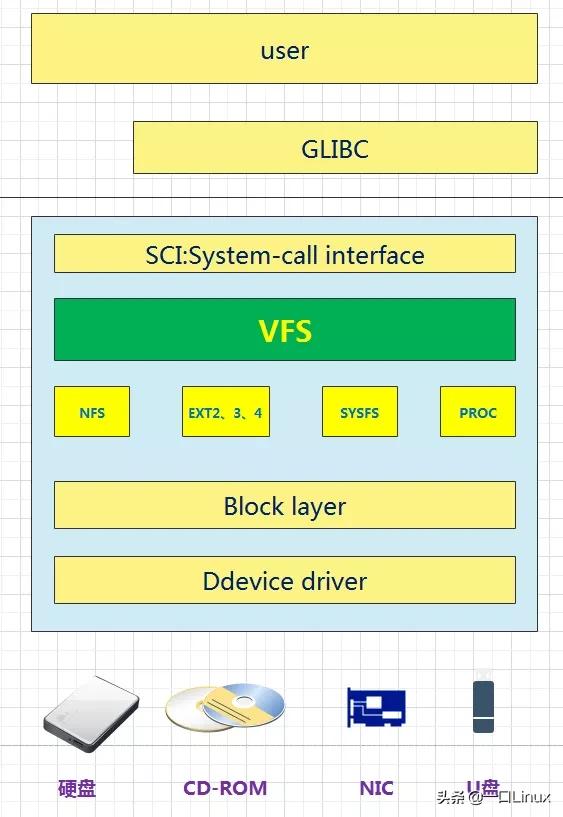
VFS在整个Linux系统中的架构视图如下:
VFS
Linux系统的User使用GLIBC(POSIX标准、GUN C运行时库)作为应用程序的运行时库,然后通过操作系统,将其转换为系统调用SCI(system-call interface),SCI是操作系统内核定义的系统调用接口,这层抽象允许用户程序的I/O操作转换为内核的接口调用。
2. 用户如何透明的去处理文件?
我们知道每个文件系统是独立的,有自己的组织方法,操作方法。那么对于用户来说,不可能所有的文件系统都了解,那么怎么做到让用户透明的去处理文件呢?
例如:我想写文件,那就直接read就OK,不管你是什么文件系统,具体怎么去读!这里就需要引入虚拟文件系统。
所以虚拟文件系统就是:对于一个system,可以存在多个“实际的文件系统”,例如:ext2,ext3,fat32,ntfs...例如我现在有多个分区,对于每一个分区我们知道可以是不同的“实际文件系统”。
例如现在三个磁盘分区分别是:ext2,ext3,fat32,那么每个“实际的文件系统”的操作和数据结构肯定不一样,那么,用户怎么能透明使用它们呢?
这个时候就需要VFS作为中间一层!用户直接和VFS打交道。
VFS是一种软件机制,只存在于内存中,每次系统初始化期间Linux都会先在内存中构造一棵VFS的目录树(也就是源码中的namespace)。
VFS主要的作用是对上层应用屏蔽底层不同的调用方法,提供一套统一的调用接口,二是便于对不同的文件系统进行组织管理。
VFS提供了一个抽象层,将POSIX API接口与不同存储设备的具体接口实现进行了分离,使得底层的文件系统类型、设备类型对上层应用程序透明。
例如read,write,那么映射到VFS中就是sys_read,sys_write,那么VFS可以根据你操作的是哪个“实际文件系统”(哪个分区)来进行不同的实际的操作!这个技术也是很熟悉的“钩子结构”技术来处理的。
其实就是VFS中提供一个抽象的struct结构体,然后对于每一个具体的文件系统要把自己的字段和函数填充进去,这样就解决了异构问题(内核很多子系统都大量使用了这种机制)。
三、Linux虚拟文件系统四大对象
为了对文件系统进行统一的管理与组织,Linux创建了一个公共根目录和全局文件系统树。要访问一个文件系统中的文件,必须先将这个文件系统挂载在全局文件系统树的某个根目录下,这一挂载过程被称作文件系统的挂载,所挂载的目录称为挂载点。
传统的文件系统在磁盘上的布局如下:

由上图可知,文件系统的开头通常是由一个磁盘扇区所组成的引导块,该部分的主要目的是用于对操作系统的引导。一般只在启动操作系统时使用。
随后是超级块,超级块主要存放了该物理磁盘中文件系统结构的相关信息,并且对各个部分的大小进行说明。
最后由i节点位图,逻辑块位图、i节点、逻辑块这几部分分布在物理磁盘上。
Linux为了对超级块,i节点,逻辑块这三部分进行高效的管理,Linux创建了几种不同的数据结构,分别是 文件系统类型、inode、dentry 等几种。
其中,文件系统类型规定了某种文件系统的行为,利用该数据结构可以构造某种文件系统类型的实例,另外,该实例也被称为超级块实例。
超级块则是反映了文件系统整体的控制信息。超级块能够以多种的方式存在,对于基于磁盘的文件系统,它以特定的格式存在于磁盘的固定区域(取决于文件系统类型)上。在挂载文件系统时,该超级块中的内容被读入磁盘中,从而构建出位于内存中的新的超级块。
inode则反映了文件系统对象中的一般元数据信息。dentry则是反映出某个文件系统对象在全局文件系统树中的位置。
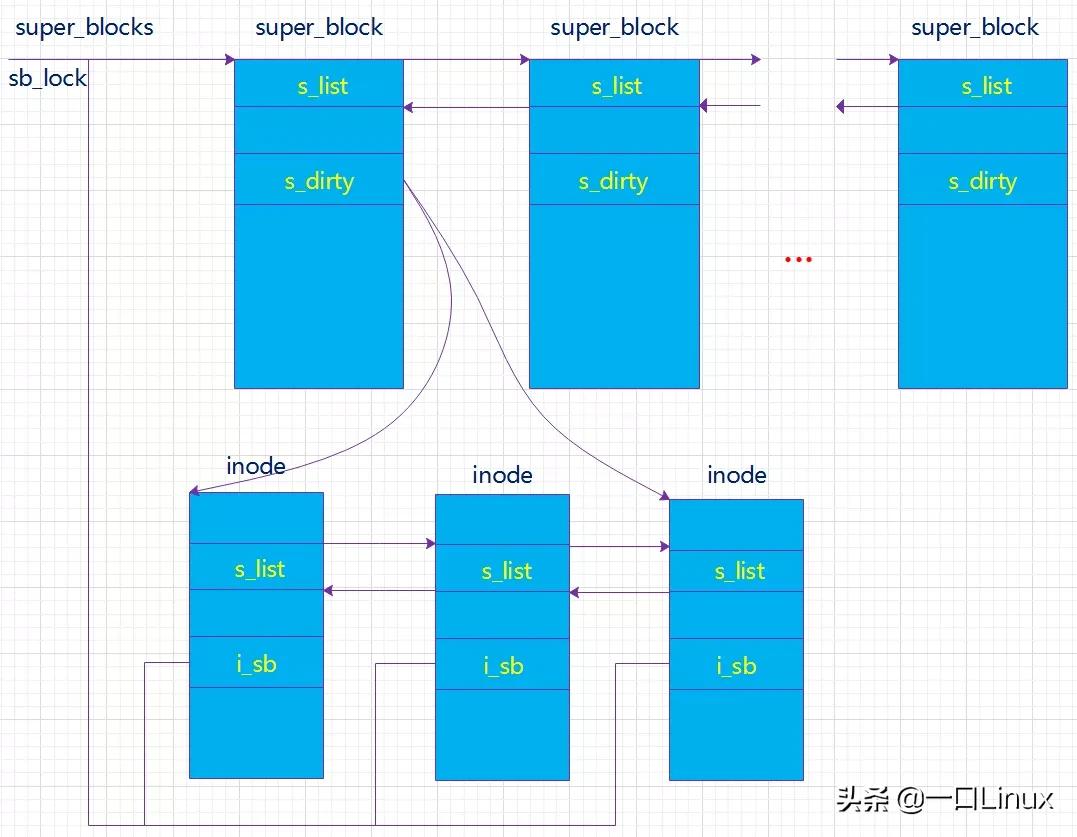
Linux对这四种数据结构进行了相关的关联。如下图:
结构体关系
1. 超级块(super block)
超级块:一个超级块对应一个文件系统(已经安装的文件系统类型如ext2,此处是实际的文件系统,不是VFS)。
之前我们已经说了文件系统用于管理这些文件的数据格式和操作之类的,系统文件有系统文件自己的文件系统,同时对于不同的磁盘分区也有可以是不同的文件系统。那么一个超级块对于一个独立的文件系统。保存文件系统的类型、大小、状态等等。
(“文件系统”和“文件系统类型”不一样!一个文件系统类型下可以包括很多文件系统即很多的super_block)
既然我们知道对于不同的文件系统有不同的super_block,那么对于不同的super_block的操作肯定也是不同的,所以我们在下面的super_block结构中可以看到上面说的抽象的struct结构(例如下面的:struct super_operations):
(linux内核3.14)
1246structsuper_block{
1247structlist_heads_list;/*Keepthisfirst*/
1248dev_ts_dev;/*searchindex;_not_kdev_t*/
1249unsignedchars_blocksize_bits;
1250unsignedlongs_blocksize;
1251loff_ts_maxbytes;/*Maxfilesize*/
1252structfile_system_type*s_type;
1253conststructsuper_operations*s_op;
1254conststructdquot_operations*dq_op;
1255conststructquotactl_ops*s_qcop;
1256conststructexport_operations*s_export_op;
1257unsignedlongs_flags;
1258unsignedlongs_magic;
1259structdentry*s_root;
1260structrw_semaphores_umount;
1261ints_count;
1262atomic_ts_active;
1263#ifdefCONFIG_SECURITY
1264void*s_security;
1265#endif
1266conststructxattr_handler**s_xattr;
1267
1268structlist_heads_inodes;/*allinodes*/
1269structhlist_bl_heads_anon;/*anonymousdentriesfor(nfs)exporting*/
1270structlist_heads_mounts;/*listofmounts;_not_forfsuse*/
1271structblock_device*s_bdev;
1272structbacking_dev_info*s_bdi;
1273structmtd_info*s_mtd;
1274structhlist_nodes_instances;
1275structquota_infos_dquot;/*Diskquotaspecificoptions*/
1276
1277structsb_writerss_writers;
1278
1279chars_id[32];/*Informationalname*/
1280u8s_uuid[16];/*UUID*/
1281
1282void*s_fs_info;/*Filesystemprivateinfo*/
1283unsignedints_max_links;
1284fmode_ts_mode;
1285
1286/*Granularityofc/m/atimeinns.
1287Cannotbeworsethanasecond*/
1288u32s_time_gran;
1289
1290/*
1291*ThenextfieldisforVFS*only*.Nofilesystemshaveanybusiness
1292*evenlookingatit.Youhadbeenwarned.
1293*/
1294structmutexs_vfs_rename_mutex;/*Kludge*/
1295
1296/*
1297*Filesystemsubtype.Ifnon-emptythefilesystemtypefield
1298*in/proc/mountswillbe"type.subtype"
1299*/
1300char*s_subtype;
1301
1302/*
1303*Savedmountoptionsforlazyfilesystemsusing
1304*generic_show_options()
1305*/
1306char__rcu*s_options;
1307conststructdentry_operations*s_d_op;/*defaultd_opfordentries*/
1308
1309/*
1310*Savedpoolidentifierforcleancache(-1meansnone)
1311*/
1312intcleancache_poolid;
1313
1314structshrinkers_shrink;/*per-sbshrinkerhandle*/
1315
1316/*Numberofinodeswithnlink==0butstillreferenced*/
1317atomic_long_ts_remove_count;
1318
1319/*Beingremountedread-only*/
1320ints_readonly_remount;
1321
1322/*AIOcompletionsdeferredfrominterruptcontext*/
1323structworkqueue_struct*s_dio_done_wq;
1324
1325/*
1326*Keepthelrulistslastinthestructuresotheyalwayssitontheir
1327*ownindividualcachelines.
1328*/
1329structlist_lrus_dentry_lru____cacheline_aligned_in_smp;
1330structlist_lrus_inode_lru____cacheline_aligned_in_smp;
1331structrcu_headrcu;
1332};
解释字段:

超级块方法
structsuper_operations{
//该函数在给定的超级块下创建并初始化一个新的索引节点对象
structinode*(*alloc_inode)(structsuper_block*sb);
//释放指定的索引结点。
void(*destroy_inode)(structinode*);
//VFS在索引节点被修改时会调用此函数。
void(*dirty_inode)(structinode*,intflags);
//将指定的inode写回磁盘。
int(*write_inode)(structinode*,structwriteback_control*wbc);
//删除索引节点。
int(*drop_inode)(structinode*);

void(*evict_inode)(structinode*);
//用来释放超级块
void(*put_super)(structsuper_block*);
//使文件系统的数据元素与磁盘上的文件系统同步,wait参数指定操作是否同步。
int(*sync_fs)(structsuper_block*sb,intwait);
int(*freeze_fs)(structsuper_block*);
int(*unfreeze_fs)(structsuper_block*);
//获取文件系统状态。把文件系统相关的统计信息放在statfs中
int(*statfs)(structdentry*,structkstatfs*);
int(*remount_fs)(structsuper_block*,int*,char*);
void(*umount_begin)(structsuper_block*);

int(*show_options)(structseq_file*,structdentry*);
int(*show_devname)(structseq_file*,structdentry*);
int(*show_path)(structseq_file*,structdentry*);
int(*show_stats)(structseq_file*,structdentry*);
#ifdefCONFIG_QUOTA
ssize_t(*quota_read)(structsuper_block*,int,char*,size_t,loff_t);
ssize_t(*quota_write)(structsuper_block*,int,constchar*,size_t,loff_t);
#endif
int(*bdev_try_to_free_page)(structsuper_block*,structpage*,gfp_t);
long(*nr_cached_objects)(structsuper_block*,int);
long(*free_cached_objects)(structsuper_block*,long,int);
};
2. 索引节点(inode)
索引节点inode:保存的其实是实际的数据的一些信息,这些信息称为“元数据”(也就是对文件属性的描述)。
例如:文件大小,设备标识符,用户标识符,用户组标识符,文件模式,扩展属性,文件读取或修改的时间戳,链接数量,指向存储该内容的磁盘区块的指针,文件分类等等。
( 注意数据分成:元数据+数据本身 )
同时注意:inode有两种,一种是VFS的inode,一种是具体文件系统的inode。前者在内存中,后者在磁盘中。所以每次其实是将磁盘中的inode调进填充内存中的inode,这样才是算使用了磁盘文件inode。
inode怎样生成的?
每个inode节点的大小,一般是128字节或256字节。inode节点的总数,在格式化时就给定(现代OS可以动态变化),一般每2KB就设置一个inode。
一般文件系统中很少有文件小于2KB的,所以预定按照2KB分,一般inode是用不完的。所以inode在文件系统安装的时候会有一个默认数量,后期会根据实际的需要发生变化。
注意inode号:inode号是唯一的,表示不同的文件。其实在Linux内部的时候,访问文件都是通过inode号来进行的,所谓文件名仅仅是给用户容易使用的。
当我们打开一个文件的时候,首先,系统找到这个文件名对应的inode号;然后,通过inode号,得到inode信息,最后,由inode找到文件数据所在的block,现在可以处理文件数据了。
inode和文件的关系?
当创建一个文件的时候,就给文件分配了一个inode。一个inode只对应一个实际文件,一个文件也会只有一个inode。inodes最大数量就是文件的最大数量。
527structinode{
528umode_ti_mode;/*访问权限控制*/
529unsignedshorti_opflags;
530kuid_ti_uid;/*使用者的id*/
531kgid_ti_gid;/*使用组id*/
532unsignedinti_flags;/*文件系统标志*/
533
534#ifdefCONFIG_FS_POSIX_ACL
535structposix_acl*i_acl;
536structposix_acl*i_default_acl;
537#endif
538
539conststructinode_operations*i_op;/*索引节点操作表*/
540structsuper_block*i_sb;/*相关的超级块*/
541structaddress_space*i_mapping;/*相关的地址映射*/
542
543#ifdefCONFIG_SECURITY
544void*i_security;
545#endif
546
547/*Statdata,notaccessedfrompathwalking*/
548unsignedlongi_ino;/*索引节点号*/
549/*
550*Filesystemsmayonlyreadi_nlinkdirectly.Theyshallusethe
551*followingfunctionsformodification:
552*
553*(set|clear|inc|drop)_nlink
554*inode_(inc|dec)_link_count
555*/
556union{
557constunsignedinti_nlink;
558unsignedint__i_nlink;/*硬连接数*/
559};
560dev_ti_rdev;/*实际设备标识符号*/
561loff_ti_size;
562structtimespeci_atime;/*最后访问时间*/
563structtimespeci_mtime;/*最后修改时间*/
564structtimespeci_ctime;/*最后改变时间*/
565spinlock_ti_lock;/*i_blocks,i_bytes,maybei_size*/
566unsignedshorti_bytes;/*使用的字节数*/
567unsignedinti_blkbits;
568blkcnt_ti_blocks;/*文件的块数*/
569
570#ifdef__NEED_I_SIZE_ORDERED
571seqcount_ti_size_seqcount;
572#endif
573
574/*Misc*/
575unsignedlongi_state;
576structmutexi_mutex;
577
578unsignedlongdirtied_when;/*jiffiesoffirstdirtying首次修改时间*/
579
580structhlist_nodei_hash;/*hash值,提高查找效率*/
581structlist_headi_wb_list;/*backingdevIOlist*/
582structlist_headi_lru;/*inodeLRUlist未使用的inode*/
583structlist_headi_sb_list;/*链接一个文件系统中所有inode的链表*/
584union{
585structhlist_headi_dentry;/*目录项链表*/
586structrcu_headi_rcu;
587};
588u64i_version;
589atomic_ti_count;/*引用计数*/
590atomic_ti_dio_count;
591atomic_ti_writecount;/*写者计数*/
592conststructfile_operations*i_fop;/*former->i_op->default_file_ops文件操作*/
593structfile_lock*i_flock;/*文件锁链表*/
594structaddress_spacei_data;/*表示被inode读写的页面*/
595#ifdefCONFIG_QUOTA
596structdquot*i_dquot[MAXQUOTAS];/*节点的磁盘限额*/
597#endif
598structlist_headi_devices;/*设备链表(共用同一个驱动程序的设备形成的链表。)*/
599union{
600structpipe_inode_info*i_pipe;/*管道信息*/
601structblock_device*i_bdev;/*块设备驱动节点*/
602structcdev*i_cdev;/*字符设备驱动节点*/
603};
604
605__u32i_generation;/*索引节点版本号*/
606
607#ifdefCONFIG_FSNOTIFY
608__u32i_fsnotify_mask;/*alleventsthisinodecaresabout*/
609structhlist_headi_fsnotify_marks;
610#endif
611
612#ifdefCONFIG_IMA
613atomic_ti_readcount;/*structfilesopenRO*/
614#endif
615void*i_private;/*fsordeviceprivatepointer用户私有数据*/
616};
注意管理inode的四个链表:
staticstructhlist_head*inode_hashtable__read_mostly;
节点方法
structinode_operations{
structdentry*(*lookup)(structinode*,structdentry*,unsignedint);
void*(*follow_link)(structdentry*,structnameidata*);
int(*permission)(structinode*,int);
structposix_acl*(*get_acl)(structinode*,int);

int(*readlink)(structdentry*,char__user*,int);
void(*put_link)(structdentry*,structnameidata*,void*);

int(*create)(structinode*,structdentry*,umode_t,bool);
int(*link)(structdentry*,structinode*,structdentry*);
int(*unlink)(structinode*,structdentry*);
int(*symlink)(structinode*,structdentry*,constchar*);
int(*mkdir)(structinode*,structdentry*,umode_t);
int(*rmdir)(structinode*,structdentry*);
int(*mknod)(structinode*,structdentry*,umode_t,dev_t);
int(*rename)(structinode*,structdentry*,
structinode*,structdentry*);
int(*rename2)(structinode*,structdentry*,
structinode*,structdentry*,unsignedint);
int(*setattr)(structdentry*,structiattr*);
int(*getattr)(structvfsmount*mnt,structdentry*,structkstat*);
int(*setxattr)(structdentry*,constchar*,constvoid*,size_t,int);
ssize_t(*getxattr)(structdentry*,constchar*,void*,size_t);
ssize_t(*listxattr)(structdentry*,char*,size_t);
int(*removexattr)(structdentry*,constchar*);
int(*fiemap)(structinode*,structfiemap_extent_info*,u64start,
u64len);
int(*update_time)(structinode*,structtimespec*,int);
int(*atomic_open)(structinode*,structdentry*,
structfile*,unsignedopen_flag,
umode_tcreate_mode,int*opened);
int(*tmpfile)(structinode*,structdentry*,umode_t);
int(*set_acl)(structinode*,structposix_acl*,int);
}____cacheline_aligned;
对其中一些重要的结果进行分析:

3)目录项(dentry)
目录项是描述文件的逻辑属性,只存在于内存中,并没有实际对应的磁盘上的描述,更确切地说是存在于内存的目录项缓存,为了提高查找性能而设计。
注意不管是文件夹还是最终的文件,都是属于目录项,所有的目录项在一起构成一颗庞大的目录树。
例如:open一个文件/home/xxx/yyy.txt,那么/、home、xxx、yyy.txt都是一个目录项,VFS在查找的时候,根据一层一层的目录项找到对应的每个目录项的inode,那么沿着目录项进行操作就可以找到最终的文件。
注意:目录也是一种文件(所以也存在对应的inode)。打开目录,实际上就是打开目录文件。
108structdentry{
109/*RCUlookuptouchedfields*/
110unsignedintd_flags;/*protectedbyd_lock*/
111seqcount_td_seq;/*perdentryseqlock*/
112structhlist_bl_noded_hash;/*lookuphashlist*/
113structdentry*d_parent;/*parentdirectory父目录*/
114structqstrd_name;
115structinode*d_inode;/*Wherethenamebelongsto-NULLis
116*negative与该目录项关联的inode*/
117unsignedchard_iname[DNAME_INLINE_LEN];/*smallnames短文件名*/
118
119/*Reflookupalsotouchesfollowing*/
120structlockrefd_lockref;/*per-dentrylockandrefcount*/
121conststructdentry_operations*d_op;/*目录项操作*/
122structsuper_block*d_sb;/*Therootofthedentrytree这个目录项所属的文件系统的超级块(目录项树的根)*/
123unsignedlongd_time;/*usedbyd_revalidate重新生效时间*/
124void*d_fsdata;/*fs-specificdata具体文件系统的数据*/
125
126structlist_headd_lru;/*LRUlist未使用目录以LRU算法链接的链表*/
127/*
128*d_childandd_rcucansharememory
129*/
130union{
131structlist_headd_child;/*childofparentlist目录项通过这个加入到父目录的d_subdirs中*/
132structrcu_headd_rcu;
133}d_u;
134structlist_headd_subdirs;/*ourchildren本目录的所有孩子目录链表头*/
135structhlist_noded_alias;/*inodealiaslist索引节点别名链表*/
136};
一个有效的dentry结构必定有一个inode结构,这是因为一个目录项要么代表着一个文件,要么代表着一个目录,而目录实际上也是文件。所以,只要dentry结构是有效的,则其指针d_inode必定指向一个inode结构。但是inode却可以对应多个。
整个结构其实就是一棵树,如果看过我的设备模型kobject就能知道,目录其实就是文件(kobject、inode)再加上一层封装,这里所谓的封装主要就是增加两个指针,一个是指向父目录,一个是指向该目录所包含的所有文件(普通文件和目录)的链表头。
这样才能有我们的目录操作(比如回到上次目录,只需要一个指针步骤【..】,而进入子目录需要链表索引需要多个步骤)
dentry相关的操作(inode里面已经包含了mkdir,rmdir,mknod之类的操作了)
structdentry_operations{
/*该函数判断目录对象是否有效。VFS准备从dcache中使用一个目录项时,会调用该函数. */
int(*d_revalidate)(structdentry*,unsignedint);
int(*d_weak_revalidate)(structdentry*,unsignedint);
/*该目录生成散列值,当目录项要加入到散列表时,VFS要调用此函数。*/
int(*d_hash)(conststructdentry*,structqstr*);
/*该函数来比较name1和name2这两个文件名。使用该函数要加dcache_lock锁。*/
int(*d_compare)(conststructdentry*,conststructdentry*,
unsignedint,constchar*,conststructqstr*);
/*当d_count=0时,VFS调用次函数。使用该函数要叫 dcache_lock锁。*/
int(*d_delete)(conststructdentry*);
/*当该目录对象将要被释放时,VFS调用该函数。*/
void(*d_release)(structdentry*);
void(*d_prune)(structdentry*);
/*当一个目录项丢失了其索引节点时,VFS就掉用该函数。*/
void(*d_iput)(structdentry*,structinode*);
char*(*d_dname)(structdentry*,char*,int);
structvfsmount*(*d_automount)(structpath*);
int(*d_manage)(structdentry*,bool);
}____cacheline_aligned;
4)文件对象(file)
文件对象描述的是进程已经打开的文件。因为一个文件可以被多个进程打开,所以一个文件可以存在多个文件对象。但是由于文件是唯一的,那么inode就是唯一的,目录项也是定的!
进程其实是通过文件描述符来操作文件的,每个文件都有一个32位的数字来表示下一个读写的字节位置,这个数字叫做文件位置。
一般情况下打开文件后,打开位置都是从0开始,除非一些特殊情况。Linux用file结构体来保存打开的文件的位置,所以file称为 打开的文件描述 。file结构形成一个双链表,称为系统打开文件表。
file
775structfile{
776union{
777structllist_nodefu_llist;/*每个文件系统中被打开的文件都会形成一个双链表*/
778structrcu_headfu_rcuhead;
779}f_u;
780structpathf_path;
781#definef_dentryf_path.dentry
782structinode*f_inode;/*cachedvalue*/
783conststructfile_operations*f_op;/*指向文件操作表的指针*/
784
785/*
786*Protectsf_ep_links,f_flags.
787*MustnotbetakenfromIRQcontext.
788*/
789spinlock_tf_lock;
790atomic_long_tf_count;/*文件对象的使用计数*/
791unsignedintf_flags;/*打开文件时所指定的标志*/
792fmode_tf_mode;/*文件的访问模式(权限等)*/
793structmutexf_pos_lock;
794loff_tf_pos;/*文件当前的位移量*/
795structfown_structf_owner;
796conststructcred*f_cred;
797structfile_ra_statef_ra;/*预读状态*/
798
799u64f_version;/*版本号*/
800#ifdefCONFIG_SECURITY
801void*f_security;/*安全模块*/
802#endif
803/*neededforttydriver,andmaybeothers*/
804void*private_data;/*私有数据*/
805
806#ifdefCONFIG_EPOLL
807/*Usedbyfs/eventpoll.ctolinkallthehookstothisfile*/
808structlist_headf_ep_links;
809structlist_headf_tfile_llink;
810#endif/*#ifdefCONFIG_EPOLL*/
811structaddress_space*f_mapping;/*页缓存映射*/
812#ifdefCONFIG_DEBUG_WRITECOUNT
813unsignedlongf_mnt_write_state;
814#endif
815}__attribute__((aligned(4)));/*lestsomethingweirddecidesthat2isOK*/
重点解释一些重要字段:
- 首先,f_flags、f_mode和f_pos代表的是这个进程当前操作这个文件的控制信息。这个非常重要,因为对于一个文件,可以被多个进程同时打开,那么对于每个进程来说,操作这个文件是异步的,所以这个三个字段就很重要了。
- 对于引用计数f_count,当我们关闭一个进程的某一个文件描述符时候,其实并不是真正的关闭文件,仅仅是将f_count减一,当f_count=0时候,才会真的去关闭它。对于dup,fork这些操作来说,都会使得f_count增加,具体的细节,以后再说。
- f_op也是很重要的!是涉及到所有的文件的操作结构体。例如:用户使用read,最终都会调用file_operations中的读操作,而file_operations结构体是对于不同的文件系统不一定相同。里面一个重要的操作函数是release函数,当用户执行close时候,其实在内核中是执行release函数,这个函数仅仅将f_count减一,这也就解释了上面说的,用户close一个文件其实是将f_count减一。只有引用计数减到0才关闭文件。
注意:对于“正在使用”和“未使用”的文件对象分别使用一个双向链表进行管理。
files_struct
上面的file只是对一个文件而言,对于一个进程(用户)来说,可以同时处理多个文件,所以需要另一个结构来管理所有的files!
即:用户打开文件表--->files_struct
172structfiles_struct{
173atomic_tcount;
174rwlock_tfile_lock;/*Protectsallthebelowmembers.Nestsinsidetsk->alloc_lock*/
175intmax_fds;
176intmax_fdset;
177intnext_fd;
178structfile**fd;/*currentfdarray*/
179fd_set*close_on_exec;
180fd_set*open_fds;
181fd_setclose_on_exec_init;
182fd_setopen_fds_init;
183structfile*fd_array[NR_OPEN_DEFAULT];
184};
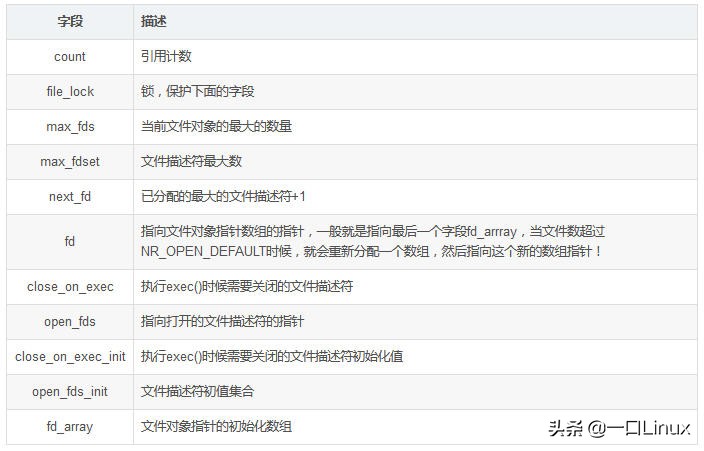
解释一些字段:
fs_struct
上面的file和files_struct记录的是与进程相关的文件的信息,但是对于进程本身来说,自身的一些信息用什么表示,这里就涉及到fs_struct结构体。
5structfs_struct{
6atomic_tcount;
7rwlock_tlock;
8intumask;
9structdentry*root,*pwd,*altroot;
10structvfsmount*rootmnt,*pwdmnt,*altrootmnt;
11};
解释一些字段:

注意:实际运行时,这三个目录不一定都在同一个文件系统中。例如,进程的根目录通常是安装于“/”节点上的ext文件系统,而当前工作目录可能是安装于/etc的一个文件系统,替换根目录也可以不同文件系统中。rootmnt,pwdmnt,altrootmnt:对应于上面三个的安装点。
文件方法(操作)file_operations
structfile_operations{
structmodule*owner;
loff_t(*llseek)(structfile*,loff_t,int);
ssize_t(*read)(structfile*,char__user*,size_t,loff_t*);
ssize_t(*write)(structfile*,constchar__user*,size_t,loff_t*);
ssize_t(*aio_read)(structkiocb*,conststructiovec*,unsignedlong,loff_t);
ssize_t(*aio_write)(structkiocb*,conststructiovec*,unsignedlong,loff_t);
ssize_t(*read_iter)(structkiocb*,structiov_iter*);
ssize_t(*write_iter)(structkiocb*,structiov_iter*);
int(*iterate)(structfile*,structdir_context*);
unsignedint(*poll)(structfile*,structpoll_table_struct*);
long(*unlocked_ioctl)(structfile*,unsignedint,unsignedlong);
long(*compat_ioctl)(structfile*,unsignedint,unsignedlong);
int(*mmap)(structfile*,structvm_area_struct*);
int(*open)(structinode*,structfile*);
int(*flush)(structfile*,fl_owner_tid);
int(*release)(structinode*,structfile*);
int(*fsync)(structfile*,loff_t,loff_t,intdatasync);
int(*aio_fsync)(structkiocb*,intdatasync);
int(*fasync)(int,structfile*,int);
int(*lock)(structfile*,int,structfile_lock*);
ssize_t(*sendpage)(structfile*,structpage*,int,size_t,loff_t*,int);
unsignedlong(*get_unmapped_area)(structfile*,unsignedlong,unsignedlong,unsignedlong,unsignedlong);
int(*check_flags)(int);
int(*flock)(structfile*,int,structfile_lock*);
ssize_t(*splice_write)(structpipe_inode_info*,structfile*,loff_t*,size_t,unsignedint);
ssize_t(*splice_read)(structfile*,loff_t*,structpipe_inode_info*,size_t,unsignedint);
int(*setlease)(structfile*,long,structfile_lock**);
long(*fallocate)(structfile*file,intmode,loff_toffset,
loff_tlen);
int(*show_fdinfo)(structseq_file*m,structfile*f);
};
上面这个对我们驱动开发人员应该是最熟悉的,也是必须掌握的了。

四、进程与这四者之间的关系
内核中用于管理进程的结构体是task_struct。进程打开文件就涉及到上述4个重要的数据结构:
file
fs_struct
files_struct
namespace
每个进程都有自己的namespace。
fs_struct用于表示进程与文件系统之间的结构关系,比如当前的工作目录,进程的根目录等等。
files_struct 用于表示当前进程打开的文件。
而对于每一个打开的文件,由file对象来表示。
Linux中,常常用文件描述符(file descriptor)来表示一个打开的文件,这个描述符的值往往是一个大于或等于0的整数。而这个整数,其实就是在files_struct中file数组fd的下标。对于所有打开的文件, 这些文件描述符会存储在open_fds的位图中。
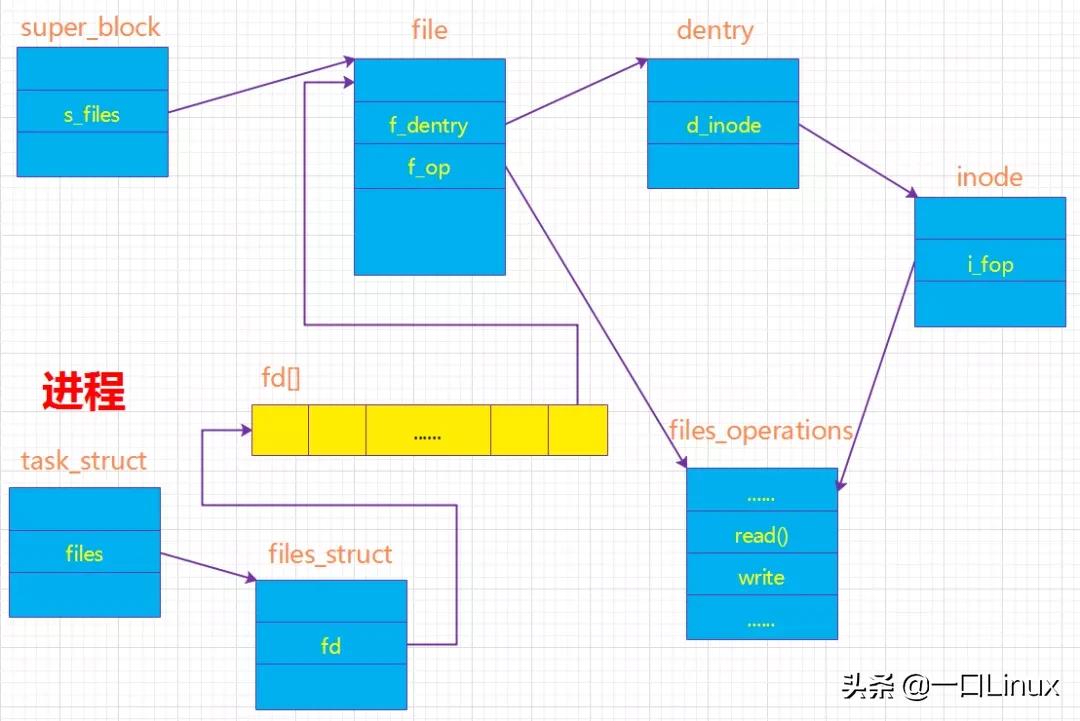
进程与超级块、文件、索引结点、目录项的关系
从图中可知:
- 进程通过task_struct中的一个域files->files_struct 来了解它当前所打开的文件对象;而我们通常所说的文件描述符其实是进程打开的文件对象数组的索引值。
- 文件对象通过域f_dentry找到它对应的dentry对象,再由dentry对象的域d_inode找到它对应的索引节点(通过索引节点又可以得到超级块的信息,也就可以得到最终操作文件的方法,在open文件的时候就是使用这样一个过程),这样就建立了文件对象与实际的物理文件的关联。
- 文件对象所对应的文件操作函数列表是通过索引节点的域i_fop得到的,而i_fop最终又是通过struct super_operations *s_op来初始化的。
VFS文件系统中的inode和dentry与实际文件系统的inode和dentry有一定的关系,但不能等同。
真实磁盘文件的inode和dentry是存在于物理外存上的,但VFS中的inode和dentry是存在于内存中的,系统读取外存中的inode和dentry信息进行一定加工后,生成内存中的inode和dentry。
虚拟的文件系统也具有inode和dentry结构,只是这是系统根据相应的规则生成的,不存在于实际外存中。
五、磁盘与文件系统
假设一块磁盘被分为好几个分区,每个分区都是不同的文件系统。
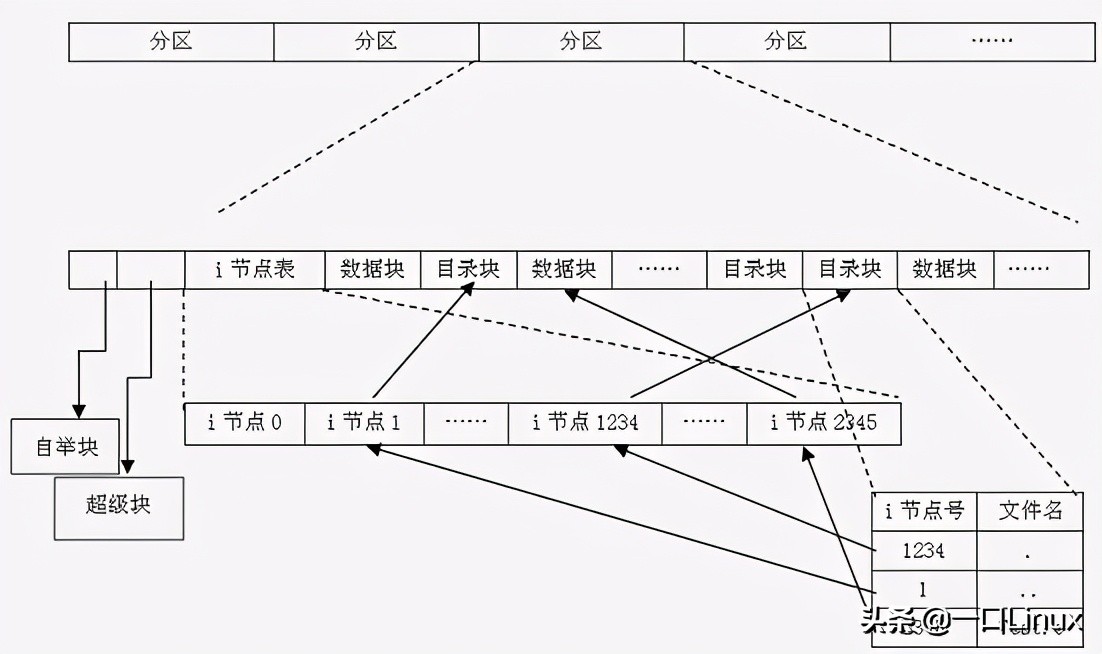
磁盘与文件系统