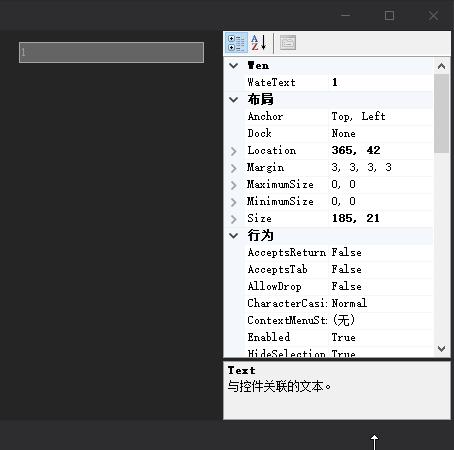
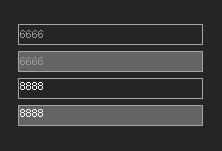
首先C# 中TextBox控件属于系统控件,若是只继承TextBox 。然后重写Paint事件是不会产生任何效果的。这种控件。重绘需要拦截消息。然后重绘。
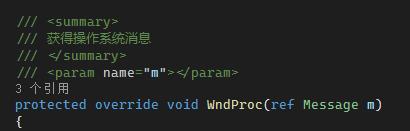
重写WndProc
首先重写WndProc 。并截获消息。
窗体重绘主要是这两个消息。判定消息 m.Msg==以下两个消息时候,执行重绘需要的代码
public const int WM_PAINT = 0x000F; //要求一个窗口重画自己
public const int WM_NCPAINT = 0x0085; //程序发送此消息给某个窗口当它(窗口)的框架必须被绘制时;

重写事件
此位置主要用到两个调用系统Dll文件,方法如下
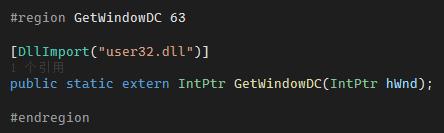
[DllImport("user32.dll")]
public static extern IntPtr GetWindowDC(IntPtr hWnd);

[DllImport("user32.dll")]
public static extern IntPtr ReleaseDC(IntPtr hWnd, IntPtr hDC);
            if (m.Msg == 0xf || m.Msg == 0x133)
            {
 IntPtr hDC = WinApi.WindowsAPI.GetWindowDC(m.HWnd);
                if (hDC.ToInt32() == 0)
                {
                    return;
                }

 //只有在边框样式为FixedSingle时自定义边框样式才有效
                using (Graphics g = Graphics.FromHdc(hDC))
                {
                    g.SetGDIHigh();
                    if (this.BorderStyle == BorderStyle.FixedSingle)
                    {
                        //边框Width为1个像素
                        using (Pen pen = new Pen(this.borderColor, 1))
                        {
                            if (this.hotTrack)
                            {
                                if (this.Focused)
                                {
                                    pen.Color = this.hotColor;
                                }
                                else
                                {
                                    if (this.isMouseOver)
                                    {
                                        pen.Color = this.hotColor;
                                    }
                                    else
                                    {
                                        pen.Color = this.borderColor;
                                    }
                                }
                            }
                            g.DrawRectangle(pen, 0, 0, this.Width - 1, this.Height - 1);
                        }
                    }
										//当文本为空,提示文本不为空,水印TextBox
                    if (this.Text == "" && this.WateText != "")
                    {
                        using (Brush b = new SolidBrush(Color.FromArgb(153, 153, 153)))
                        {
                            g.DrawString(WateText, this.Font, b, new Rectangle(0, 0, Width, this.Height), ControlHelper.StringConters);
                        }
                    }
                }
 //返回结果
 m.Result = IntPtr.Zero;
 ////释放
 WinApi.WindowsAPI.ReleaseDC(m.HWnd, hDC);
            }
以上代码主要实现其功能。
        #region 公有属性


        [Category("Wen"), Description("当文本类容为空的时候提示内容"), DefaultValue(null)]
        public string WateText { get => wateText; set { wateText = value; this.Invalidate(); } }

        /// <summary>
        /// 是否启用热点效果
        /// </summary>
        [Category("行为"),
            Description("获得或设置一个值,指示当鼠标经过控件时控件边框是否发生变化。只在控件的BorderStyle为FixedSingle时有效"),
            DefaultValue(true)]
        public bool HotTrack
        {
            get => this.hotTrack;
            set
            {
                this.hotTrack = value;
 //在该值发生变化时重绘控件,下同
 //在设计模式下,更改该属性时,如果不调用该语句,
 //则不能立即看到设计试图中该控件相应的变化
 this.Invalidate();
            }
        }

        /// <summary>
        /// 热点时边框颜色
        /// </summary>
        [Category("外观"),
            Description("获得或设置当鼠标经过控件时控件的边框颜色。只在控件的BorderStyle为FixedSingle时有效"),
            DefaultValue(typeof(Color), "#335EA8")]
        public Color HotColor { get => this.hotColor; set { this.hotColor = value; this.Invalidate(); } }

        /// <summary>
        /// 边框颜色
        /// </summary>
        [Category("外观"), Description("获得或设置控件的边框颜色"), DefaultValue(typeof(Color), "#A7A6AA")]
        public Color BorderColor { get => this.borderColor; set { this.borderColor = value; this.Invalidate(); } }


        #endregion
        #region 私有属性

        /// <summary>
        /// 是否启用热点效果
        /// </summary>
        private bool hotTrack = true;

 /// <summary>
 /// 边框颜色
 /// </summary>
 private Color borderColor = Color.FromArgb(0xA7, 0xA6, 0xAA);

 /// <summary>
 /// 热点边框颜色
 /// </summary>
 private Color hotColor = Color.FromArgb(0x33, 0x5E, 0xA8);

 /// <summary>
 /// 是否鼠标MouseOver状态
 /// </summary>
 private bool isMouseOver = false;
        private string wateText;

        #endregion
        #region 重写是鼠标事件

        protected override void OnMouseLeave(EventArgs e)
        {
            base.OnMouseLeave(e);
            isMouseOver = false;
        }
        protected override void OnMouseEnter(EventArgs e)
        {
            base.OnMouseEnter(e);
            isMouseOver = true;
        }

        #endregion
        #region 重写属性

        public new bool ReadOnly
        {
            get => base.ReadOnly;
            set
            {
                base.ReadOnly = value;
                if (value)
                {
                this.BackColor = Color.FromArgb(100, 100, 100);
                }
                else
                    this.BackColor = Color.FromArgb(37, 37, 37);
                this.Invalidate();
            }
        }

        #endregion
        //构造函数 主要是颜色改变,做一套酷黑色控件,可以自主美化
				public WenTextBox() : base()
        {
            this.BackColor = Color.FromArgb(37, 37, 38);
            this.ForeColor = Color.White;
            this.BorderStyle = BorderStyle.FixedSingle;
        }
当然我们还可以添加公有属性,提供在设计的时候直接修改属性,
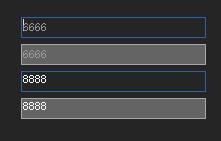
添加鼠标事件,在鼠标移动到控件内改变外框外观。是得控件更加美观。
到这里一个简单的TextBox控件美化完成
接下来看看效果