
使用arduino构建实时的GPS+GPRS汽车跟踪器
只需要把Arduino与GPRS+GPS四波段模块(SIM908)安装在汽车的一个隐蔽的地方,比如后备箱,手套箱或备用轮胎。然后连接GPRS-GSM、GPS天线和SIM卡,所有这些都用电池供电。Arduino会向您发送一个包含当前位置、经度和纬度的SMS,并向具有实时位置(谷歌地图)的web服务器发送GPS数据。GPS+GPRS扩展板可以实时跟踪你的汽车。这个程序可以识别你的号码,只有当它是正确时,它才会给你发送这些数据。

目录
步骤1:介绍
步骤2:硬件选择
步骤3:系统组装
步骤4:软件:Arduino代码
步骤5:结果:GPS实时地理定位跟踪和Santa Calus Videocall
步骤1:介绍
材料清单

GPRS +GPS:
· 1 x Arduino Uno
· 1 x 带SIM908的地理定位跟踪器 (GPRS + GPS)
· 1 x 外接 GPRS-GSM 天线
· 1 x 外接 GPS 天线
· 1 x 2300mA/h 可充电电池
· 1 x 9V 碱性电池
· 1 x 9V 插孔适配器 或 9V 电池座
步骤2:硬件选择
在本文中使用的扩展板是用于Arduino (SIM908)的GPRS+GPS四波段模块。
GPRS+GPS扩展板完全兼容旧Arduino USB版本,Duemilanove和Mega。
注意:Arduino/Raspberry Pi跳线必须在Arduino的位置。只有当扩展板与树莓派相连时,才能使用树莓派的位置。错误的跳线会损坏3G扩展板。
GPRS+GPS扩展板(顶部):
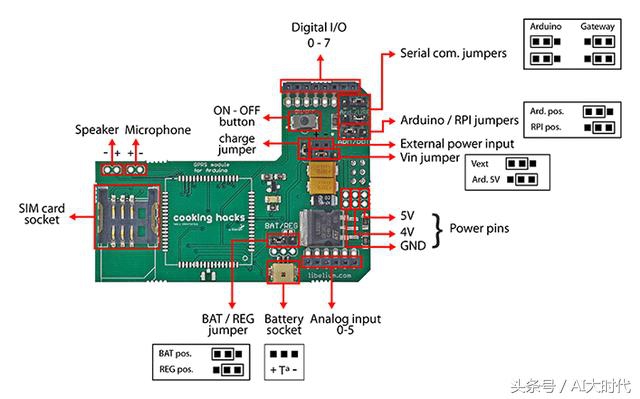
GPRS+GPS屏蔽图(底部):

扩展板的LED显示GPRS+GPS模块的状态。下表显示了LED闪烁的意义。

步骤3:系统组装
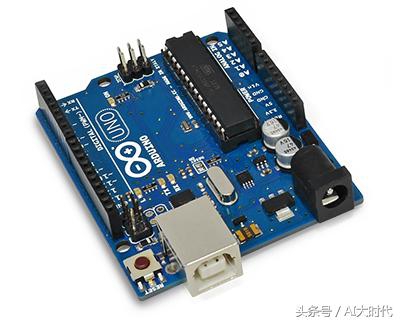
建议使用下列天线:
· 内部3 g / GPRS / GSM天线
· 外部3 g / GPRS / GSM天线
· 内部GPS天线
· 外部GPS天线
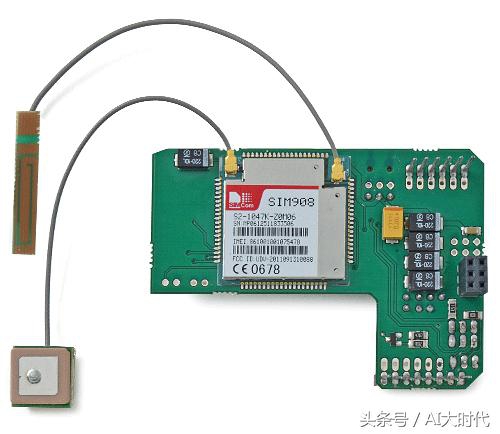
连接天线到扩展板

连接扩展板到arduino
重要问题:
· 小心处理内部天线,它很脆弱。
· GPS天线必须处于水平位置。
· 为了改善卫星信号,天线必须在一个有空旷视野的地方(没有树,没有建筑物…)。
总装
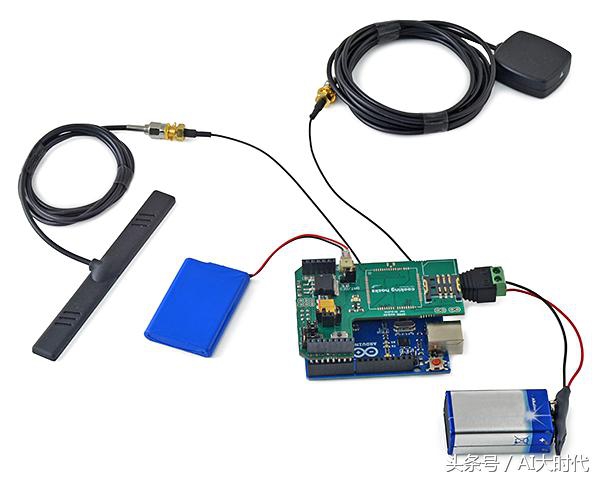
你可以用法兰把电池固定在模块上,这样整个系统就不需要那么大的空间,你也可以把它更好地放在你的车里。
安装
安装非常简单,可以把它放在任何你想要的地方,可以在你的后备箱,在仪表板上或备用轮胎下。

GPS天线位置非常重要!对于外部GPS天线,其上的箭头必须直接指向天空,内部GPS天线陶瓷面也必须向上。

在这个步骤中,如果你调用模块和你的号码是正确的,通过手机短信和HTTP,用Arduino UNO与GPRS+GPS(SIM908)扩展板发送GPS坐标。
记住,串行通信跳线必须设置在Arduino位置。
确认你的电话号码并发送GPS坐标
当你调用模块且你的电话号码是正确的,GPS就会获得经度和纬度,发送一个带有位置的SMS,并通过互联网将GPS数据发送到你电脑的php脚本。
第一步。加载代码到arduino,然后装配带天线的GPRS+GPS扩展板和安装好的sim 卡。记住,必须配置APN、登录和密码。如果你没有做,GPRS+GPS就无法连接到GPRS网络。另外,您必须使用计算机的IP地址(外部IP,而不是LAN IP地址)或服务器域设置URL。
/*
* Where is my car? Realtime GPS+GPRS Tracking of Vehicles Using Arduino
*
* Copyright (C) Libelium Comunicaciones Distribuidas S.L.
* http://www.libelium.com
*
* This program is free software: you can redistribute it and/or modify
* it under the terms of the GNU General Public License as published by
* the Free Software Foundation, either version 3 of the License, or
* (at your option) any later version.
* a
* This program is distributed in the hope that it will be useful,
* but WITHOUT ANY WARRANTY; without even the implied warranty of
* MERCHANTABILITY or FITNESS FOR A PARTICULAR PURPOSE. See the
* GNU General Public License for more details.
*
* You should have received a copy of the GNU General Public License
* along with this program. If not, see http://www.gnu.org/licenses/.
*
* Version: 1.0
* Design: David Gascón
* Implementation: Marcos Martinez
*/
int8_t answer;
int onModulePin= 2;
char aux_string[30];
int flag = 0;
char number [20];
char realnumber[9];
char mynumber[9];
int a=0;
int b=0;
int c=0;
//Your phone number
char phone_number[]="012345678";
char data[100];
int data_size;
char aux_str[30];
char aux;
int x = 0;
char N_S,W_E;
char url[] = "pruebas.libelium.com";
char frame[200];
char latitude[15];
char longitude[15];
char altitude[6];
char date[16];
char time[7];
char satellites[3];
char speedOTG[10];
char course[10];
void setup(){
mynumber[0]='0';
mynumber[1]='1';
mynumber[2]='2';
mynumber[3]='3';
mynumber[4]='4';
mynumber[5]='5';
mynumber[6]='6';
mynumber[7]='7';
mynumber[8]='8';
pinMode(onModulePin, OUTPUT);
Serial.begin(115200);
power_on();
power_onGPS();
power_onSMS();
delay(5000);
sendATcommand("AT+CPIN=****", "OK", 2000);
delay(3000);
while( (sendATcommand("AT+CREG?", "+CREG: 0,1", 1000) || sendATcommand("AT+CREG?", "+CREG: 0,5", 1000)) == 0 );
sendATcommand("AT+CLIP=1", "OK", 1000);
while ( start_GPS() == 0);
while (sendATcommand("AT+CREG?", "+CREG: 0,1", 2000) == 0);
// sets APN , user name and password
sendATcommand("AT+SAPBR=3,1,\"Contype\",\"GPRS\"", "OK", 2000);
sendATcommand("AT+SAPBR=3,1,\"APN\",\"*******\"", "OK", 2000);
sendATcommand("AT+SAPBR=3,1,\"USER\",\"*******\"", "OK", 2000);
sendATcommand("AT+SAPBR=3,1,\"PWD\",\"*******\"", "OK", 2000);
// gets the GPRS bearer
while (sendATcommand("AT+SAPBR=1,1", "OK", 20000) == 0)
{
delay(5000);
}
delay(1000);
while(Serial.available() != 0)
{
Serial.read();
}
}
void loop(){
answer = sendATcommand("", "+CLIP", 1000);
//Detect incomming call
if (answer == 1)
{
Serial.println("Incoming call");
if ( flag == 0){
for (int i=0; i<19; i++){
// read the incoming byte:
while (Serial.available() == 0)
{
delay (50);
}
//Stores phone number
number[i] = Serial.read();
}
Serial.flush();
flag = 1;
}
//Stores phone calling number
for (int i=0; i<=14; i++){
if(number[i]== '"'){
i++;
realnumber[0]=number[i];
i++;
realnumber[1]=number[i];
i++;
realnumber[2]=number[i];
i++;
realnumber[3]=number[i];
i++;
realnumber[4]=number[i];
i++;
realnumber[5]=number[i];
i++;
realnumber[6]=number[i];
i++;
realnumber[7]=number[i];
i++;
realnumber[8]=number[i];
break;
}
}
//Check phone number
for (int i=0;i<9;i++){
if (realnumber[i] == mynumber[i]){
a++;
if( a==9){
Serial.println("Correct number");
sendATcommand("ATH", "OK", 1000);
if(b==1){
b=0;
}else{
b=1;
c=1;
}
break;
}
}else{
Serial.println("Wrong number");
break;
}
}
a=0;
answer=0;
flag = 0;
}
//Send SMS once and position to HTTP
if (b==1){
get_GPS();
send_HTTP();
delay(500);
if (c==1){
sendSMS();
delay(100);
c=0;
}
}
}
void power_on(){
uint8_t answer=0;
digitalWrite(onModulePin,HIGH);
delay(3000);
digitalWrite(onModulePin,LOW);
while(answer == 0){ // Send AT every two seconds and wait for the answer
answer = sendATcommand("AT", "OK", 2000);
}
}
int8_t sendATcommand(char* ATcommand, char* expected_answer, unsigned int timeout){
uint8_t x=0, answer=0;
char response[100];
unsigned long previous;
memset(response, '\0', 100); // Initialice the string
delay(100);
while( Serial.available() > 0) Serial.read(); // Clean the input buffer
if (ATcommand[0] != '\0')
{
Serial.println(ATcommand); // Send the AT command
}
x = 0;
previous = millis();
// this loop waits for the answer
do{
if(Serial.available() != 0){ // if there are data in the UART input buffer, reads it and checks for the asnwer
response[x] = Serial.read();
//Serial.print(response[x]);
x++;
if (strstr(response, expected_answer) != NULL) // check if the desired answer (OK) is in the response of the module
{
answer = 1;
}
}
}while((answer == 0) && ((millis() - previous) < timeout)); // Waits for the asnwer with time out
return answer;
}
void power_onGPS(){
uint8_t answer=0;
// checks if the module is started
answer = sendATcommand("AT", "OK", 2000);
if (answer == 0)
{
// power on pulse
digitalWrite(onModulePin,HIGH);
delay(3000);
digitalWrite(onModulePin,LOW);
// waits for an answer from the module
while(answer == 0){
// Send AT every two seconds and wait for the answer
answer = sendATcommand("AT", "OK", 2000);
}
}
}
int8_t start_GPS(){
unsigned long previous;
previous = millis();
// starts the GPS
sendATcommand("AT+CGPSPWR=1", "OK", 2000);
sendATcommand("AT+CGPSRST=0", "OK", 2000);
// waits for fix GPS
while(( (sendATcommand("AT+CGPSSTATUS?", "2D Fix", 5000) ||
sendATcommand("AT+CGPSSTATUS?", "3D Fix", 5000)) == 0 ) &&
((millis() - previous) < 90000));
if ((millis() - previous) < 90000)
{
return 1;
}
else
{
return 0;
}
}
int8_t get_GPS(){
int8_t counter, answer;
long previous;
// First get the NMEA string
// Clean the input buffer
while( Serial.available() > 0) Serial.read();
// request Basic string
sendATcommand("AT+CGPSINF=0", "AT+CGPSINF=0\r\n\r\n", 2000);
counter = 0;
answer = 0;
memset(frame, '\0', 100); // Initialize the string
previous = millis();
// this loop waits for the NMEA string
do{
if(Serial.available() != 0){
frame[counter] = Serial.read();
counter++;
// check if the desired answer is in the response of the module
if (strstr(frame, "OK") != NULL)
{
answer = 1;
}
}
// Waits for the asnwer with time out
}
while((answer == 0) && ((millis() - previous) < 2000));
frame[counter-3] = '\0';
// Parses the string
strtok(frame, ",");
strcpy(longitude,strtok(NULL, ",")); // Gets longitude
strcpy(latitude,strtok(NULL, ",")); // Gets latitude
strcpy(altitude,strtok(NULL, ".")); // Gets altitude
strtok(NULL, ",");
strcpy(date,strtok(NULL, ".")); // Gets date
strtok(NULL, ",");
strtok(NULL, ",");
strcpy(satellites,strtok(NULL, ",")); // Gets satellites
strcpy(speedOTG,strtok(NULL, ",")); // Gets speed over ground. Unit is knots.
strcpy(course,strtok(NULL, "\r")); // Gets course
convert2Degrees(latitude);
convert2Degrees(longitude);
return answer;
}
/* convert2Degrees ( input ) - performs the conversion from input
* parameters in DD°MM.mmm' notation to DD.dddddd° notation.
*
* Sign '+' is set for positive latitudes/longitudes (North, East)
* Sign '-' is set for negative latitudes/longitudes (South, West)
*
*/
int8_t convert2Degrees(char* input){
float deg;
float minutes;
boolean neg = false;
//auxiliar variable
char aux[10];
if (input[0] == '-')
{
neg = true;
strcpy(aux, strtok(input+1, "."));
}
else
{
strcpy(aux, strtok(input, "."));
}
// convert string to integer and add it to final float variable
deg = atof(aux);
strcpy(aux, strtok(NULL, '\0'));
minutes=atof(aux);
minutes/=1000000;
if (deg < 100)
{
minutes += deg;
deg = 0;
}
else
{
minutes += int(deg) % 100;
deg = int(deg) / 100;
}
// add minutes to degrees
deg=deg+minutes/60;
if (neg == true)
{
deg*=-1.0;
}
neg = false;
if( deg < 0 ){
neg = true;
deg*=-1;
}
float numberFloat=deg;
int intPart[10];
int digit;
long newNumber=(long)numberFloat;
int size=0;
while(1){
size=size+1;
digit=newNumber%10;
newNumber=newNumber/10;
intPart[size-1]=digit;
if (newNumber==0){
break;
}
}
int index=0;
if( neg ){
index++;
input[0]='-';
}
for (int i=size-1; i >= 0; i--)
{
input[index]=intPart[i]+'0';
index++;
}
input[index]='.';
index++;
numberFloat=(numberFloat-(int)numberFloat);
for (int i=1; i<=6 ; i++)
{
numberFloat=numberFloat*10;
digit= (long)numberFloat;
numberFloat=numberFloat-digit;
input[index]=char(digit)+48;
index++;
}
input[index]='\0';
}
void send_HTTP(){
uint8_t answer=0;
// Initializes HTTP service
answer = sendATcommand("AT+HTTPINIT", "OK", 10000);
if (answer == 1)
{
// Sets CID parameter
answer = sendATcommand("AT+HTTPPARA=\"CID\",1", "OK", 5000);
if (answer == 1)
{
// Sets url
sprintf(aux_str, "AT+HTTPPARA=\"URL\",\"http://%s/demo_sim908.php?", url);
Serial.print(aux_str);
sprintf(frame, "visor=false&latitude=%s&longitude=%s&altitude=%s&time=%s&satellites=%s&speedOTG=%s&course=%s",
latitude, longitude, altitude, date, satellites, speedOTG, course);
Serial.print(frame);
answer = sendATcommand("\"", "OK", 5000);
if (answer == 1)
{
// Starts GET action
answer = sendATcommand("AT+HTTPACTION=0", "+HTTPACTION:0,200", 30000);
if (answer == 1)
{
Serial.println(F("Done!"));
}
else
{
Serial.println(F("Error getting url"));
}
}
else
{
Serial.println(F("Error setting the url"));
}
}
else
{
Serial.println(F("Error setting the CID"));
}
}
else
{
Serial.println(F("Error initializating"));
}
sendATcommand("AT+HTTPTERM", "OK", 5000);
}
void power_onSMS(){
uint8_t answer=0;
// checks if the module is started
answer = sendATcommand("AT", "OK", 2000);
if (answer == 0)
{
// power on pulse
digitalWrite(onModulePin,HIGH);
delay(3000);
digitalWrite(onModulePin,LOW);
// waits for an answer from the module
while(answer == 0){ // Send AT every two seconds and wait for the answer
answer = sendATcommand("AT", "OK", 2000);
}
}
}
void sendSMS(){
sendATcommand("AT+CPIN=****", "OK", 2000);
delay(3000);
Serial.println("Connecting to the network...");
while( (sendATcommand("AT+CREG?", "+CREG: 0,1", 500) ||
sendATcommand("AT+CREG?", "+CREG: 0,5", 500)) == 0 );
Serial.print("Setting SMS mode...");
sendATcommand("AT+CMGF=1", "OK", 1000); // sets the SMS mode to text
Serial.println("Sending SMS");
sprintf(aux_string,"AT+CMGS=\"%s\"", phone_number);
answer = sendATcommand(aux_string, ">", 2000); // send the SMS number
if (answer == 1)
{
Serial.print("Help me! I've been stolen. Find me in:");
Serial.print("Latitude: ");
int i = 0;
while(latitude[i]!=0){
Serial.print(latitude[i]);
i++;
}
Serial.print(" / Longitude: ");
i = 0;
while(longitude[i]!=0){
Serial.print(longitude[i]);
i++;
}
Serial.write(0x1A);
answer = sendATcommand("", "OK", 20000);
if (answer == 1)
{
Serial.print("Sent ");
}
else
{
Serial.print("error ");
}
}
else
{
Serial.print("error ");
Serial.println(answer, DEC);
}
}
第二步, 当GPS定位GPS卫星时,GPRS+GPS 扩展板会连接到网络,它会通过互联网将GPS数据发送到你电脑的php脚本。
<?php
if (!empty($_GET['latitude']) && !empty($_GET['longitude']) &&
!empty($_GET['time']) && !empty($_GET['satellites']) &&
!empty($_GET['speedOTG']) && !empty($_GET['course'])) {
function getParameter($par, $default = null){
if (isset($_GET[$par]) && strlen($_GET[$par])) return $_GET[$par];
elseif (isset($_POST[$par]) && strlen($_POST[$par]))
return $_POST[$par];
else return $default;
}
$file = 'gps.txt';
$lat = getParameter("latitude");
$lon = getParameter("longitude");
$time = getParameter("time");
$sat = getParameter("satellites");
$speed = getParameter("speedOTG");
$course = getParameter("course");
$person = $lat.",".$lon.",".$time.",".$sat.",".$speed.",".$course."\n";
echo "
DATA:\n
Latitude: ".$lat."\n
Longitude: ".$lon."\n
Time: ".$time."\n
Satellites: ".$sat."\n
Speed OTG: ".$speed."\n
Course: ".$course;
if (!file_put_contents($file, $person, FILE_APPEND | LOCK_EX))
echo "\n\t Error saving Data\n";
else echo "\n\t Data Save\n";
}
else {
?>
<!DOCTYPE html>
<html>
<head>
<!-- Load Jquery -->
<script language="JavaScript" type="text/javascript" src="jquery-1.10.1.min.js"></script>
<!-- Load Google Maps Api -->
<!-- IMPORTANT: change the API v3 key -->
<script src="http://maps.googleapis.com/maps/api/js?key=your_key&sensor=false"></script>
<!-- Initialize Map and markers -->
<script type="text/javascript">
var myCenter=new google.maps.LatLng(41.669578,-0.907495);
var marker;
var map;
var mapProp;
function initialize()
{
mapProp = {
center:myCenter,
zoom:15,
mapTypeId:google.maps.MapTypeId.ROADMAP
};
setInterval('mark()',5000);
}
function mark()
{
map=new google.maps.Map(document.getElementById("googleMap"),mapProp);
var file = "gps.txt";
$.get(file, function(txt) {
var lines = txt.split("\n");
for (var i=0;i<lines.length;i++){
console.log(lines[i]);
var words=lines[i].split(",");
if ((words[0]!="")&&(words[1]!=""))
{
marker=new google.maps.Marker({
position:new google.maps.LatLng(words[0],words[1]),
});
marker.setMap(map);
map.setCenter(new google.maps.LatLng(words[0],words[1]));
document.getElementById('sat').innerHTML=words[3];
document.getElementById('speed').innerHTML=words[4];
document.getElementById('course').innerHTML=words[5];
}
}
marker.setAnimation(google.maps.Animation.BOUNCE);
});
}
google.maps.event.addDomListener(window, 'load', initialize);
</script>
</head>
<body>
<?php
echo '
<!-- Draw information table and Google Maps div -->
<div>
<center><br />
<b> SIM908 GPS position DEMO </b><br /><br />
<div id="superior" style="width:800px;border:1px solid">
<table style="width:100%">
<tr>
<td>Time</td>
<td>Satellites</td>
<td>Speed OTG</td>
<td>Course</td>
</tr>
<tr>
<td id="time">'. date("Y M d - H:m") .'</td>
<td id="sat"></td>
<td id="speed"></td>
<td id="course"></td>
</tr>
</table>
</div>
<br /><br />
<div id="googleMap" style="width:800px;height:700px;"></div>
</center>
</div>';
?>
</body>
</html>
<?php } ?>
要使用php脚本,需要一个php的Apache服务器。可以在安装了Apache的PC机上运行该脚本。可以很容易地做到这一点:
对于Windows使用WAMP: http://www.wampserver.com/
对于Linux使用LAMP:在Linux中使用包管理器
对于Mac使用MAMP: http://www.mamp.info/
当接收到帧时,将在地图中显示一个标记。必须在php脚本中更改谷歌地图API v3 key:
"http://maps.googleapis.com/maps/api/js?key=your_key&sensor=false"
要使用标记显示地图,需要访问下一个url:
http://your_IP_or_domain/demo_sim908.php
IP地址或服务器域必须与arduino的skecth中使用的相同(如果正在计算机上运行演示程序,请将"your_IP_or_domain"替换为"localhost")
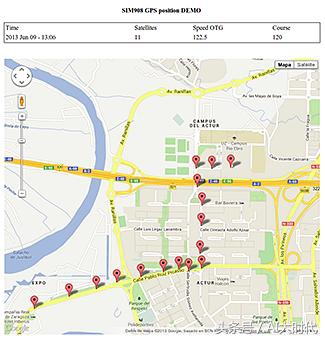
第五步:结果:GPS实时地理定位跟踪
当你打电话时,SIM908模块识别你的电话号码,如果它是正确的,GPS搜索GPS卫星。GPRS+GPS 扩展板会连接到网络,通过HTTP请求发送GPS数据。然后可以在谷歌地图中显示设备的位置。
整个过程非常简单:GPS模块获取位置数据,3G模块发送HTTP请求汽车的坐标。它每隔几秒钟就开始发送HTTP请求,其中包含位置(纬度和经度)的数据。
平面中的坐标转换/表示
如果想把你GPS的NMEA输出转换成你需要的坐标格式,可以访问这个网站:
http://www.earthpoint.us/convert.aspx
由于没有找到合适的GPS+GPRS模块,没有对代码进行测试,有熟悉的朋友请发信息给我!